ZANUS FRONT OFFICE FOR INSURANCE CARRIERS — AI PHONE
Every policyholder call answered. From the first ring, storm night included.
The AI answers on your menu, in your chosen voices, in up to 40 languages — the month-end billing rush, the hail storm at 2 AM, the agent hotline on a Friday afternoon. It answers billing dates, grace periods, how to get an ID card, how to file; takes first notice of loss with the peril-specific questions your intake rules define; files endorsement requests; reads your disclosures as written; and transfers coverage and claim questions to a licensed person with the context whispered in. Hang-ups become call-back lists the AI works itself.
Try it free 7 days on your own business · no credit card · per company, never per seat
REAL AI - the whole Front Office is AI, not old software with an AI button. Give it your website: it learns your company, works from your approved knowledge and gets better with every answer you approve.
Live on this site right now — the assistant in the corner is the product · Award-winning AI — CES · ISE · TMCnet
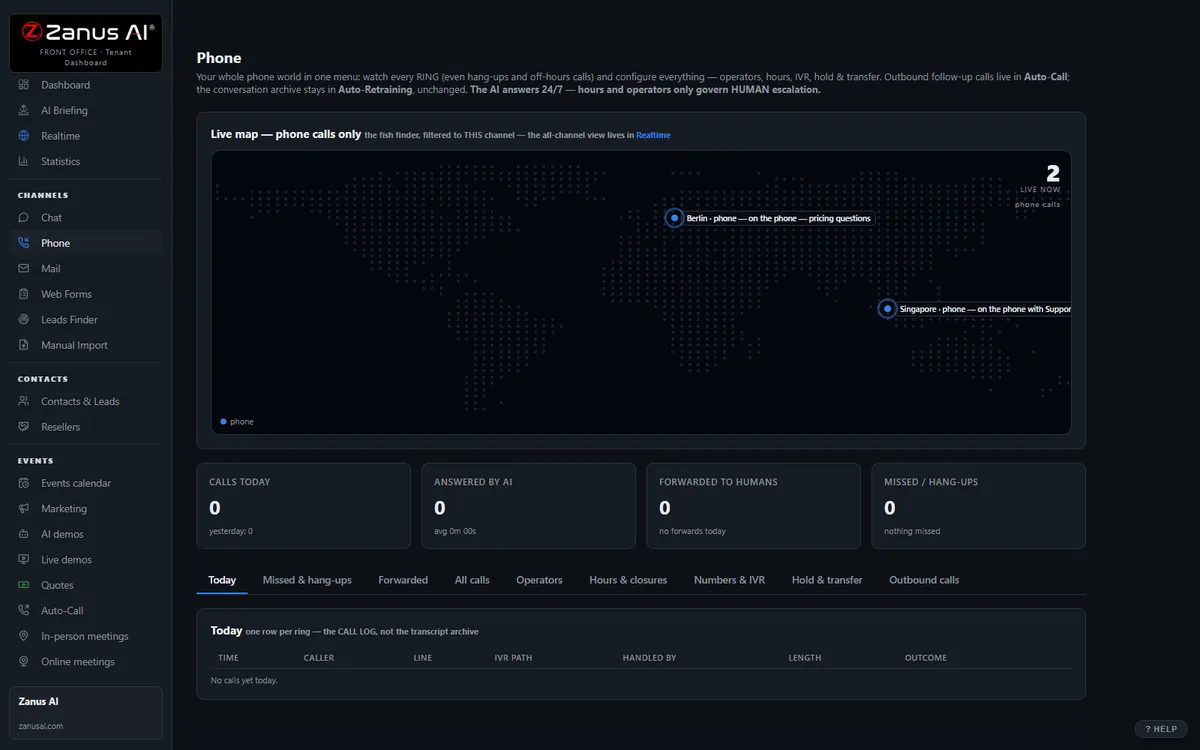
The real Phone menu: every ring on your number — answered, transferred, transcribed, reviewed.
What it does
Two thousand calls after a hail storm no longer queue on the Tuesday roster: every claimant is answered at once, first notice taken, safety instructions read from your script.
Policyholders on the ID-card number, agents on the producer line: appetite, appointment status, submission status answered from your approved guides — the same AI, your routing.
Who called, which policy line, verified or routed, filed or transferred, transcript and summary. The transfer arrives with the story; nobody explains twice.
Inside AI Phone — the real screens
Click a tab. Every picture is the live Front Office, not a mockup — the left menu is the whole product.
Programmed by talking. Nothing changes without your yes.
Lisa reads your website, interviews you by voice or by chat — only about what the site does not say — writes every department, and tests it with exam calls before the line opens. Afterwards you change anything by telling her: “in Sales, add: we close at noon on Fridays in August.” A rule can carry dates: “the Christmas greeting until December 27.”
- Your website is the first interview — you answer only what it does not say
- Exam calls before the line opens; every real call reviewed afterwards
- She proposes improvements; you say yes or no. Nothing changes without your yes
- Keep your existing number and your existing phones


From your mobile, tell Lisa what to do with the caller on hold
A person who took a call on his mobile presses a key and tells Lisa: “transfer him to Mary”, “take a message”, “send him to voicemail.” The colleague receiving the transfer can say yes, no, voicemail, message, or the name of a department. Callers who drop in the menu are logged as call-back leads with number and path taken.
- Your whole team works from the phones they already have
- The administrator holds the first phone: an extension that rings in the browser, with hold, transfer, consult, a voicemail inbox and the AI beside him
- Every further person who wants a phone of his own inside Front Office is an operator — forwarding a call to someone’s mobile never needs one
- Hang-ups called back automatically — see Auto-Call below for scheduled calls
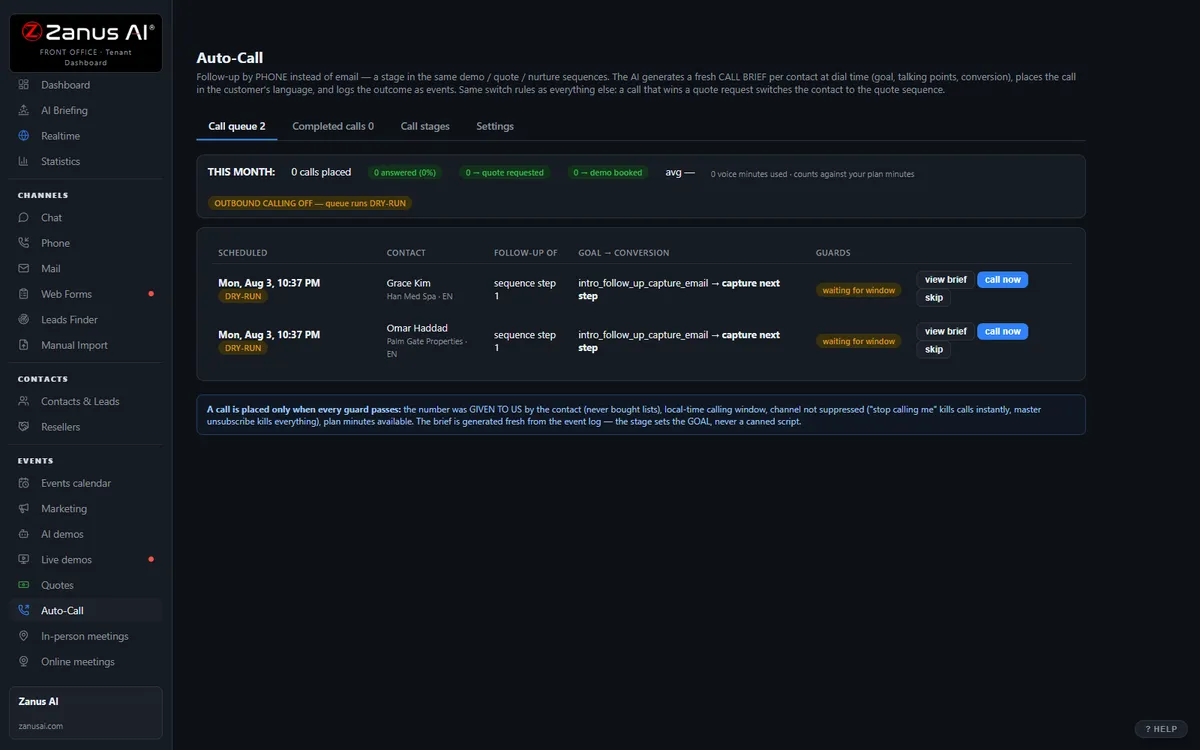
Auto-Call — the AI calls THEM
Not only answering. From an automated event (a due date, a ready order, tomorrow’s appointment), a scheduled funnel or a list you upload, the AI calls your registered contacts and announces your message — or talks as an agent: answers the question, moves the appointment, confirms, collects the missing detail.
- “Hi Michael, this is Atlantic Mutual: your claim payment was issued today and will reach your account within three business days.”
- “Hi Patricia, this is Atlantic Mutual calling to schedule the adjuster’s inspection for your claim. Would Wednesday morning or Friday afternoon work?”
- Triggered by automated events, scheduled funnels or lists
- Announce a message, or act as an agent the policyholder can talk back to
- Call window, attempts, voicemail policy, consent and do-not-call flags — your rules
- Every call transcribed with its outcome; the AI identifies your business at the start
Scheduled Auto-Call comes inside a solution — see pricing. Calling back the hang-ups is part of AI Phone.
When your people are on the call, the AI is in their ear — AI ASSIST
Your operators work with headsets in the phone panel: outbound from to-do lists (yours, or the ones the AI prepares from hang-ups and follow-ups), inbound from the queue. Flip the AI ASSIST toggle and the AI listens to the live conversation and proposes, in real time, what to say — grounded answers in a side panel, each with its knowledge source named. The operator reads and talks — the AI never speaks into the call.
- Outbound from operator to-do lists, inbound from the queue — same panel, same knowledge
- New operators sound experienced on day one; nobody quotes a policy from memory
- Answers appear while the policyholder is still asking — sources shown
- Same knowledge base as every other channel — one truth
- Switch it on only for the calls where you want it

Available on its own — or inside a solution
Questions, answered
Do we keep our phone numbers and IVR?
Yes. Your existing numbers stay; calls route to the AI first, your representatives first, or any mix by hour and by line — for example, AI overnight and during a catastrophe surge, representatives during hours with AI overflow when the queue builds. When a representative takes the call, AI ASSIST proposes grounded answers on their screen.
What happens with a coverage or claim question?
Your rules decide: transfer to a licensed representative or adjuster with the context whispered in, take a message for the right desk, or read your approved instructions word for word. The AI never says whether a loss is covered, never binds or reinstates, and never quotes outside the tables you approve. Injuries or danger get your emergency script first, then a person.
Try it free on your own carrier. 7 days. No credit card.
Give it your website. It learns your company. Then call it, chat with it, e-mail it — and decide. Nothing to install, nothing to cancel.
← Previous: AI Briefing · Sharing with a colleague? 📄 Get the PDF · ✉️ Email this page ·