ZANUS FRONT OFFICE FOR INSURANCE CARRIERS — AI CHAT & VOICE
Website chat that files the request — not a deflection bot.
Policyholders ask the website what they would ask the contact center: where is my claim, when is my premium due, how do I add a driver, can I get an ID card, is this provider in the plan. The AI answers from your approved information and the request record, in text or real voice, in 40 languages — and files the endorsement or first notice right there. Coverage questions are handed to a licensed person when your rules say so.
Try it free 7 days on your own business · no credit card · per company, never per seat
REAL AI - the whole Front Office is AI, not old software with an AI button. Give it your website: it learns your company, works from your approved knowledge and gets better with every answer you approve.
Live on this site right now — the assistant in the corner is the product · Award-winning AI — CES · ISE · TMCnet
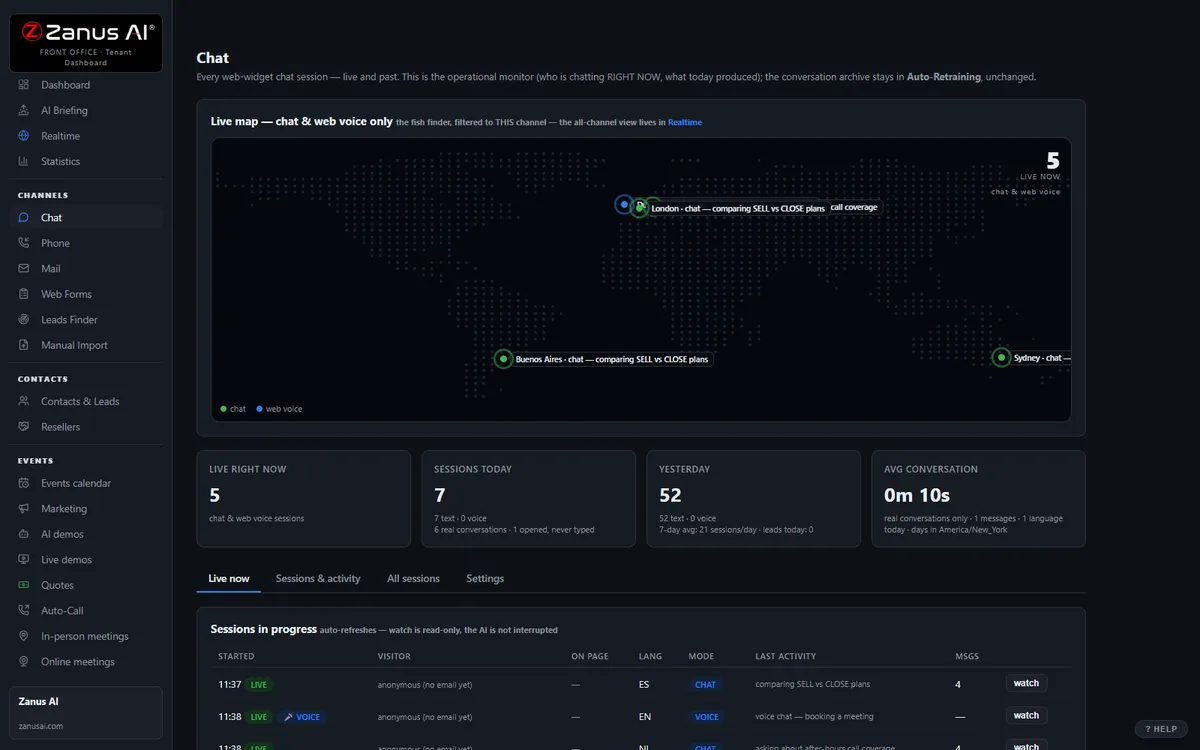
The real Chat menu: every conversation lands in the same dashboard as calls and emails.
What it does
Claim status from the request record, billing dates, documents, how to file, what happens next, enrollment deadlines — from your pages, policy documents and plan summaries only.
Add a vehicle, change an address, report a loss, request a declarations page: the request is filed complete and confirmed before the chat ends. No “call us during business hours”.
The claim guard blocks any statement without a source in your knowledge. No guessing about coverage, premiums or a claim’s outcome — that goes to a licensed person.
Inside AI Chat — the real screens
Click a tab. Every picture is the live Front Office, not a mockup — the left menu is the whole product.
It closes, then hands over clean
The chat gives product answers, runs the demo, builds the quote and books the meeting. Your staff only handles the "needs human" queue.
- Full funnel in the chat window
- Instant handover with full transcript
- Auto dark / light theme, your branding

Available on its own — or inside a solution
Questions, answered
Can the chat see a policyholder’s policy and claim details?
It works on the front-office record — contact details, conversations, requests and their status — and on what your core systems publish to it through Connectors. It asks your identifying questions before reading anything policy-specific back, and routes what it cannot verify.
How does it handle a distressed claimant?
Your rules: read the approved safety and emergency instructions first, then hand the conversation to a person on duty with the transcript. The AI never gives coverage guidance beyond the wording you approved.
Try it free on your own carrier. 7 days. No credit card.
Give it your website. It learns your company. Then call it, chat with it, e-mail it — and decide. Nothing to install, nothing to cancel.
← Previous: AI Phone · Sharing with a colleague? 📄 Get the PDF · ✉️ Email this page ·