ZANUS FRONT OFFICE FOR CALL CENTER — ROLES & PROTECTION
Who hears which recording is your rule. What the AI may spend is your cap.
A call center handles the most sensitive conversations a business has, and the AI in the room must be as governed as the people. Roles per operator decide who may open which recording and transcript, who sees which lists and which caller fields; six daily caps — credits, voice, avatar, chats, explainers, emails — keep AI ASSIST minutes and every other AI resource known; session shields and polite failovers keep a script from burning what your callers need.
Try it free 7 days on your own business · no credit card · per company, never per seat
REAL AI - the whole Front Office is AI, not old software with an AI button. Give it your website: it learns your company, works from your approved knowledge and gets better with every answer you approve.
Live on this site right now — the assistant in the corner is the product · Award-winning AI — CES · ISE · TMCnet
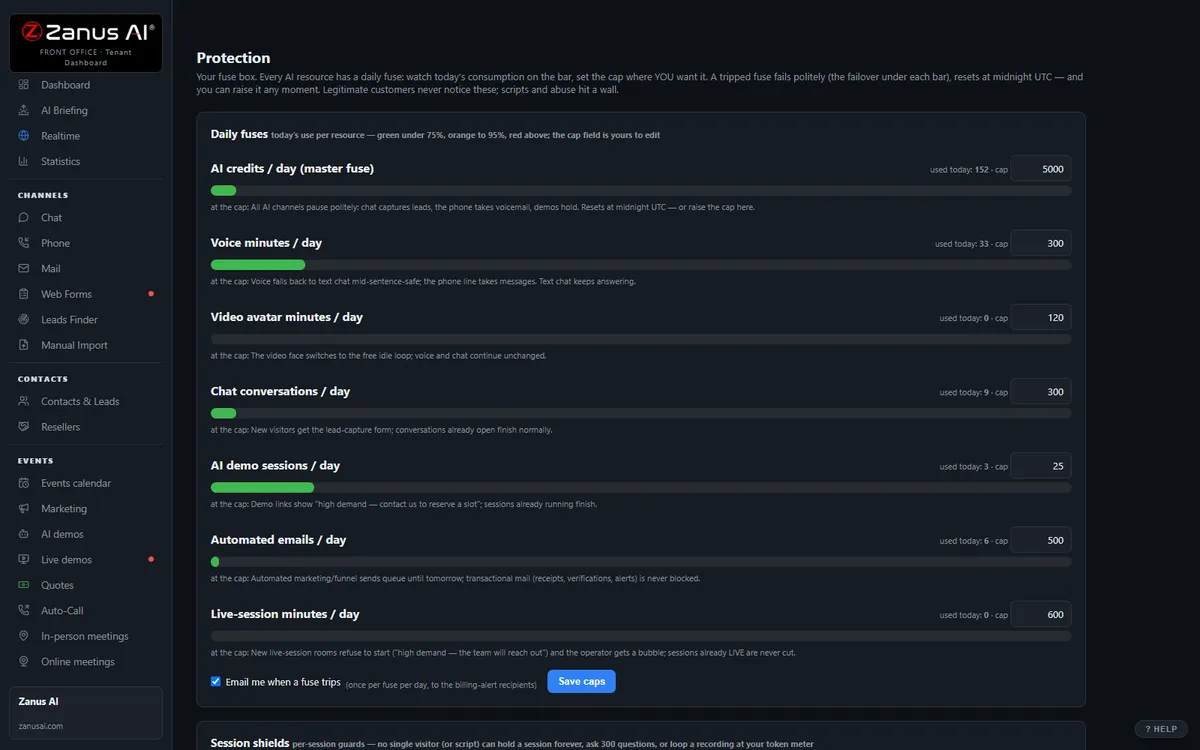
The real Protection menu: daily fuses — credits, voice, avatar, chats, demos, emails — live bars, editable caps, failovers in writing.
What it does
Who opens which recording, who sees which list, which caller fields are masked for which role — set once, applied on every screen.
Caps sit far above a busy Monday — they exist for abuse, not for callers — and the supervisor sees AI ASSIST minutes per operator.
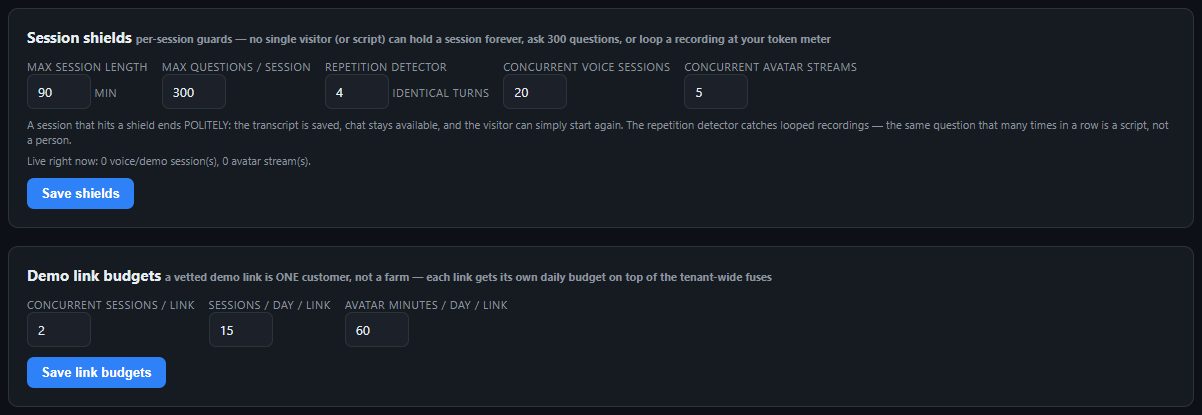
Time ceilings, question budgets and repetition detectors; over cap, chat offers a call-back form — a call in progress is never cut.
Inside Protection — the real screens
Click a tab. Every picture is the live Front Office, not a mockup — the left menu is the whole product.
Polite failovers, not error screens
Over-cap chat falls back to lead capture. Voice falls back to text. The avatar drops to the free standby loop. Marketing sends shift to tomorrow. Callers see courtesy; scripts hit a wall — and the first fuse trip of the day emails your billing contacts, with every trip in the audit log.
- Callers see a polite fallback, not an error screen
- First trip of the day → email to billing contacts
- Every trip in the audit log
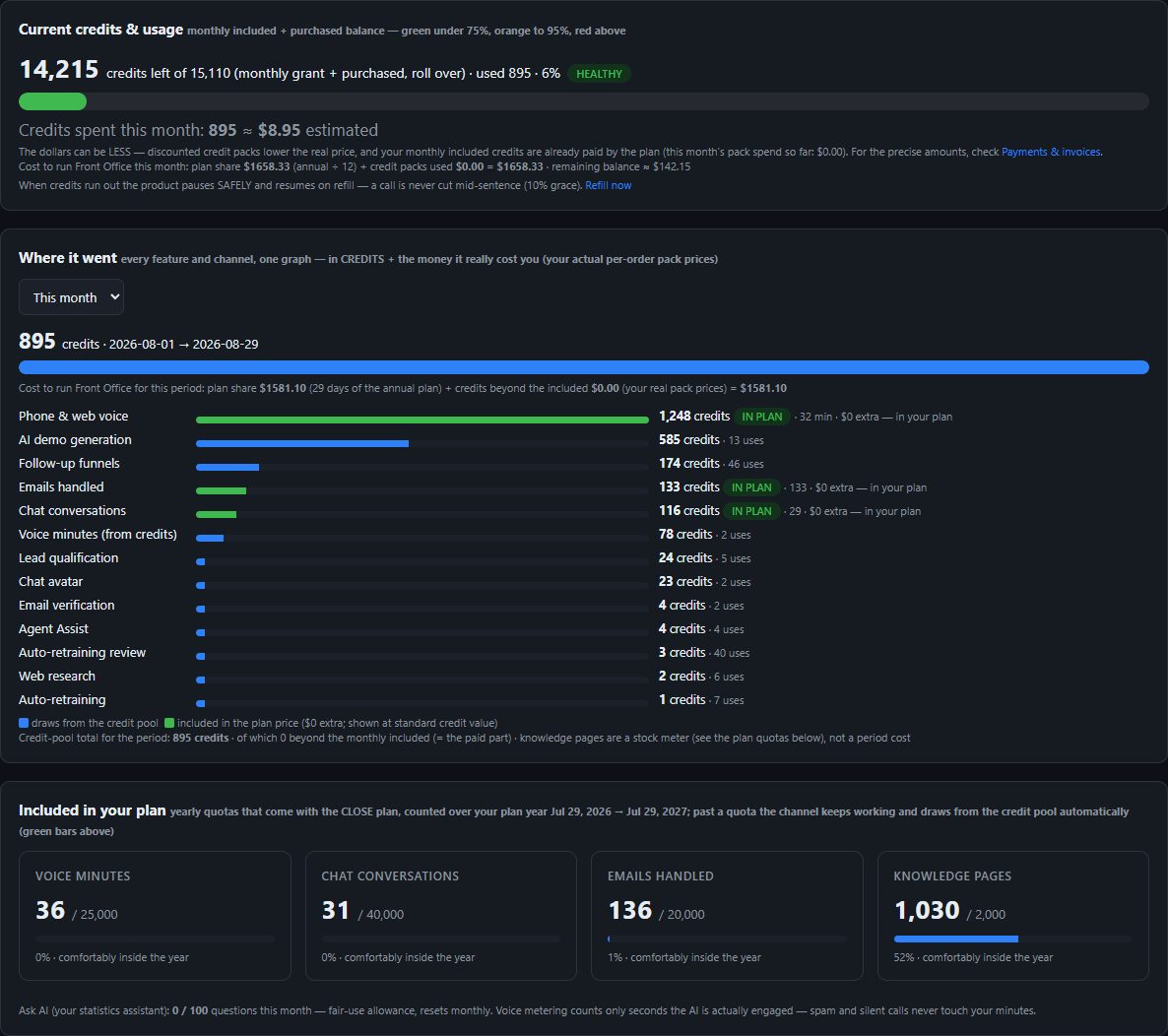
Credits on an honest gauge
Some AI features run on rechargeable credits, consumed only if and when you use them — and Protection guards that balance: a live gauge with the value in view, per-feature spend graphs, and auto-refill with a monthly cap that never double-orders. Refill directly from the app.
- Alert thresholds mailed BEFORE anything runs out
- Auto-refill: pick the pack, set the trigger, cap the month
- At zero the tenant pauses politely — a call in progress is never cut
- See plans →
Available on its own — or inside a solution
Questions, answered
Can an operator switch AI ASSIST off, and who sees the minutes?
Yes — the toggle is on the panel, the rate shows before dialing, and metering runs only while it is ON. The supervisor sees minutes per operator and per day in the briefing and in Forecast & Statistics; a daily cap you set stops the spend where you decide.
Is Protection an add-on?
No. Available on its own or inside a solution — see pricing.
Try it free on your own business. 7 days. No credit card.
Give it your website. It learns your company. Then call it, chat with it, e-mail it — and decide. Nothing to install, nothing to cancel.
← Previous: Connectors · Sharing with a colleague? 📄 Get the PDF · ✉️ Email this page ·