ZANUS FRONT OFFICE FOR INBOUND SALES — BUYING COMMITTEESNEW
The buying committee, mapped by the AI that talked to it.
In a software deal, a fleet purchase, a construction bid or a staffing contract, the lead is a committee: the person who filled the form, the one who asked about pricing, the one who asked about integrations. The AI groups verified contacts by company automatically, infers each role from what they actually asked, scores the account 0–100 with the WHY, and flags the empty chair — no economic buyer engaged yet — before it costs you the quarter.
Try it free 7 days on your own business · no credit card · per company, never per seat
REAL AI - the whole Front Office is AI, not old software with an AI button. Give it your website: it learns your company, works from your approved knowledge and gets better with every answer you approve.
Live on this site right now — the assistant in the corner is the product · Award-winning AI — CES · ISE · TMCnet
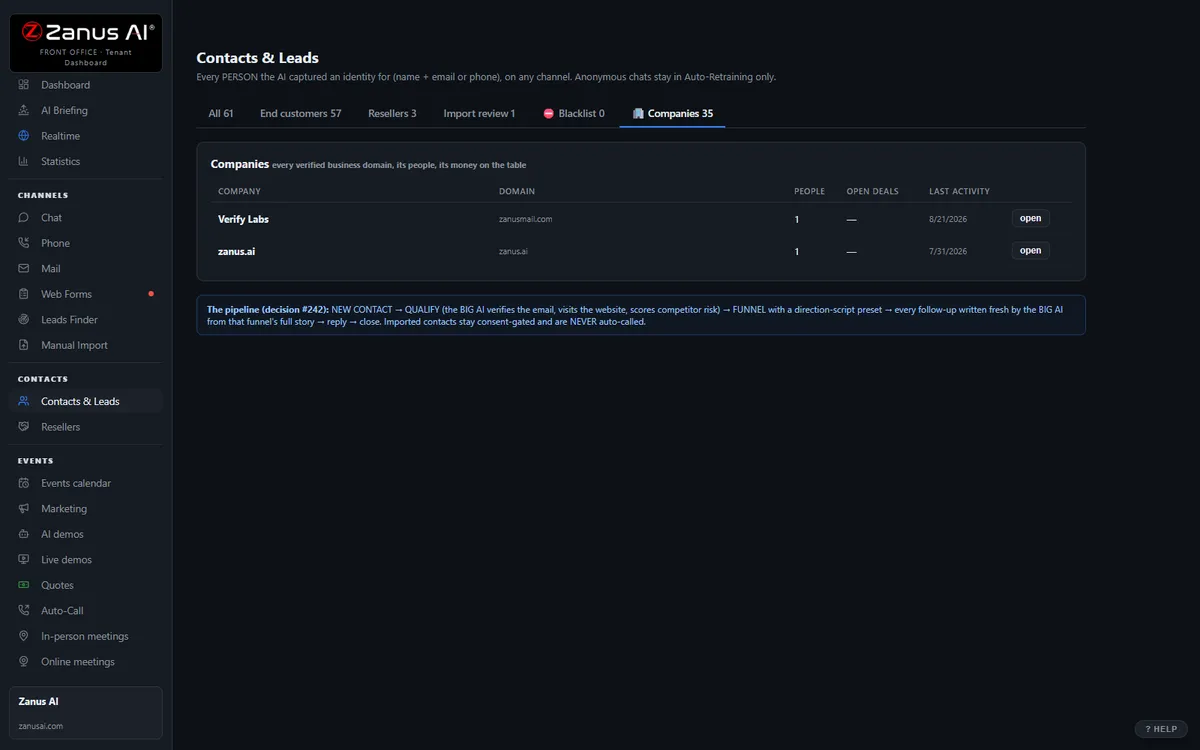
The real Companies tab: all the people, roles, combined timeline, health score.
What it does
Contacts with verified business emails from the same company cluster automatically; webmail addresses do not. Merge or split subsidiaries by hand.
Pricing questions — economic buyer. Technical questions — evaluator. Scheduling — champion. Labeled on every person, from what they said.
“62 and falling — no reply to the last two touches, quote unopened for nine days.” Surfaced in the morning briefing.
Inside Companies — the real screens
Click a tab. Every picture is the live Front Office, not a mockup — the left menu is the whole product.
Health score on everything — always with the WHY
Every contact and company carries a 0–100 health score recomputed from real events: recency, demo engagement, quote opens, reply sentiment, call outcomes. "62 and falling — no reply to the last two touches, quote unopened for 9 days."
- On contact cards, company cards and a sortable Statistics column
- Falling scores surface in the morning briefing’s At Risk list
- Available on its own or inside a solution
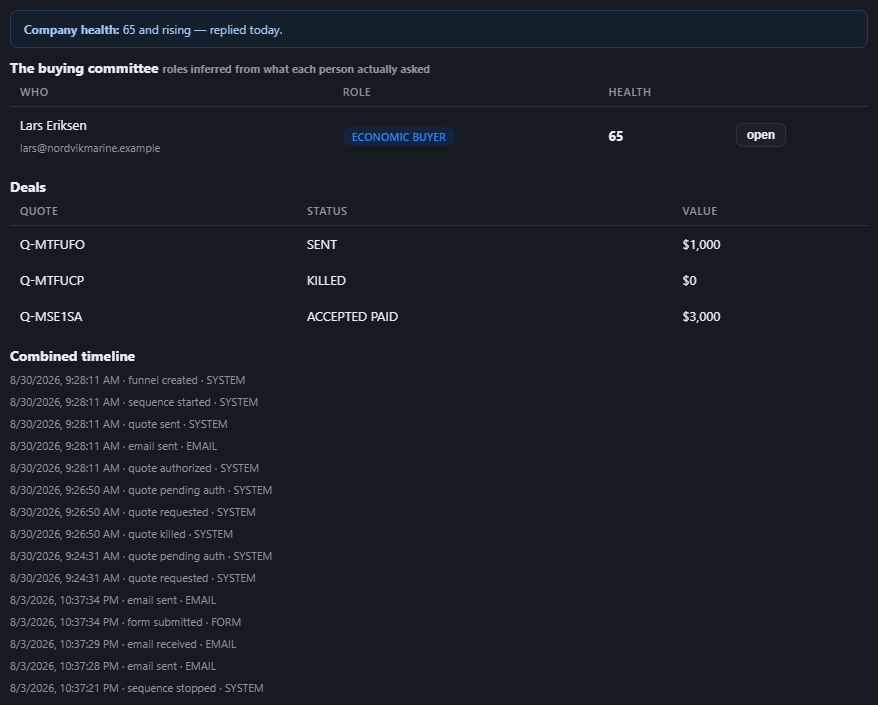
Available on its own — or inside a solution
Questions, answered
Does this replace our account structure?
It coexists: Companies is a view inside Contacts & Leads and syncs with your CRM accounts through Connectors. A person can belong to two companies; deals aggregate per company. Available on its own or inside a solution — see pricing.
Is this useful when we sell to individuals?
Yes where households or repeat buyers matter — a dealer’s family with three vehicles, a builder’s developer client — and it stays out of the way for single-buyer deals.
Try it free on your own business. 7 days. No credit card.
Give it your website. It learns your company. Then call it, chat with it, e-mail it — and decide. Nothing to install, nothing to cancel.
← Previous: Booking · Sharing with a colleague? 📄 Get the PDF · ✉️ Email this page ·