Back Office AI
Get started

ZANUS BACK OFFICE — CALENDAR & TASKS

A schedule where nothing slips silently.

Every task is linked to a client or a piece of work — never free-floating. Buckets collect what is urgent, at deadline, or behind schedule, and the AI reschedules smartly when plans change.

Get started

Cloud tenant or your own server · unlimited users · ready from day one
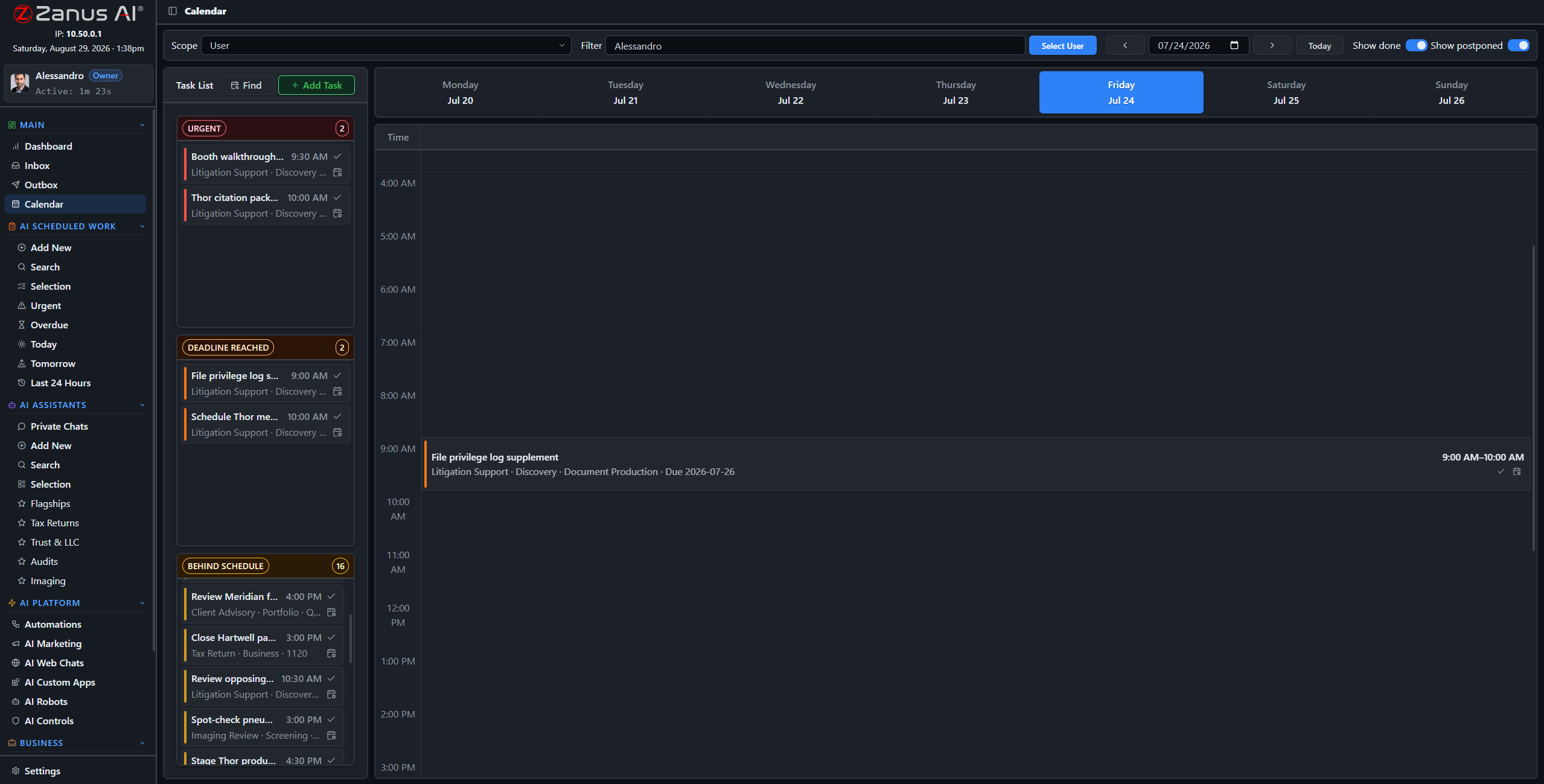
Week calendar with tasks linked to clients and works

Week strip and time grid: people and AI works on one schedule, buckets catching what slips.

What it does

Linked, not floating

Each task belongs to a client or a work, so the schedule stays connected to the actual business — click through from the slot to the substance.

Buckets catch the slips

Urgent, deadline-reached and behind-schedule tasks collect in visible buckets. Nothing disappears into next week by accident.

Confidential stays confidential

Permission-aware to the end: a user who cannot read a task’s client still sees the time slot — the details are redacted by the server.

People and AI on one schedule

The AI’s scheduled works and your team’s tasks live in the same grid. The morning view answers one question: what is happening today, and what needs a human?

  • AI works and human tasks side by side
  • Smart rescheduling when something moves
  • Workload balancing across the team
Smart task completion and rescheduling
AI projects and goals with milestone tracking

Projects and goals on the same rails

Set business goals — revenue targets, operational KPIs, project milestones — and connect them to real tasks for real accountability. The AI tracks progress and raises the flag when a milestone drifts.

  • Goals connected to tasks, not to slides
  • Milestone alerts before the deadline, not after
  • Performance dashboards at a glance
Cloud AI subscriptions typically price per seat and meter the AI usage on top — and agent platforms hand you a toolkit that someone still has to design, build and maintain. Zanus Back Office ships as a WORKING system: unlimited users, every module included, grounded in YOUR documents from day one.

Questions, answered

Does it sync with our calendars?

Organization email and calendar integration (Google Workspace, Microsoft 365) is configured by your admin in settings.

Who sees what?

Permissions rule everything: the server redacts confidential details from users without rights to the underlying client — even in shared views.

See it working on YOUR business — the demo IS the product.

Get started
VIEW ALL NEXT

← Previous: Logistics  ·  Sharing with a colleague? 📄 Get the PDF · ✉️ Email this page ·