ZANUS AI FOR ENERGY & UTILITIES — OVERVIEW
The grid’s memory, on duty.
Customer calls answered around the clock, outage and planned-work notices drafted for approval. Substation as-builts, switching orders and forty years of maintenance history that answer the control room in seconds — in an isolated tenant, or air-gapped inside your own perimeter.
Private tenant or your own server · your whole team · critical-infrastructure-conscious architecture
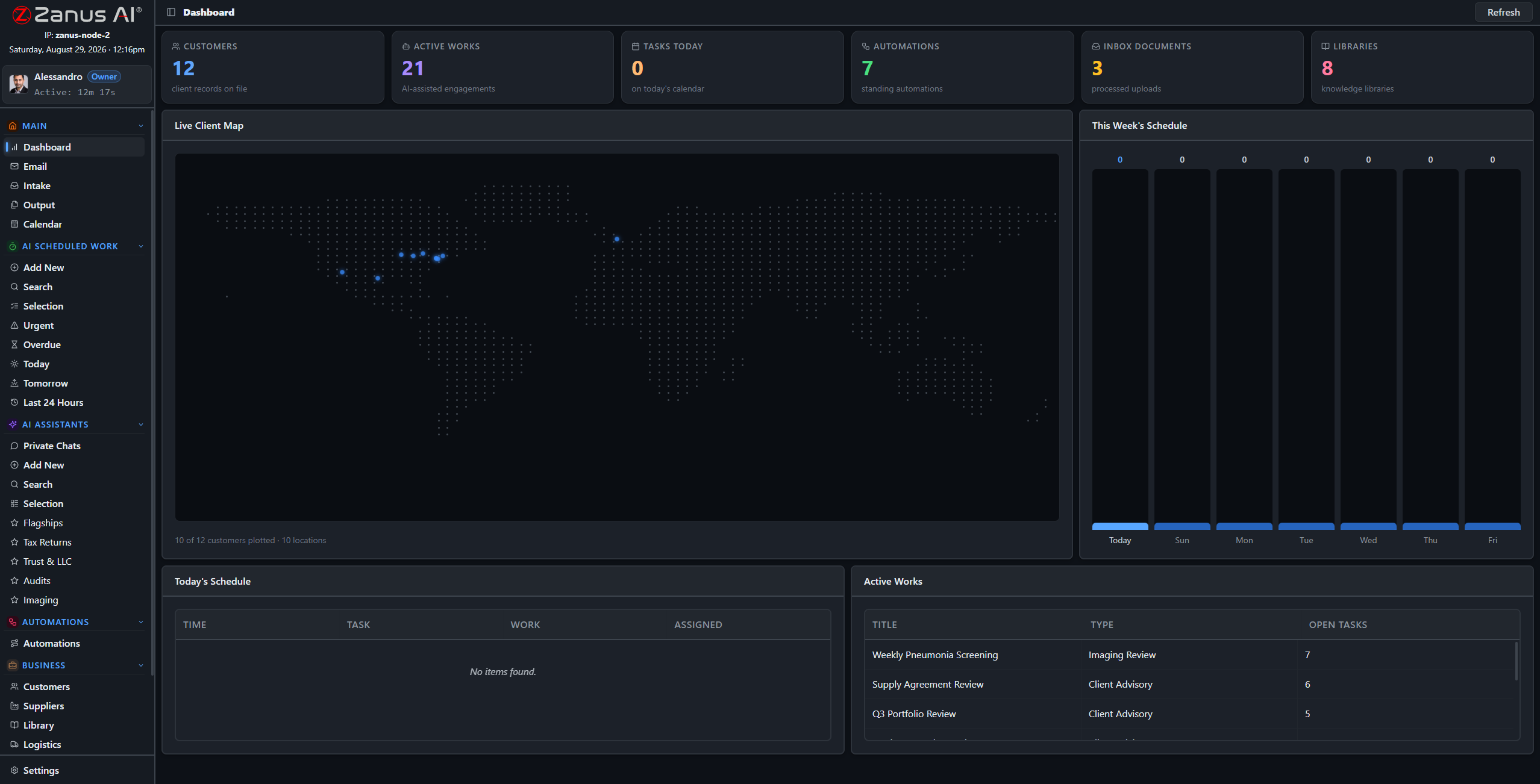
A real deployment view: asset records, scheduled reliability works, the operation’s day on one screen.
What it does
When the outage map lights up, every customer line is answered — status given from YOUR approved information, gas-leak language escalated instantly by your rules, crews left to work.
Relay settings memos, feeder histories, as-built drawings: institutional knowledge becomes a system that answers with the document cited — before the people who wrote it retire.
Your tenant is isolated; grid documentation never trains anyone else’s model. The same OS runs air-gapped on hardware you own, inside your own perimeter, USB updates only.
Front office: the customer side, handled
Outage status, start-stop-transfer service, billing questions, streetlight-out reports: the Zanus front office answers every ring on your menu, takes structured reports, books appointments into real calendars and answers the questions your CSRs repeat all day — in up to 40 languages.
- AI phone on your menu and voices, 24/7 — storm nights included
- Service starts and appointments booked into real calendars
- Outage status from YOUR approved information, never improvised
- See the Front Office for utilities →


Back office: the operation’s paper, working
A monthly reliability report drafted from your own records, a switching-order draft cross-checked against the one-lines and prior orders, discrepancies flagged for the operations engineer — support work at machine speed, every operational decision left with your qualified people.
- Scheduled AI work: reliability reports, inspection summaries
- Verified answers from YOUR grid documentation, source cited
- Finished drafts await engineer sign-off in Output
- See the Back Office for utilities →
When the perimeter is the requirement
Utilities under critical-infrastructure-protection requirements run the identical OS on Zanus hardware inside their own perimeter: air-gap capable, USB updates, your whole team — operational documentation physically incapable of leaving.
- Private On-Premises AI: owned, no recurring fees
- On-Prem Tokens Server for high-volume processing
- Explore the AI Servers →

Questions, answered
Is this NERC CIP compliant?
The architecture is critical-infrastructure-conscious: isolated tenants, role-based access, server-side redaction, full audit trail — and a fully air-gapped on-premises option. Bring your CIP compliance lead to the demo; specifics are reviewed during onboarding.
Does the AI touch SCADA or operate equipment?
No. It reads and drafts documentation. Switching decisions, relay settings and every operational action remain with your qualified operators and engineers — the AI organizes, cross-references and cites.
One system across generation, T&D and the office?
Yes: one tenant with five-level workgroups per division, or separate tenants on shared infrastructure. Control room, field crews, engineering and customer service each see exactly what their role allows.
See it working on YOUR utility — the demo IS the product.
ZANUS AI FOR ENERGY & UTILITIES — FRONT OFFICE
Ten thousand outage calls. Zero hold music.
On a normal Tuesday the calls are billing questions and service transfers. On storm night they are everything at once. The Zanus front office answers on your menu, in your voices, gives status from your approved information, and escalates emergencies instantly — 24/7, in up to 40 languages.
Private tenant or your own server · your whole team · critical-infrastructure-conscious architecture

Calls, chats, reports and follow-ups — one dashboard your customer-service manager can read.
What it does
Every line answered when the map lights up: status given consistently from YOUR information, structured outage reports taken, emergency language transferred immediately by your rules.
Start, stop and transfer requests handled end to end: details collected, appointments booked into real synced calendars, confirmations sent in the customer’s language.
Due dates, payment locations, rebate programs, deposit rules: answered instantly and identically every time, from YOUR approved information — never a guess about your tariffs.
From report to routed work, hands-free
A customer reports a streetlight out or a low-hanging line; the AI takes the location, the details and the photos through web forms, files a structured intake, and routes it — dispatch sees a clean report instead of a voicemail to decipher.
- Structured reports: location, details, contact, photos
- Tickets created and routed by your rules
- Callbacks and updates sent without a CSR dialing
- Gas-leak and wire-down language: instant transfer, never improvised


The web side answers too
Website chat grounded in your approved tariffs, programs and outage information — answering at 11 PM what would otherwise be tomorrow’s call volume. Every conversation logged with a transcript.
- Grounded chat on your site, 40 languages
- Rebate and program questions answered from your documents
- Every conversation logged, transcript included
- See the full Front Office tour →
Questions, answered
How does it handle emergencies?
By YOUR rules: gas-leak, wire-down or shock language triggers immediate transfer or the instruction to call 911 — the AI never plays first responder.
Do we keep our phone numbers?
Yes. Your numbers stay; calls route to the AI first, staff first, or any mix per line and per hour — including a storm-mode routing you flip on when the weather turns.
Can it give restoration estimates?
It gives exactly what your approved information says — posted estimates, no invented promises. When your ops team updates the estimate, the AI answers with the new one.
See it working on YOUR utility — the demo IS the product.
ZANUS AI FOR ENERGY & UTILITIES — BACK OFFICE
Forty years of grid paper.
Now it works a shift.
Switching orders, clearances, outage reports, pole inspection records, vegetation logs, compliance evidence: a utility runs on documentation. The Zanus back office turns that archive into a working AI staff — drafting, cross-referencing and answering with sources cited, under your engineers’ sign-off.
Private tenant or your own server · your whole team · critical-infrastructure-conscious architecture
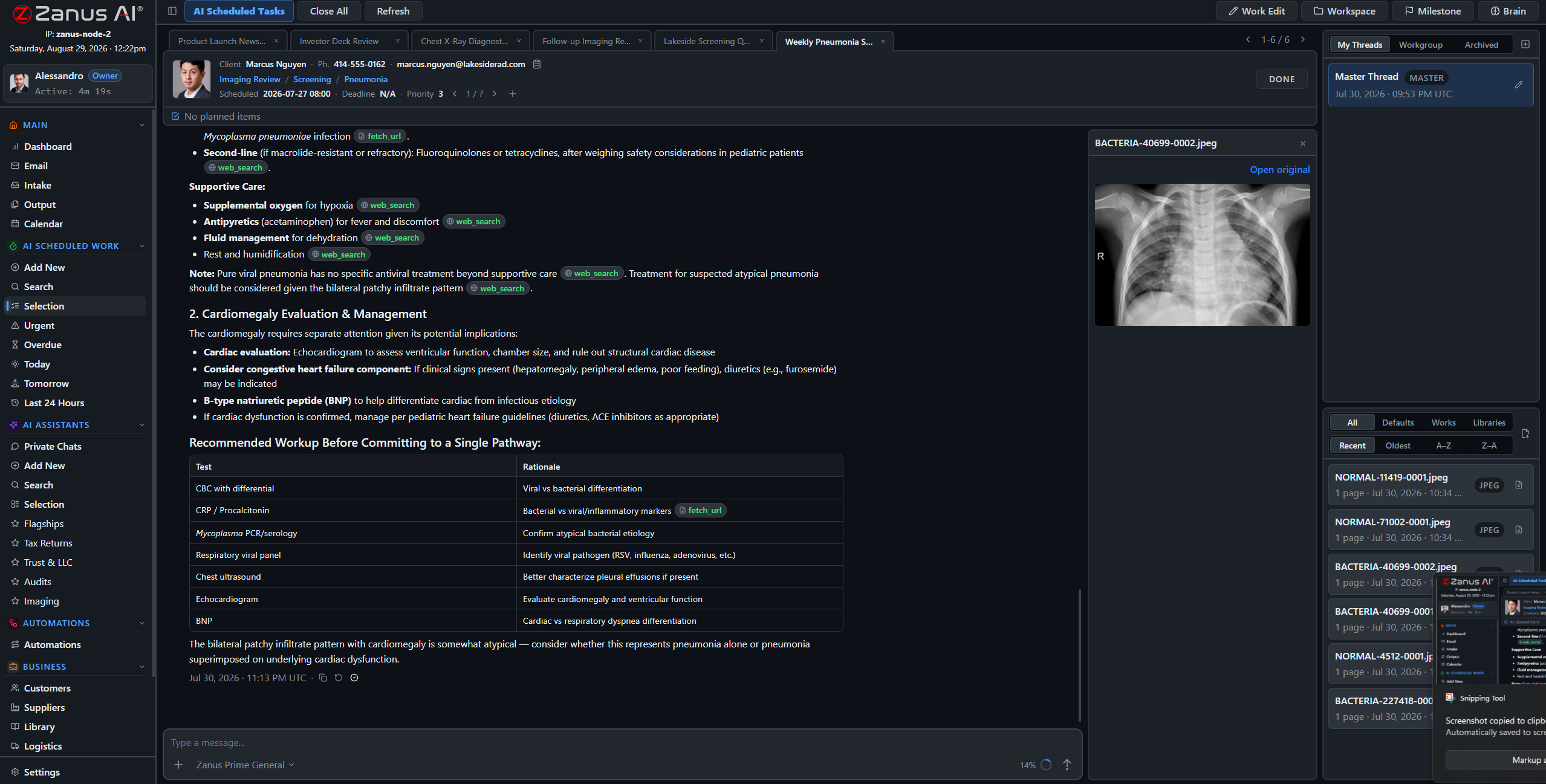
A real session: records compared, discrepancies flagged, sources cited — the engineer decides.
What it does
The monthly reliability report, the weekly vegetation-management status, the storm after-action draft — assigned to the AI like to an operations analyst, executed on schedule, fully auditable.
“When did we last replace the regulator at substation 7, and what did the crew note?” — answered in seconds with the work orders attached, instead of an afternoon in the records room.
Every AI-drafted report, summary and cross-check lands in Output awaiting review. Nothing operational moves without your qualified people’s decision.
The switching-order cross-check, drafted
An operations engineer drafts a switching order; the AI cross-references it against the current one-line diagrams, the clearance procedures and prior orders on the same equipment, and flags every discrepancy with the source attached. The engineer reviews, corrects, decides — the AI never switches anything.
- Cross-references against one-lines and prior orders
- Discrepancies flagged with documents attached
- Support work only: operating decisions stay qualified and human
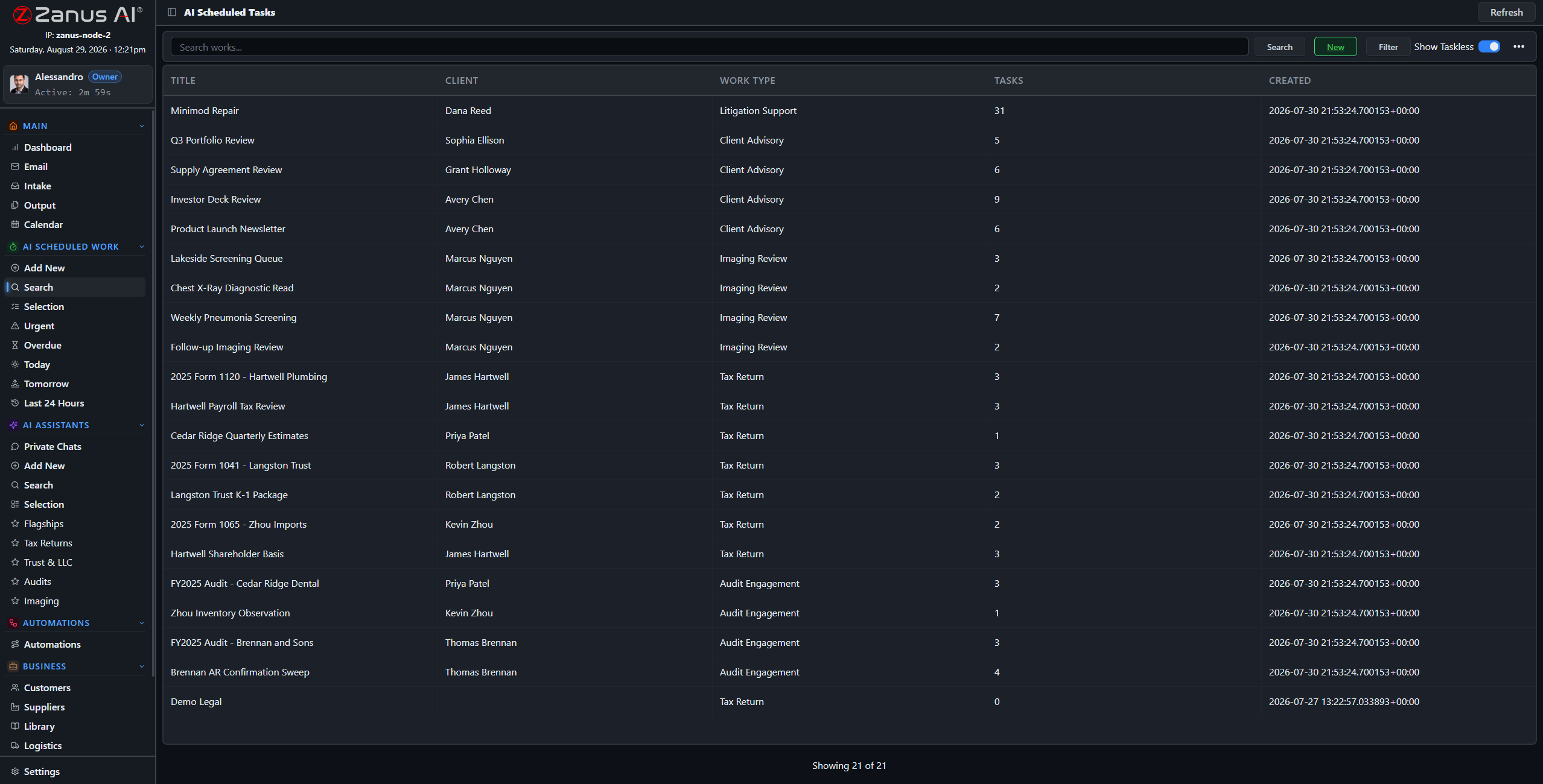

Compliance evidence, assembled as you go
Inspection summaries, maintenance-completion rollups, audit-prep packets with the records attached: the documentation an audit demands is drafted continuously from the records you already keep — not reconstructed in a two-week fire drill.
- Audit-prep packets drafted from your own records
- Inspection and maintenance evidence organized by asset
- Approval workflow before anything is filed
Questions, answered
Does it connect to our OMS or GIS?
API connectors integrate with existing systems; documents and data flow through the intake pipeline under your handling rules. Bring your OMS, GIS and work-management stack to the demo and we map the path.
Can it read old scanned records?
Yes — scanned as-builts, handwritten inspection sheets, microfiche-era exports: the ingestion pipeline turns what the utility actually has into queryable knowledge with sources attached.
YOU MIGHT ALSO LIKE
The Back Office executes. Who answers the phone?
Front Office AI picks up every call and chat — books, quotes, follows up, 24/7 in 40 languages. Watch it run a business like yours, live.
See it working on YOUR utility — the demo IS the product.
ZANUS AI FOR ENERGY & UTILITIES — GRID DOCUMENTS
Grid knowledge that outlives retirement.
One-line diagrams, as-builts, relay settings memos, equipment manuals, pole inspection records, easement files — loaded into curated libraries the AI reads from. Ask in plain language; get the answer with the source document cited, scoped to whoever asks.
Private tenant or your own server · your whole team · critical-infrastructure-conscious architecture
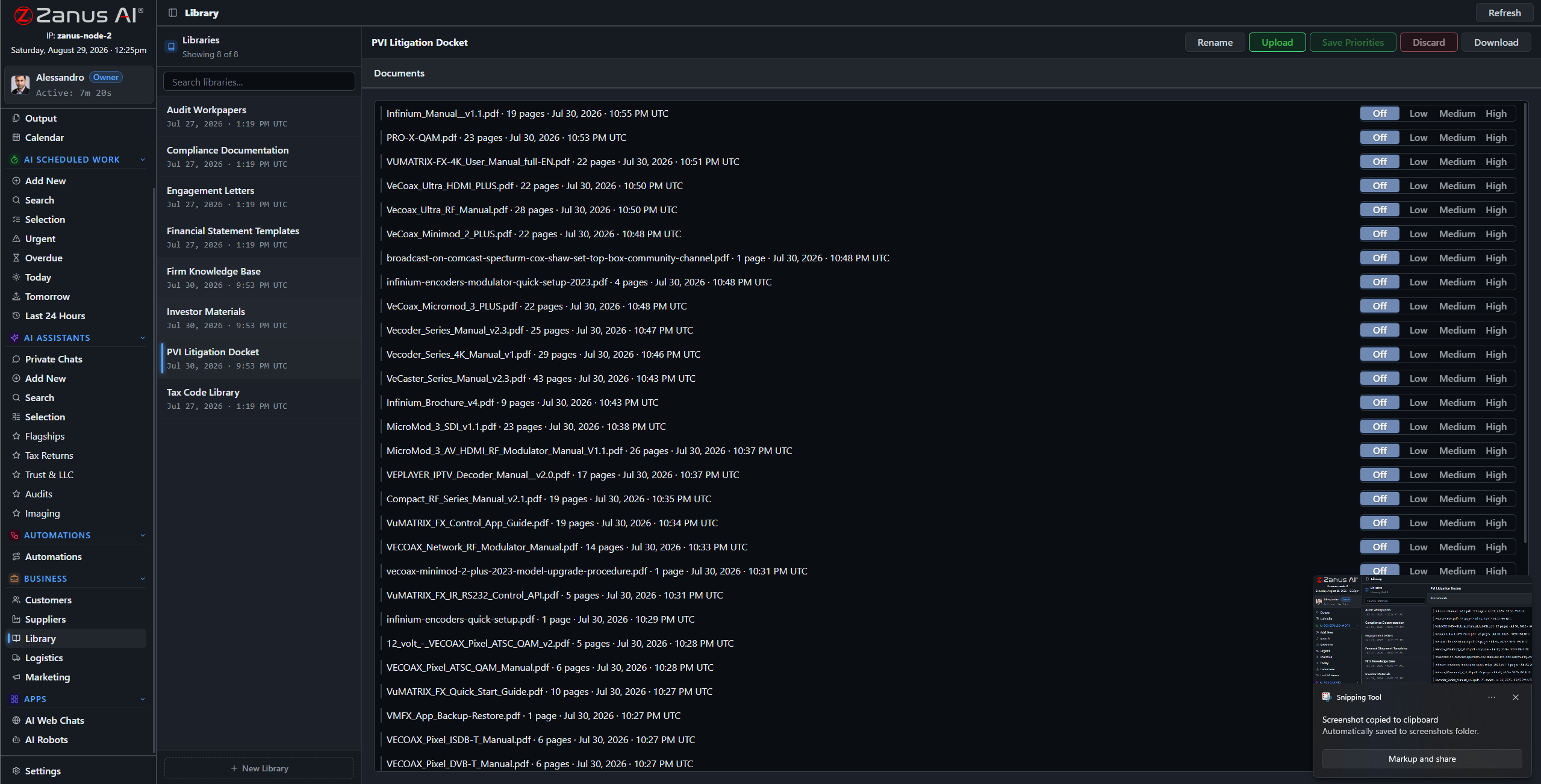
Libraries: current as-builts outrank superseded drawings, issued settings outrank study drafts — you set the order.
What it does
PDFs, scanned as-builts, settings sheets, photos from the field, decades-old typewritten memos — the ingestion pipeline turns what the utility holds into queryable knowledge.
No source in your library, no claim: the AI cites the drawing, the memo, the manual — or says it cannot answer. On a grid, a guessed setting is not an option.
A CSR asks about a rebate program; a relay tech asks about settings history: each gets answers scoped to their role, enforced server-side, redacted at the field level.
“Why is feeder 14 configured that way?”
The answer lives in a 2004 memo written by an engineer who retired in 2019. Loaded into the libraries, that memo now answers the question in seconds — with the document attached — for every operator who will ever wonder again.
- Plain-language questions across decades of records
- Sources attached to every answer
- Priority order: current documents rule, superseded ones outranked

Questions, answered
Who can see the operational drawings?
Only roles you authorize. Permissions reach the field level and the server redacts what a user cannot see — contractors get their scope, not the network.
Do our documents train outside models?
Never. Your tenant is isolated; your grid documentation is yours alone — and the air-gapped on-premises option keeps it physically inside your perimeter.
See it working on YOUR utility — the demo IS the product.
ZANUS AI FOR ENERGY & UTILITIES — AI WORKFORCE
An operations analyst that never rotates off shift.
Assign work to the AI the way you assign it to staff: type, records, deadline, recurrence. The monthly reliability report, the weekly vegetation status, the after-action draft when the storm passes — executed on schedule, with citations, under review.
Private tenant or your own server · your whole team · critical-infrastructure-conscious architecture
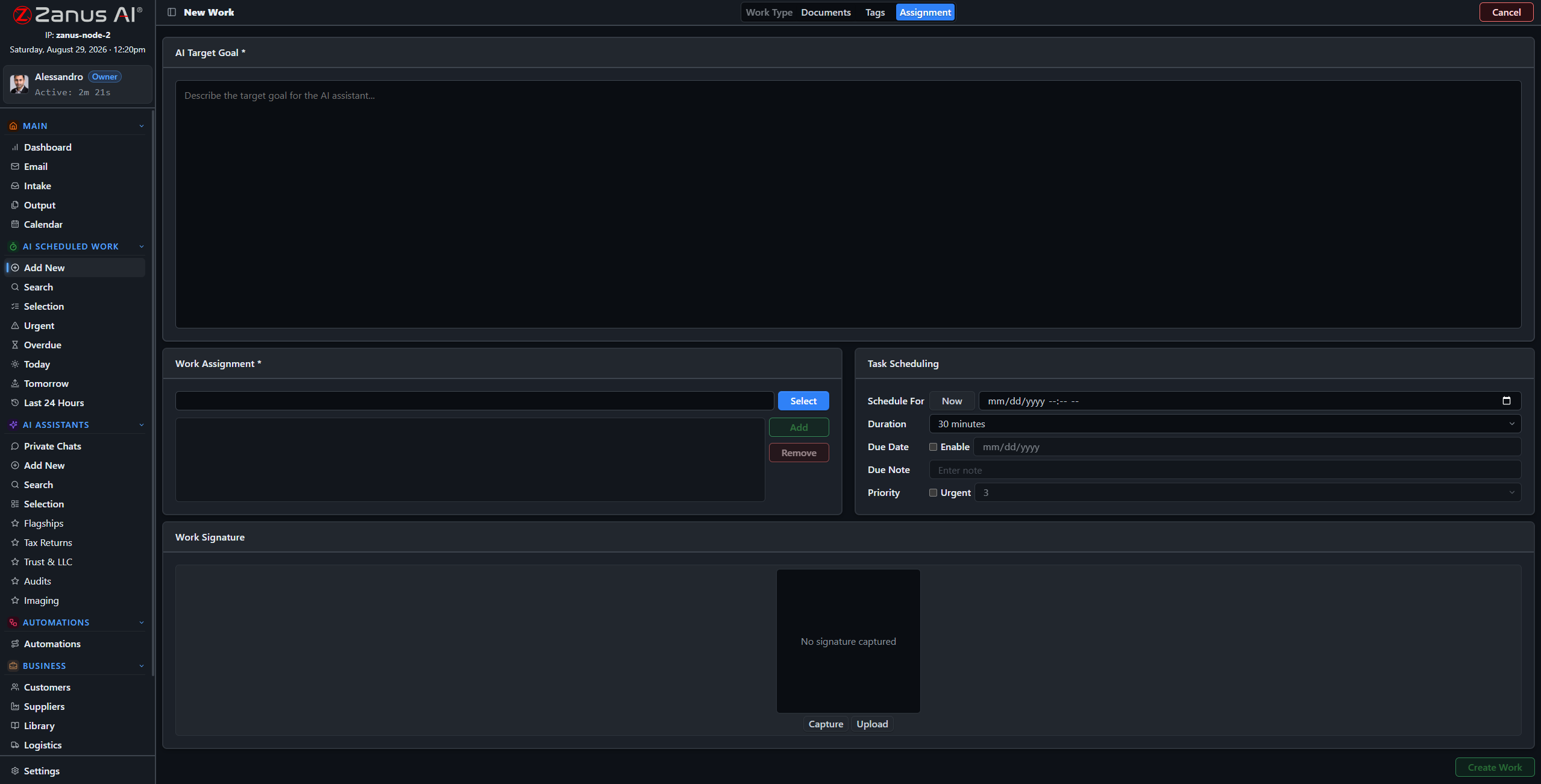
Four steps: work type, records and libraries, tags, schedule — the AI takes it from there.
What it does
Reliability report, inspection summary, after-action draft, regulatory-filing prep: work types molded to your utility, with default libraries and examples per type.
The AI’s workload is managed like the team’s: one-click views show what is urgent, late, today and tomorrow — the filing deadline never slips silently.
Reasoning streamed as it works, sources cited, milestones tracked, linked to the asset and the calendar — supervision on the record, interruption one click away.
First Monday, 6 AM: the reliability report is drafted
Set “Monthly Reliability Report” once: each month the AI compiles outage records into the draft — interruptions summarized, causes categorized, trends flagged with sources — and files it for the operations manager before the month-open meeting.
- Recurring schedules for periodic operational reporting
- Findings cited to outage and maintenance records
- Draft in Output, awaiting sign-off
Questions, answered
Can we supervise mid-work?
Yes — open any session, read the reasoning, redirect it, or stop it. The AI works like staff: visible, accountable, interruptible.
Can it prepare regulatory filings?
It assembles the draft package from your records — data compiled, evidence attached, sources cited. Your compliance manager reviews, corrects and files; the AI never submits anything itself.
See it working on YOUR utility — the demo IS the product.
ZANUS AI FOR ENERGY & UTILITIES — PROCEDURES & SAFETY
The procedure that finds the lineman.
Switching procedures, clearance and hold-tag rules, arc-flash and PPE requirements, storm-response playbooks: rules that protect people only when the current version is in hand. In Zanus they are living documents — answerable in chat from any device, priority-ordered so the latest revision always wins.
Private tenant or your own server · your whole team · critical-infrastructure-conscious architecture
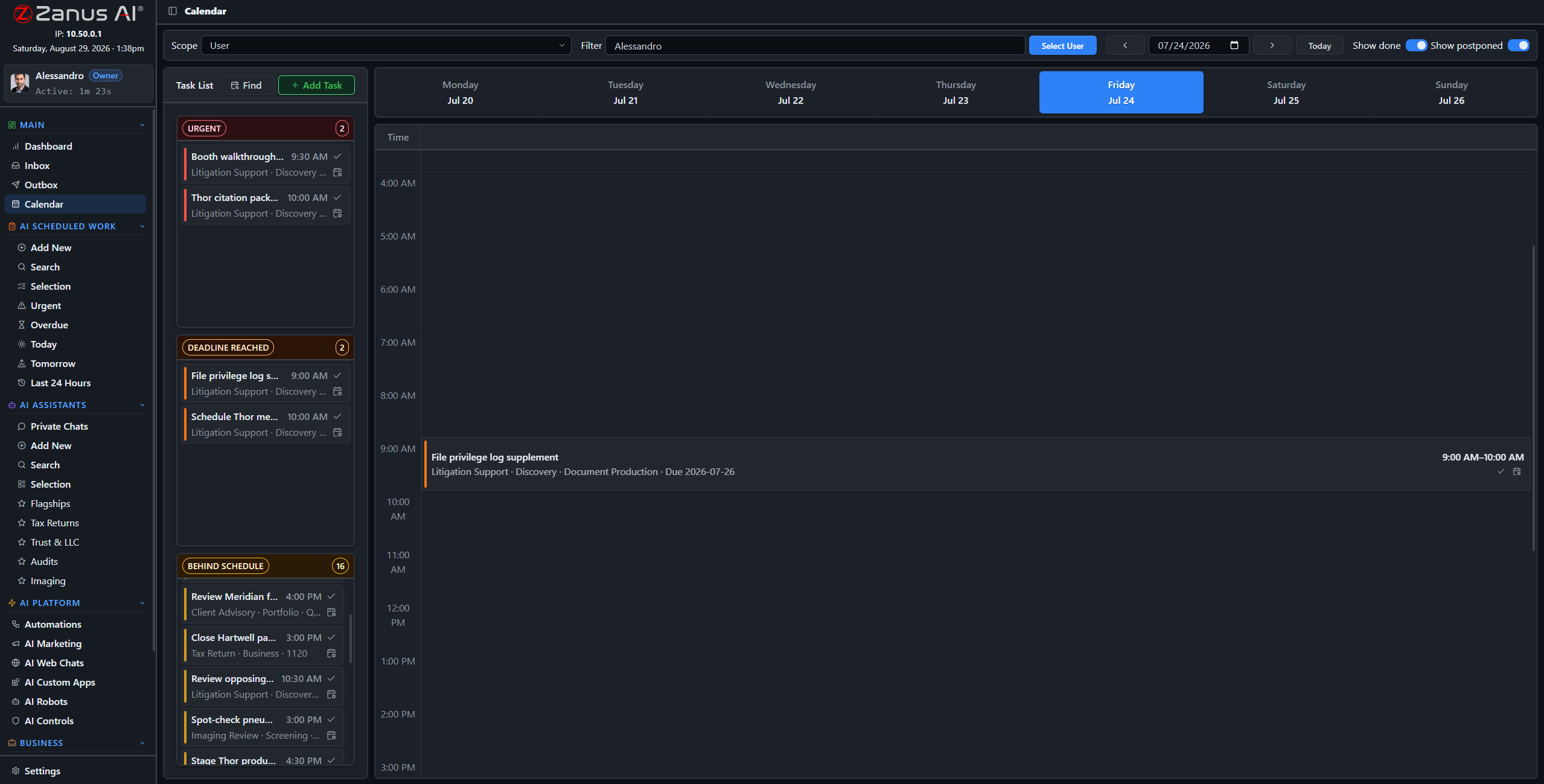
Procedure upkeep, scheduled like operations work: annual reviews and qualification expirations on the calendar.
What it does
Switching and clearance procedures, minimum approach distances, PPE matrices, storm playbooks: one library, current revisions on top, superseded versions outranked.
“What is the minimum approach distance at 69 kV?” — the current document, cited, in seconds, on the tablet in the bucket truck. Retrieval is instant; the qualified worker still makes the call.
Work types carry their default procedures: the AI drafting an inspection summary reads from the current inspection procedure — by construction, not by memory.
Safety-program upkeep, scheduled
Annual procedure reviews, qualification and certification expiration checks, tailboard-briefing material drafted for the morning crew meeting: assign them once as recurring AI work and the safety program stays current between audits — OSHA-conscious documentation, kept alive.
- Recurring review works with deadlines
- Qualification expirations flagged ahead of time
- Every review on the audit record
Questions, answered
How do procedure updates roll out?
Upload the new revision, set it on top: from that moment every answer and every AI work cites the new procedure. Old versions remain archived for audit.
See it working on YOUR utility — the demo IS the product.
ZANUS AI FOR ENERGY & UTILITIES — TEAM TRAINING
Half the control room retires by 2030. Their knowledge stays.
The utility workforce cliff is real: decades of feeder quirks, storm lessons and switching judgment walking toward retirement. New hires learn your procedures from the AI, and every operator and apprentice has an assistant that answers “how do we…?” instantly.
Private tenant or your own server · your whole team · critical-infrastructure-conscious architecture

Training lives inside the software: the AI walks each new hire through the utility’s own procedures.
What it does
New CSRs, operators and field staff learn your systems, tariffs and procedures through guided training on your own documents — productive in days, not a season.
“How do I process a service transfer with an outstanding balance?” — asked to the assistant, answered from the procedure, without pulling the senior CSR off her queue.
Private chats work on any device with a login — the how-to knowledge follows the apprentice to the substation, the service center or the storm room.

Capture the judgment before it retires
Interview notes, storm-restoration debriefs and annotated one-lines from your veteran engineers go into the libraries — and become sourced answers the next generation of operators can query at 3 AM, when the veteran is no longer on call.
- Answers cite the current procedure or memo
- Preset assistants per role: CSR, operator, field crew
- Training progress visible to supervisors
Questions, answered
Does training content go stale?
No — the assistant answers from the live libraries. Update the procedure once and every future answer updates with it.
See it working on YOUR utility — the demo IS the product.
ZANUS AI FOR ENERGY & UTILITIES — AUTOMATIONS
The utility’s repetitive work, set once.
Describe the job in plain words — “when an outage record opens, draft the customer notice and the estimated-restoration update” — and it becomes connected blocks on a canvas, running on its own, with every run visible.
Private tenant or your own server · your whole team · critical-infrastructure-conscious architecture
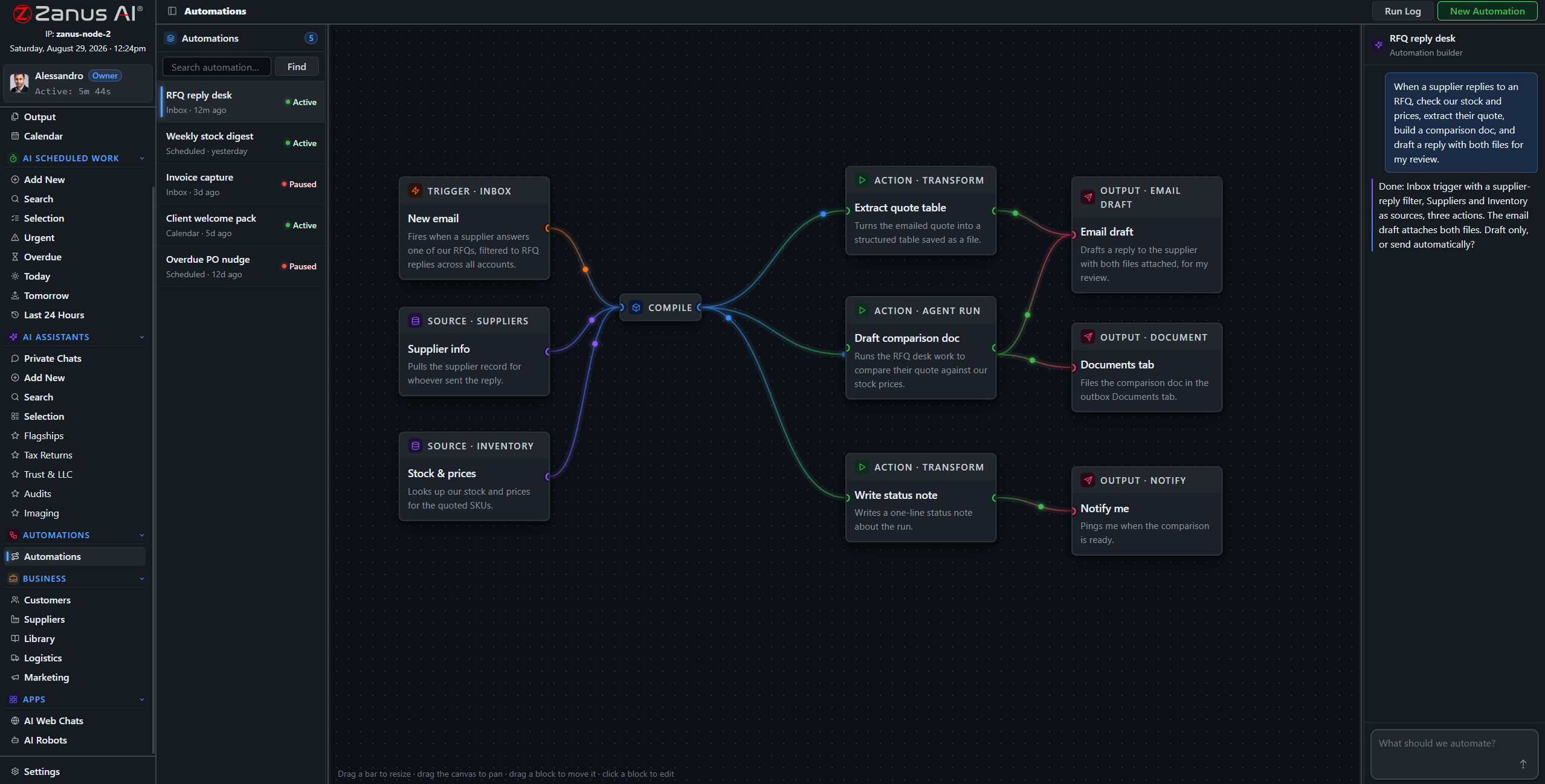
A real flow: trigger, record sources, AI compile, outputs routed — drawn from a description.
What it does
An outage record opens: the affected-area notice and the restoration update draft themselves from your approved language, queued for approval — minutes after the lights go out.
Pole and substation inspection reports arrive from the field: filed to the asset record, defects summarized and routed to engineering with photos attached.
The monthly regulatory data pull, the quarterly reliability summary: compiled by the AI on schedule, filed to Output for the compliance manager — never reconstructed at deadline.
When something fails, you SEE it
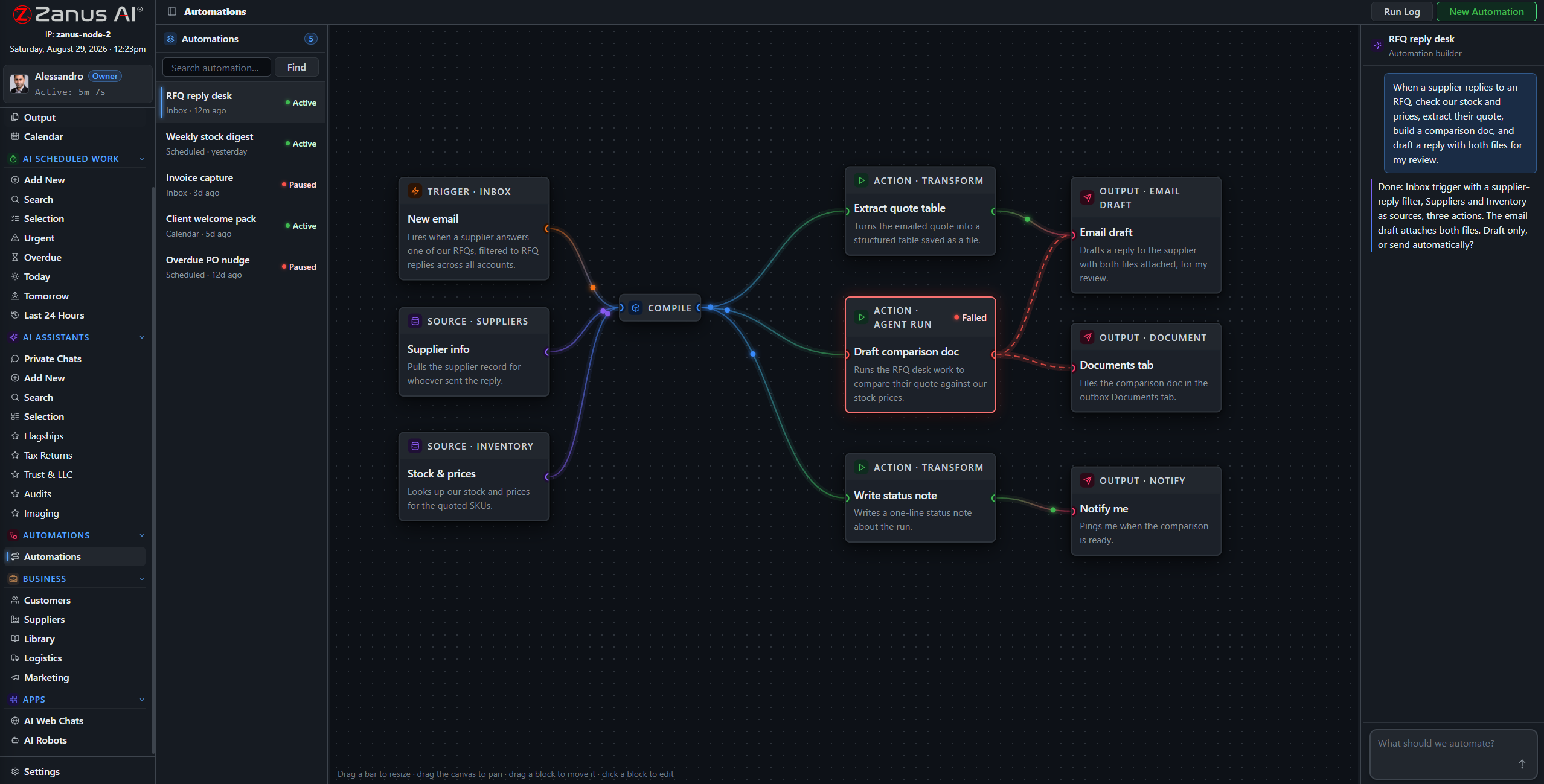
Run states live on the flow: green success, red failure on the exact block. In a utility, a silently skipped notice becomes a regulator’s question — here, nothing fails silently and retry is one click.
- Run log per automation
- One-click retry on failures
- Finished documents in Output, statused
Questions, answered
Who approves customer-facing notices?
Your rules: queue everything for human approval, or auto-send only the categories you designate as safe — planned-work reminders yes, restoration promises never.
See it working on YOUR utility — the demo IS the product.
ZANUS AI FOR ENERGY & UTILITIES — CUSTOMER NOTICES
The notice that arrives before the complaint.
Planned-outage notices, restoration updates, rate-change letters, efficiency-program invitations, payment reminders — drafted by the AI from your own records, in the customer’s language, queued for your approval. Communication at utility scale, without the scramble.
Private tenant or your own server · your whole team · critical-infrastructure-conscious architecture
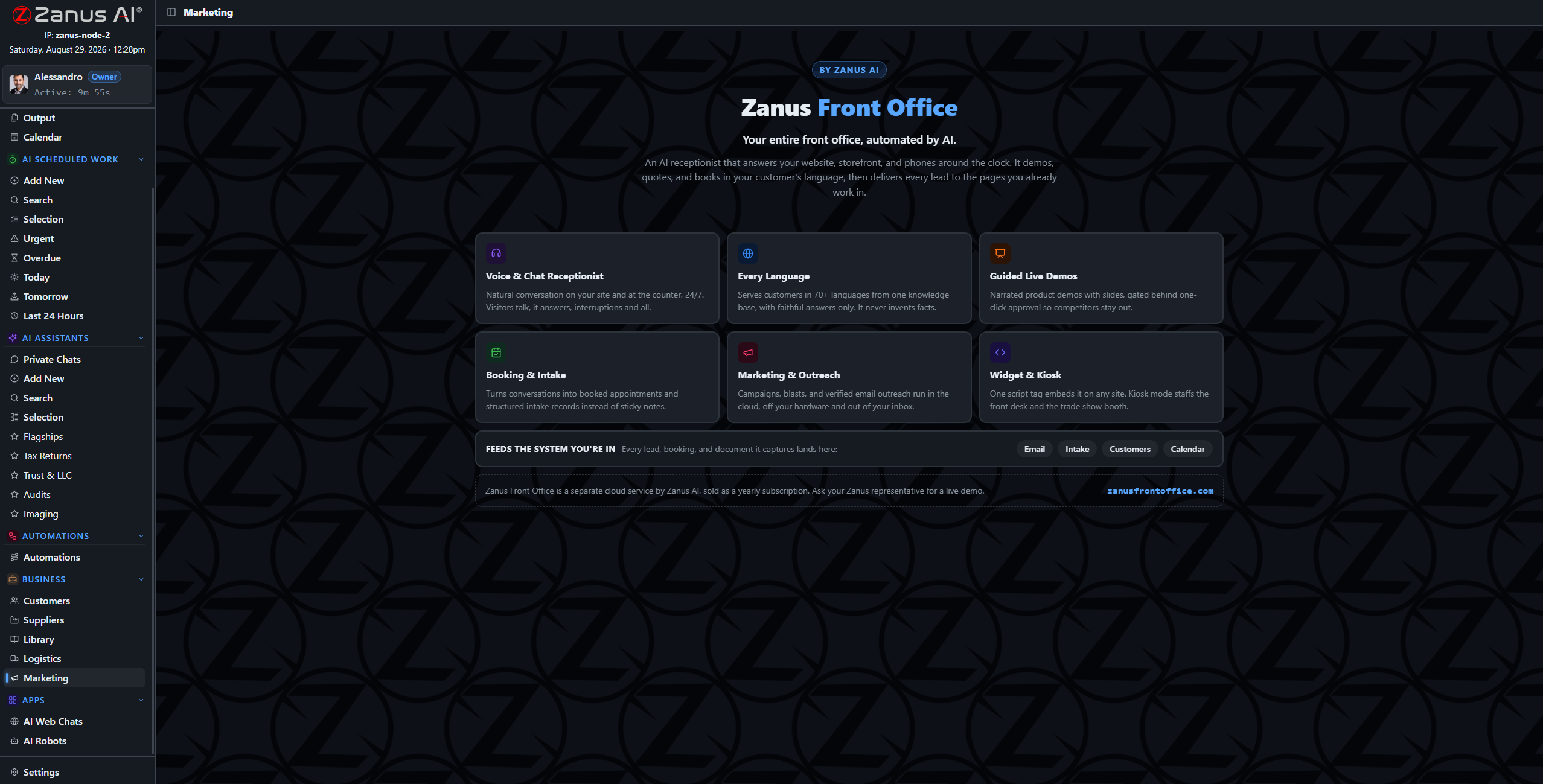
Campaigns and sequences drafted from your records — notices, reminders, program invitations — awaiting approval.
What it does
Customers on the affected feeder, accounts eligible for the rebate, addresses in the planned-work zone: audiences built from your own records — no list exports to a third-party tool.
Notices written the way customers actually read them — what is happening, when, what to do — in the customer’s own language, in your utility’s voice.
Contact preferences and opt-outs are enforced by the system, not by memory. Every send is on the record — evidence when the regulator asks who was notified, and when.
From the outage record to the inbox, without export
The audience, the content and the sending live in the same system as your customer records — nothing leaves your tenant to reach a mailing platform. “Notify every customer on feeder 14 of Tuesday’s planned work” becomes a drafted, scheduled notice in minutes.
- Audiences from your own customer data — private by architecture
- Notices and sequences drafted for review
- Delivery tracked: sent, delivered, replies routed

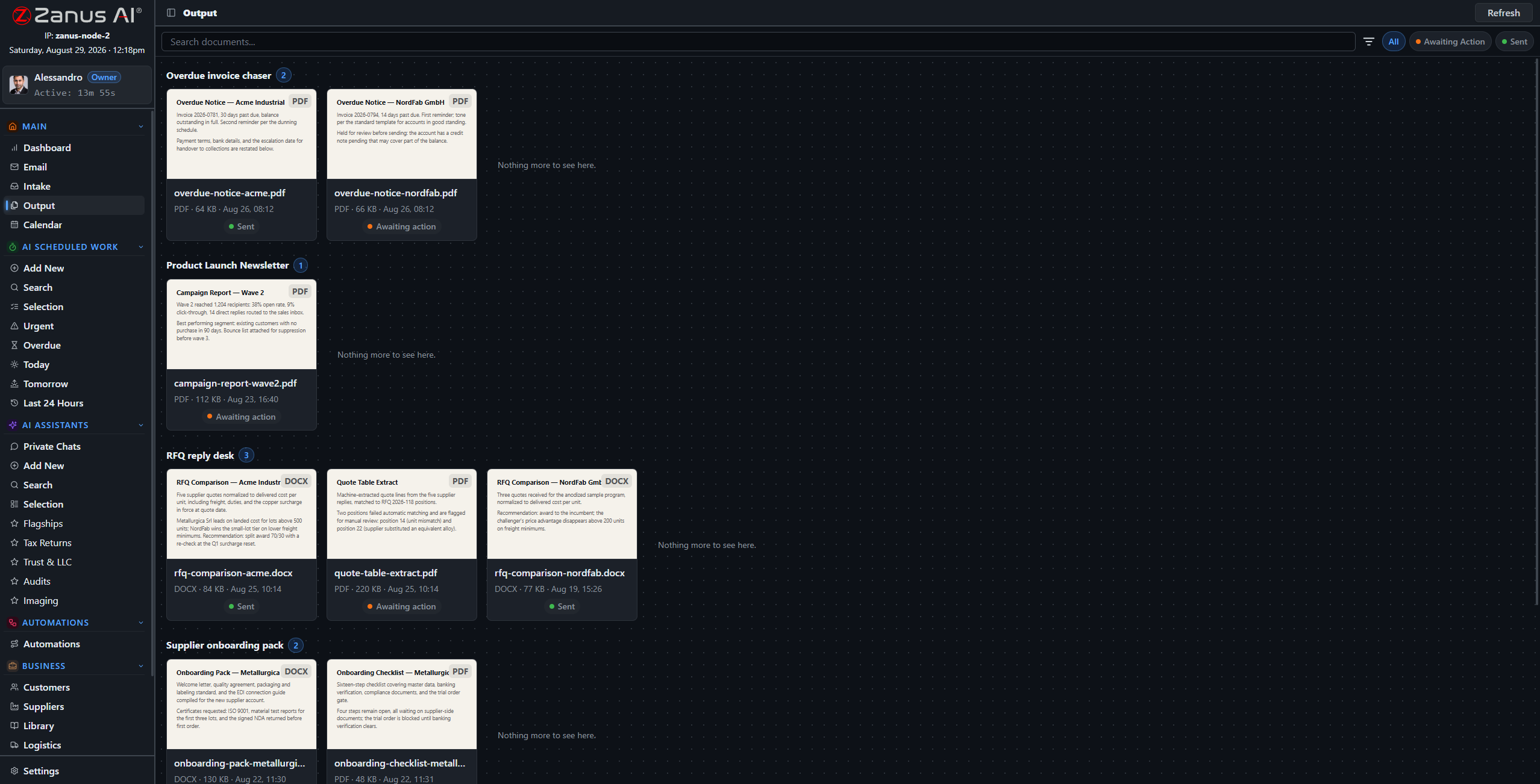
Approval first, always
Every outbound customer notice lands in the approval queue unless you designate the category as auto-send. Nothing reaches a ratepayer without the review your communications policy requires.
- Approval workflow per notice type
- Full history of what was sent to whom
- Results tracked: delivery, replies, call-volume relief
Questions, answered
Can it handle rate-change communications?
It drafts them from your approved filings and language, for your review — accurate to the tariff, sent to the right customer classes, every send on the record.
Does proactive notice actually cut call volume?
That is the operational point: a customer who received the planned-work notice does not call about the planned work. The notices go out on your triggers, before the phones ring.
See it working on YOUR utility — the demo IS the product.
ZANUS AI FOR ENERGY & UTILITIES — SCADA & INTEGRATIONS
Your systems keep running the grid. Zanus runs the paperwork.
Your OMS, GIS, CIS, work-management system and historians stay the systems of record. Zanus becomes the system of work: API connectors and the intake pipeline move documents and data under your rules, with a dry-run preview before anything writes. The AI never operates equipment.
Private tenant or your own server · your whole team · critical-infrastructure-conscious architecture

No rip and replace: the operational systems stay — the AI layer connects to the records they produce.
What it does
Zanus reads, drafts and answers. It does not switch, dispatch or control. Data from your operational systems flows in through connectors and the intake pipeline — documentation out, decisions human.
Customers, assets and documents mapped field by field, with a dry-run preview before anything writes — push, pull or two-way, your choice per field.
A full API for the rest of the stack: meter-data exports, inspection apps, custom tools — data in, results out, under scoped keys, every sync on the audit record.
One question across all your systems
The outage lives in the OMS, the asset in the GIS, the settings memo in the library — and the AI reads across what you connect. “What is open on substation 7, and what did the last inspection flag?” becomes one question with one grounded answer.
- Field mapping with dry-run preview
- Each system stays master of its own records
- Every sync event on the audit record
- External systems appear as blocks on the automation canvas
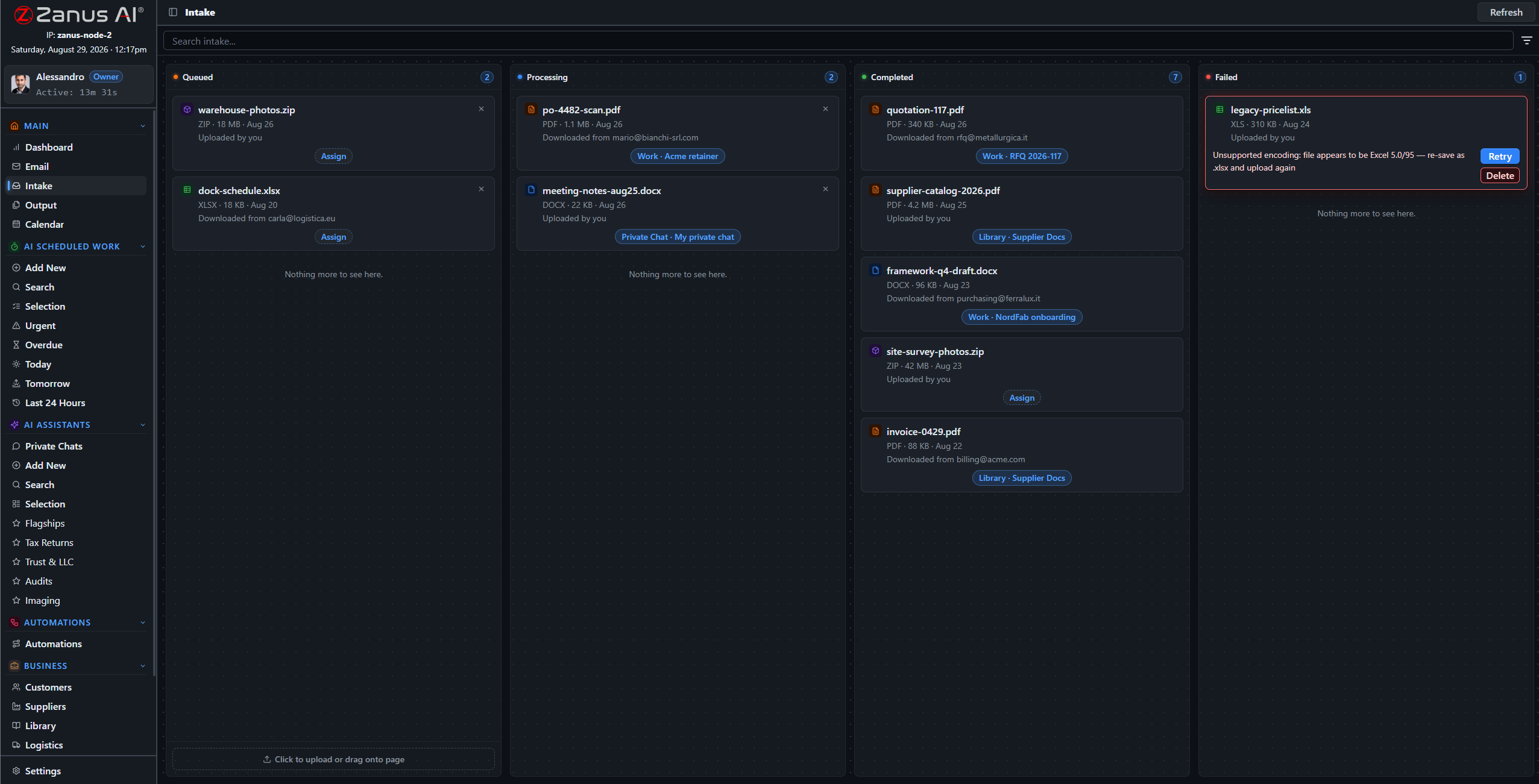
Documents flow back where they belong
The inspection summary the AI drafted, the after-action report, the compliance packet: finished documents return to the right asset and customer records through the same connectors — reviewed and approved by your engineers first.
- AI output filed back to your record systems
- Approval workflow before anything writes back
- Webhooks notify your systems in real time
Questions, answered
Do you integrate with SCADA?
Zanus does not operate or monitor the grid in real time — that boundary is deliberate. Exports and records from your operational environment can flow in through API connectors under your architecture’s rules. Bring your architecture to the demo and we walk the exact boundary together.
Does operational data pass through third parties?
No. The connectors run inside your tenant — or inside your perimeter on the air-gapped on-premises option. Data moves directly between your systems.
See it working on YOUR utility — the demo IS the product.
ZANUS AI FOR ENERGY & UTILITIES — COMPLIANCE
Built like the grid depends on it.
Utility security review is unforgiving, and it should be. Admin-created accounts, permissions to the field level, server-side redaction, a searchable audit trail, pre-update snapshots with rollback — and a fully air-gapped on-premises option inside your own perimeter.
Private tenant or your own server · your whole team · critical-infrastructure-conscious architecture
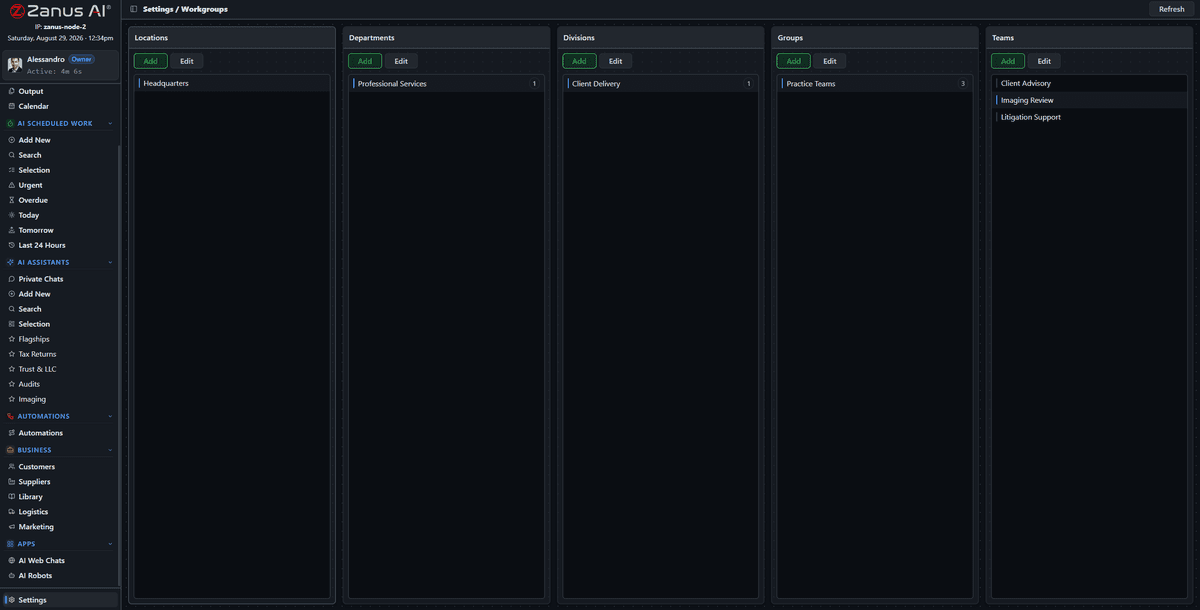
Workgroups map divisions, service centers and crews — access shaped to the org chart, enforced server-side.
What it does
The server redacts what a role cannot see — a contractor sees their work packet, not the network; a CSR sees the account, not the infrastructure documentation.
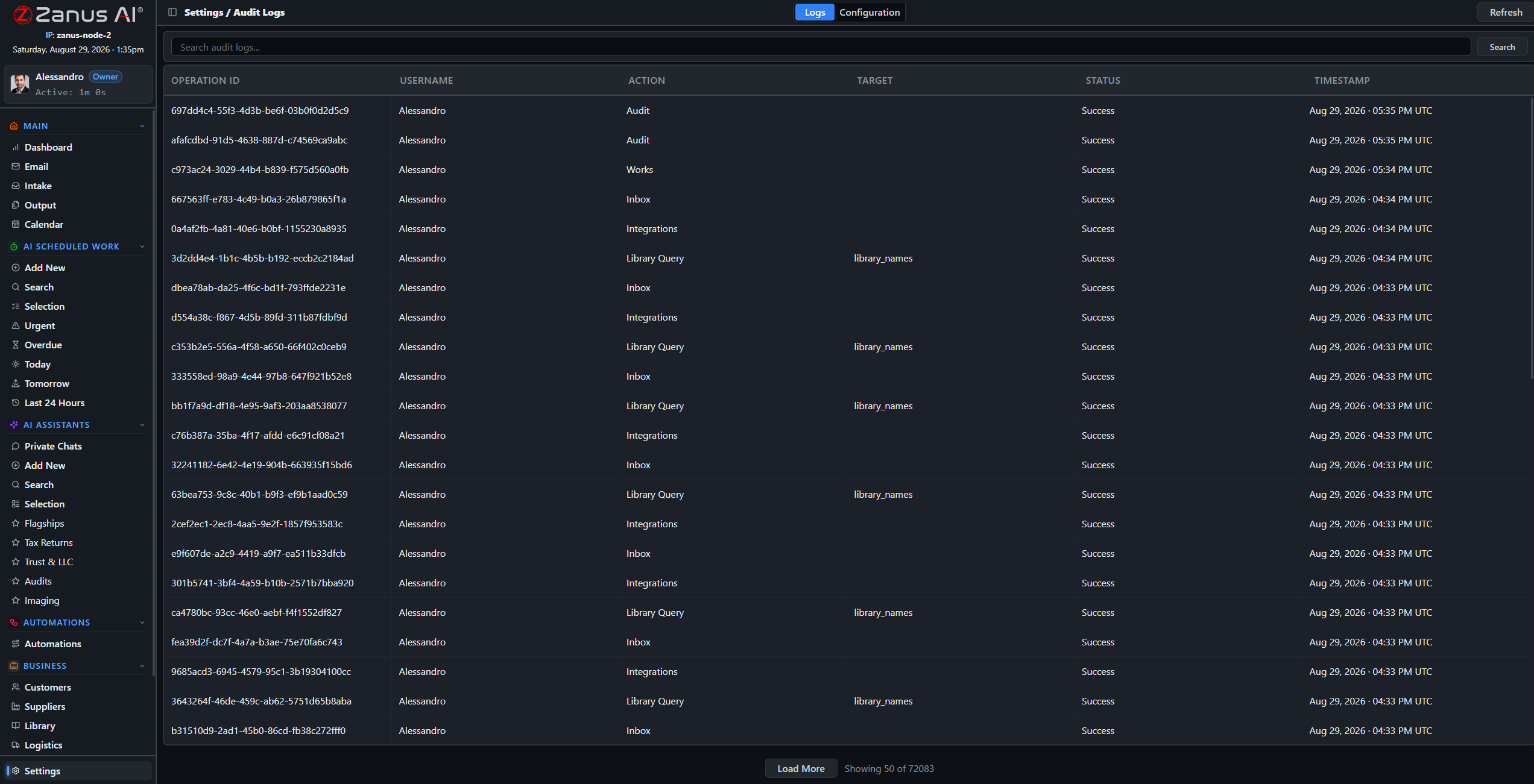
A searchable log of every audited action: who opened the one-line, who changed the procedure, when — personnel-access evidence ready in minutes, not weeks.
The identical OS runs on hardware you own inside your perimeter: air-gap capable, USB updates, no recurring fees — for the documentation that must never touch the internet.
The audit that takes minutes, not weeks
When the question comes — from a regulator, an internal auditor or your own CIP compliance lead — the answer is a search away: access records, document trails, update history, all in one place, with pre-update snapshots to prove what changed and when.
- Searchable audit trail with configurable categories
- Automatic pre-update snapshots with rollback
- USB updates for air-gapped deployments
Questions, answered
Where does our grid documentation live?
In your isolated tenant — never training outside models — or fully on-premises inside your perimeter, physically incapable of internet exposure.
How does this fit CIP requirements?
The architecture is critical-infrastructure-conscious: isolation, role-based access, redaction, audit, air gap. Specific applicability is reviewed with your compliance lead during onboarding — bring them to the demo.
See it working on YOUR utility — the demo IS the product.
ZANUS AI FOR ENERGY & UTILITIES — LIVE DEMO
Do not watch a video.
Talk to your AI.
Big vendors show utility demos as videos behind a form. Ours is the product itself, configured for utilities: open the chat below-right and try it — report a streetlight out, ask a billing question, ask how the monthly reliability report gets drafted.
The conversation you have with us IS the demo
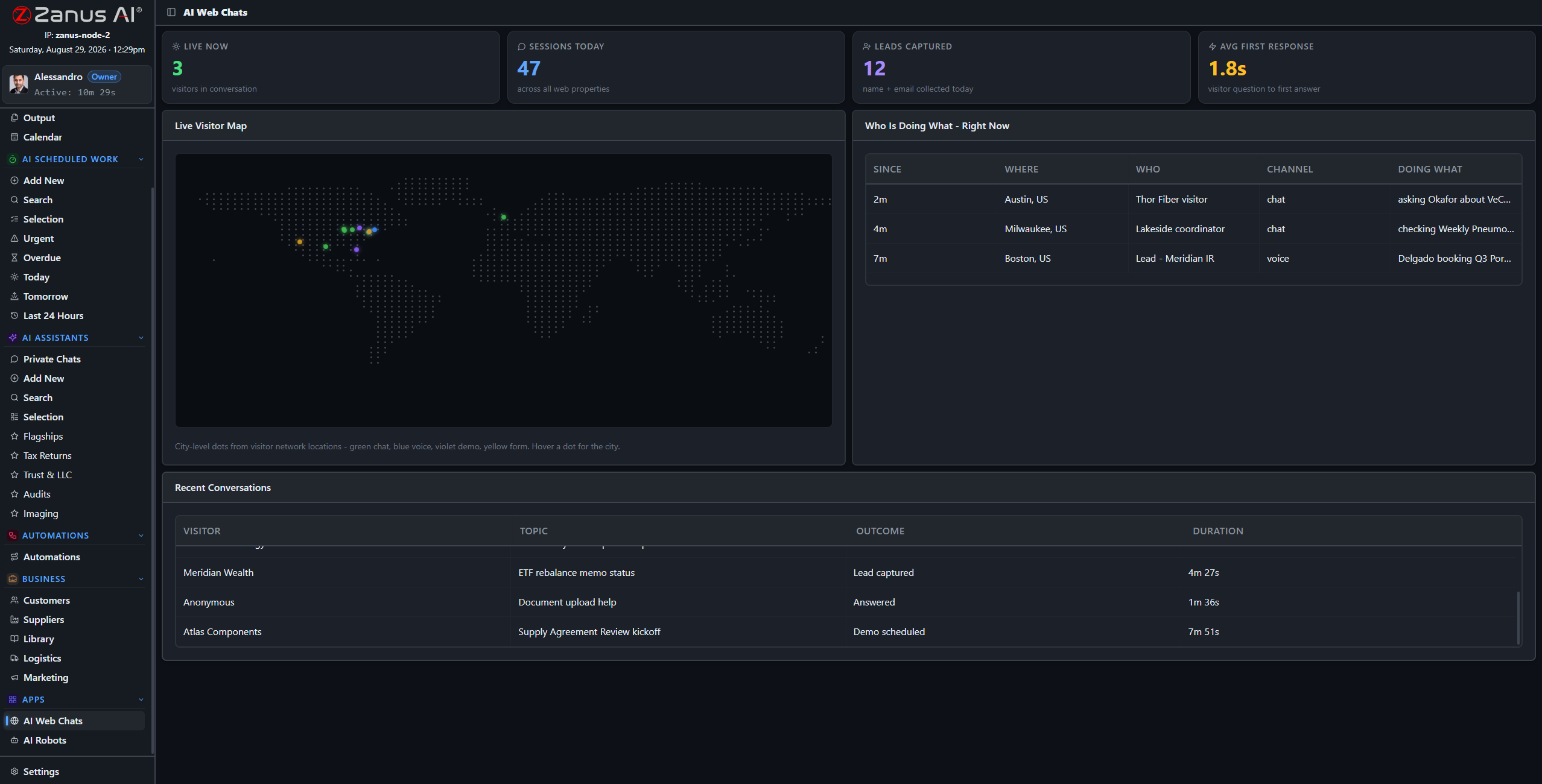
This screen is watching demos like yours happen: live conversations, outcomes, first response in seconds.
What it does
Ask the chat: “I want to report a streetlight out on Elm Street” — watch it take a structured report like your best CSR on a quiet day.
Ask: “how would you draft the monthly reliability report?” — it walks the workflow it would run in your tenant, grounded, cited, sign-off included.
The full demo loads a utility tenant with sample records: reliability reporting, procedure answers, outage notices — your operation’s world, working.
Or pick your exact business
Every link below is a full live-demo page for that specific business — its vocabulary, its calls, its booking rules.
Two minutes to your inbox
Request the demo and the interactive utility demo arrives in about two minutes — no sales call, no calendar dance. Watch it, interrupt it with questions, and book the human conversation when YOU are ready.
- Interactive demo, utility-configured
- Ask questions mid-demo — it answers and resumes
- In your inbox in ~2 minutes, free

Questions, answered
Is the demo really the product?
Yes — the same AI, configured with a sample utility tenant. What you see is what your team gets, with your documentation instead of the samples.
See it working on YOUR utility — the demo IS the product.
Sharing with a colleague? 📄 Get the PDF · ✉️ Email this page ·