ZANUS AI FOR RISK ASSESSMENT & VISUAL INSPECTION — OVERVIEW
You fly the drone. The report writes itself.
Client calls answered and inspections booked while the crew is on a roof. Drone and camera footage ingested, conditions scored, hazards flagged, and the inspection report drafted in YOUR template with the reasoning documented — reviewed and signed by your inspector.
Private tenant or your own server · your whole team · footage stays in your custody
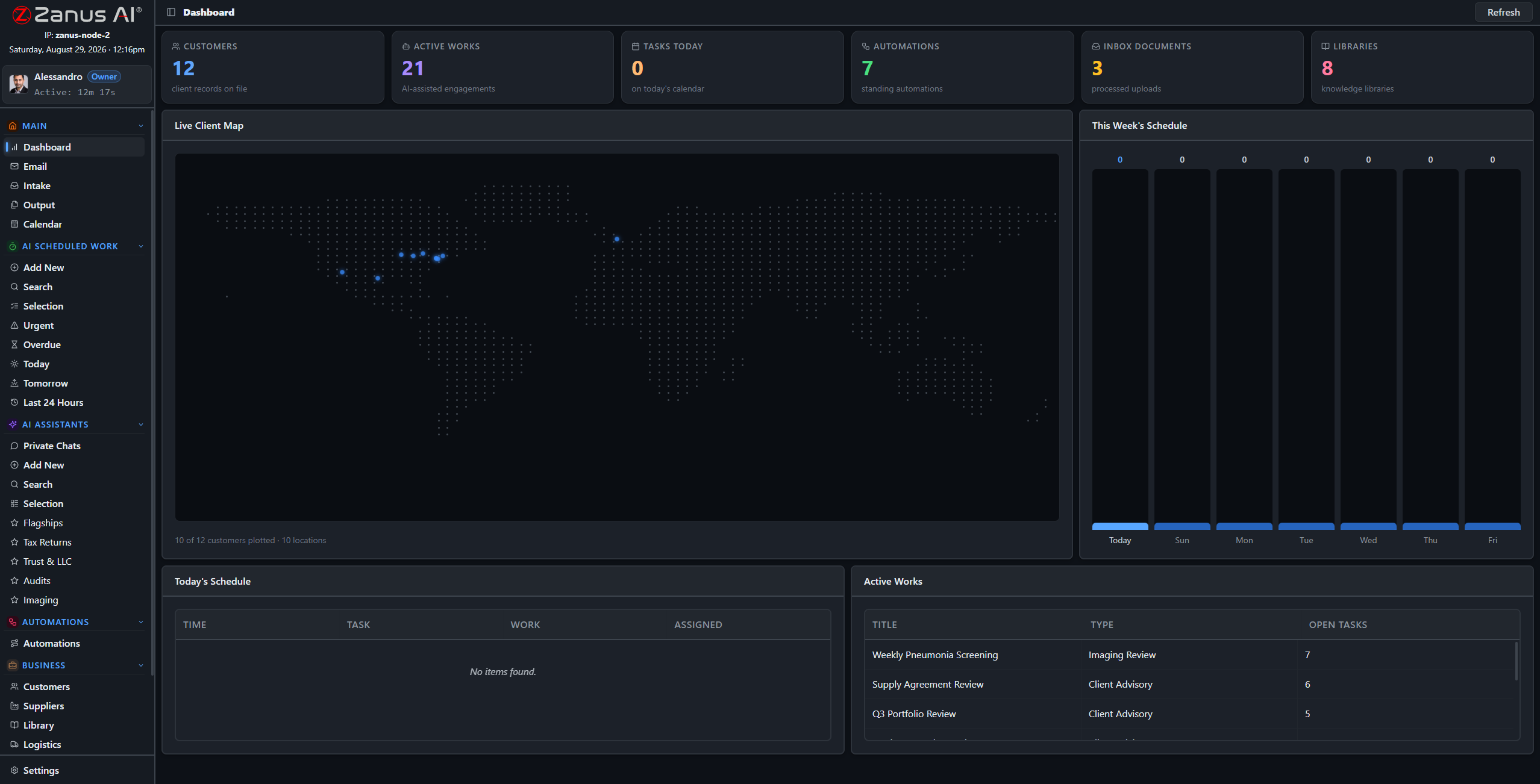
A real deployment view: client records, post-flight reviews scheduled, reports awaiting inspector sign-off.
What it does
Drone flights, camera walkthroughs and photo sets are ingested and analyzed — the AI works the imagery so the inspector starts from findings, not from four hours of raw video.
Roof, facade and structural conditions scored with the reasoning documented — every score traceable to the frames and the rubric behind it, defensible in front of a client.
The inspection report drafts itself from your own templates: findings, imagery, scores, recommendations — the inspector reviews, adjusts and signs instead of typing until midnight.
Front office: booked inspections, not voicemail tag
Property managers, adjusters and owners call to book, ask for status or request a quote. The Zanus front office answers on your menu, in your voices, quotes from your real price list, books into real crew calendars and collects the site details — 24/7, in up to 40 languages.
- AI phone on your lines and voices, 24/7
- Inspections booked into real crew calendars
- Quotes from your actual price list, with payable links
- See the Front Office for inspection →

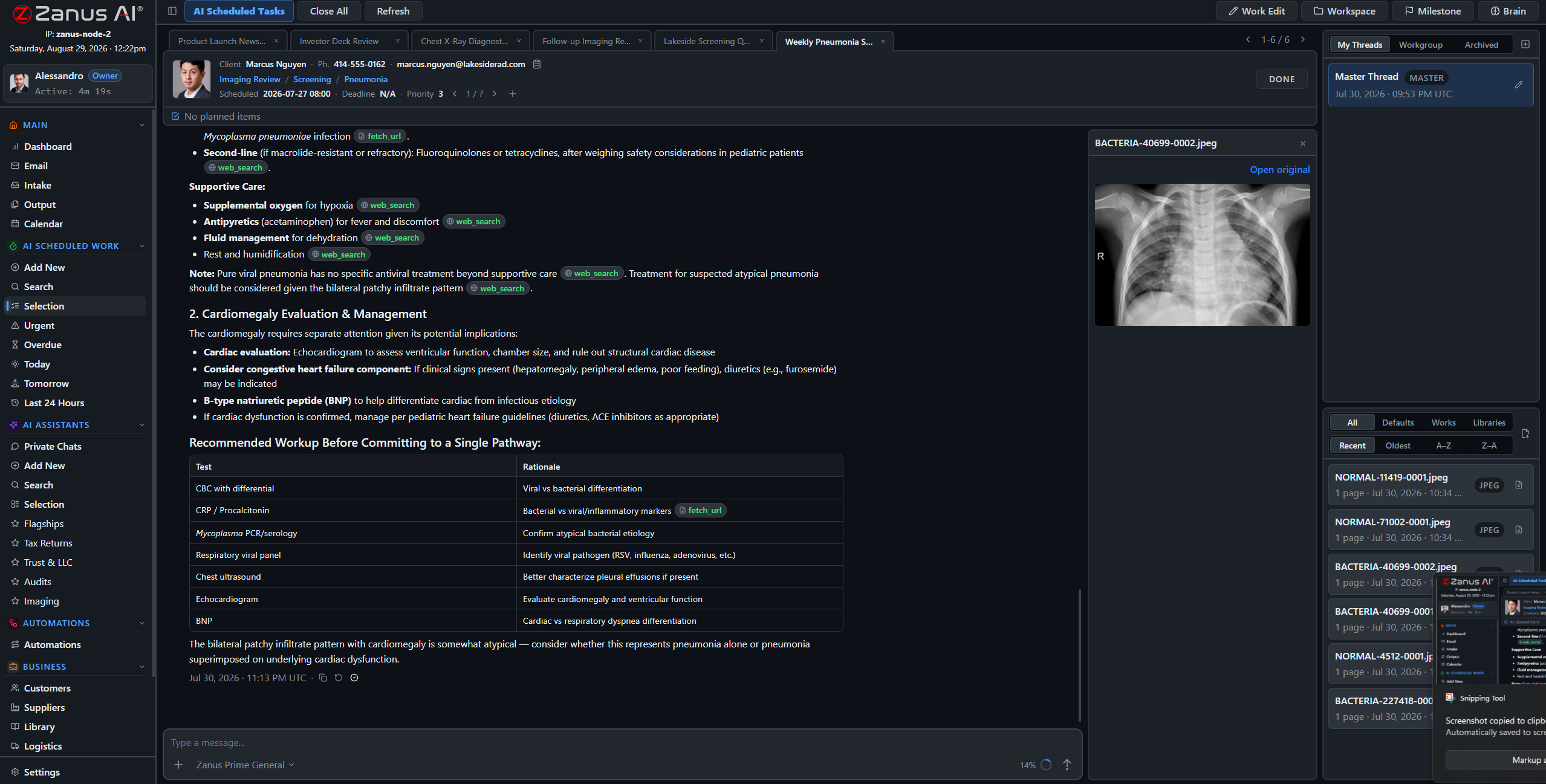
Back office: footage becomes findings
The crew lands, uploads the flight, and by next morning the review session is waiting: conditions scored, hazards flagged, the report drafted in your template with every finding tied to its frames — the inspector’s job becomes judgment, not transcription.
- Footage and photos ingested and analyzed
- Condition scoring with documented reasoning
- Report drafted in YOUR template, awaiting sign-off
- See the Back Office for inspection →
When volume outgrows the cloud
High-volume operations — post-storm surges, portfolio-wide assessments, utility corridors — graduate to Zanus hardware in their own building: the On-Prem Tokens Server for processing muscle, the Private On-Premises AI for full custody, owned outright.
- On-Prem Tokens Server for high-volume processing
- Private On-Premises AI: owned, air-gap capable, no recurring fees
- Explore the AI Servers →

Questions, answered
Does the AI certify the inspection?
No. The AI ingests, scores and drafts — with the reasoning documented. The inspection is reviewed, corrected where needed and signed by your inspector or engineer. Licensed judgment stays human.
What footage can it take?
Drone video, camera walkthroughs, photo sets and scanned prior reports — the ingestion pipeline handles documents, images and media, and files them to the right site record.
We run several crews — one system?
Yes: one tenant with workgroups per crew or region, your whole team at a flat price. Pilots, inspectors and office staff each see exactly what their role allows.
See it working on YOUR operation — the demo IS the product.
ZANUS AI FOR RISK ASSESSMENT & VISUAL INSPECTION — FRONT OFFICE
Booked inspections, not voicemail tag.
When a storm rolls through, every property manager in the county calls at once — and the jobs go to whoever answers. The Zanus front office answers on your menu, in your voices: quotes, bookings, status updates — 24/7, in up to 40 languages, while your crews stay on site.
Private tenant or your own server · your whole team · footage stays in your custody

Calls, chats, bookings and follow-ups — one dashboard your office manager can read.
What it does
Forty calls in a morning after a hail event. Every one answered in one ring, qualified, quoted from your real prices and booked — the surge becomes a schedule instead of a voicemail box.
Address, access, roof type, hazards on site: collected by form at booking, filed to the job record — the pilot arrives briefed, not guessing.
Status questions answered from your approved records, instantly and identically every time — without pulling the office off the reports in progress.
From first call to scheduled flight, hands-free
An adjuster calls needing a roof assessment this week; the AI answers, quotes from your price list, offers real crew availability, books it and sends the confirmation with the access form — while your team keeps flying.
- Real calendar sync with crews — no double-booking
- Quotes from your actual price list, with payable links
- Access and site forms collected before the visit
- Unusual or urgent requests escalated to you, by your rules


The web side books too
Website chat grounded in your services and coverage area, web forms for inspection requests worked in minutes, every conversation logged with a transcript — the request that lands Sunday night is on Monday’s schedule.
- Grounded chat on your site, up to 40 languages
- Inspection-request forms answered in minutes, not days
- Transcripts of every conversation, searchable
- See the full Front Office tour →
Questions, answered
Do we keep our phone numbers?
Yes. Your numbers stay; calls route AI-first, staff-first, or any mix — configured per line and per hour, surge rules for storm season if you like.
Can it quote complex jobs?
It quotes from your real price list by your rules, and escalates anything outside them — a portfolio assessment or an unusual structure goes to you, with the details already collected.
What languages?
Up to 40 — clients and crews are each answered in their own language, with your company’s approved information.
See it working on YOUR operation — the demo IS the product.
ZANUS AI FOR RISK ASSESSMENT & VISUAL INSPECTION — BACK OFFICE
Footage becomes findings.
The drone made capture fast — then dumped four hours of video on the inspector’s desk. The Zanus back office ingests the footage, scores the conditions, flags the hazards and drafts the report in your own template, with the reasoning documented — sign-off stays with your inspector.
Private tenant or your own server · your whole team · footage stays in your custody
A real session: roof section scored, membrane damage flagged, reasoning documented, inspector decides.
What it does
Flights, walkthroughs and photo sets filed to the right site record on upload — the archive stays organized at the speed the crews capture.
Roof, facade and structural condition scores come with the reasoning documented and the frames referenced — when the client asks “why a 3?”, the answer is on the record.
Every AI-drafted report lands in Output awaiting review. Nothing carrying your company’s name ships without your inspector’s decision — and where an engineer must stamp, the engineer stamps.
The overnight review session
Upload the flight at 5 PM; by morning the session is waiting: sections scored against your rubric, ponding and membrane damage flagged, hazards called out, every finding tied to its frames — and the draft report assembled in your template, ready for the inspector’s red pen.
- Condition scoring against YOUR rubric
- Hazards flagged with the imagery referenced
- Draft report in Output before the day starts


Your template, your standard, every time
The report the client receives is YOUR report: your sections, your scoring scale, your letterhead — generated from your own templates, so the tenth report of a surge week reads as carefully as the first.
- Automated reports from your own templates
- Findings, scores and imagery placed automatically
- Approval workflow before anything reaches a client
Questions, answered
Can the AI miss a hazard?
It is support, not certification: it flags what it finds with the reasoning shown, and the inspector reviews the footage and the findings before anything ships. The workflow is built so the human check is the last step, always.
What about prior reports?
Load them: past reports, structural assessments and photo archives become part of the site’s record, so every new inspection is drafted with the history in view.
YOU MIGHT ALSO LIKE
The Back Office executes. Who answers the phone?
Front Office AI picks up every call and chat — books, quotes, follows up, 24/7 in 40 languages. Watch it run a business like yours, live.
See it working on YOUR operation — the demo IS the product.
ZANUS AI FOR RISK ASSESSMENT & VISUAL INSPECTION — REPORTS & FOOTAGE
Every site you ever flew, searchable.
Inspection reports, structural assessments, drone footage, photo sets, code references, prior client correspondence — loaded into curated libraries the AI reads from. Ask in plain language; get the answer with the source cited, at the permission level of whoever asks.
Private tenant or your own server · your whole team · footage stays in your custody
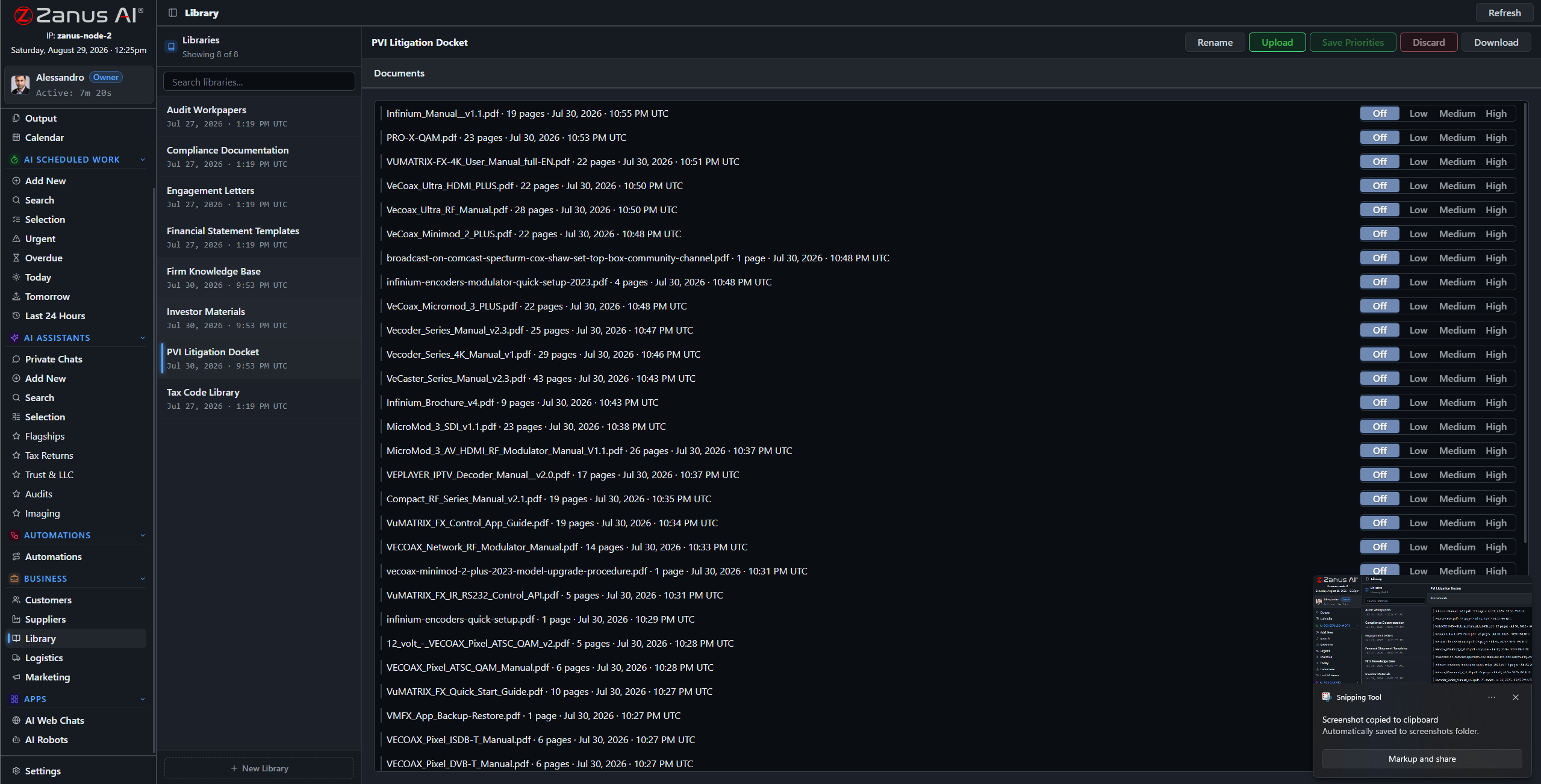
Libraries: signed reports outrank drafts, current code references outrank old ones — you set the order.
What it does
PDF reports, scanned assessments, photo sets, drone video and audio notes — the ingestion pipeline turns the whole archive into queryable knowledge.
No source in your library, no claim: the AI cites the report, the frames, the code reference — or says it cannot answer. An assessment business runs on defensible statements.
The client-facing coordinator asks about delivery dates; the engineer asks about the structural findings: each gets answers scoped to their role, enforced server-side.
“What did the 2023 report say about the east facade?”
Answered in seconds with the report section and the photos attached — instead of an afternoon in old project folders. The same for “have we flown this property before?” and “which sites scored below 3 last year?” The operation’s memory becomes an asset you can sell: re-inspections quote themselves.
- Plain-language questions across every site and season
- Report sections and imagery attached to answers
- Priority order: signed reports always outrank drafts

Questions, answered
Who can see client footage?
Only roles you authorize. Permissions reach the field level and the server redacts what a user cannot see — one client’s portfolio is never visible to work on another’s.
Does our footage train outside models?
Never. Your tenant is isolated; your footage and findings are yours alone — and the on-premises option keeps them physically inside your building.
See it working on YOUR operation — the demo IS the product.
ZANUS AI FOR RISK ASSESSMENT & VISUAL INSPECTION — AI WORKFORCE
A report writer on every flight.
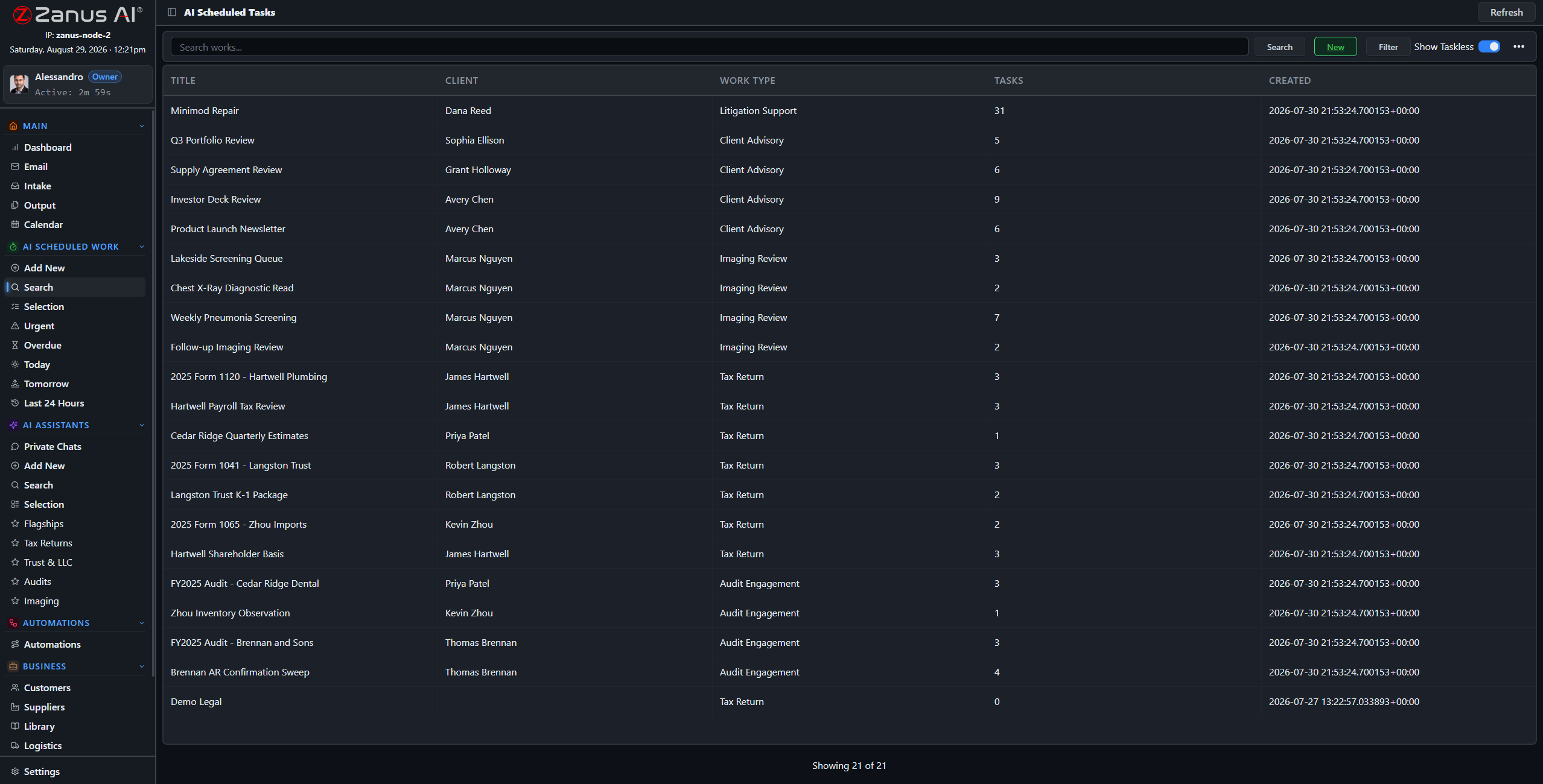
Assign work to the AI the way you assign it to staff: type, footage, deadline, priority. Post-flight reviews, condition-score summaries, re-inspection lists — executed on schedule, with reasoning documented, under review.
Private tenant or your own server · your whole team · footage stays in your custody
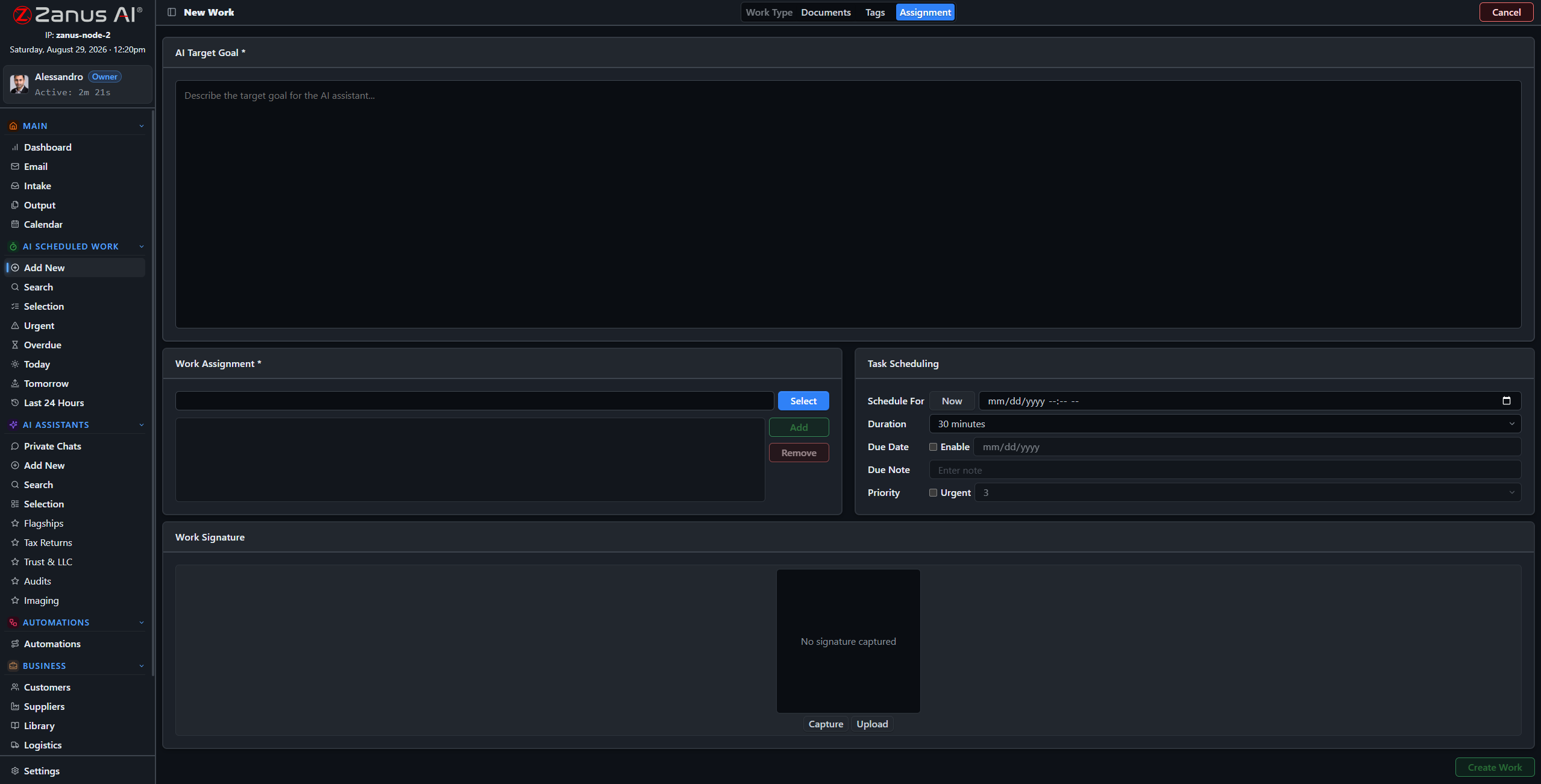
Four steps: work type, footage and libraries, tags, schedule — the AI takes it from there.
What it does
Post-flight review, condition-score summary, hazard sweep, re-inspection due list: work types molded to your practice, with default rubrics and libraries per type.
The AI’s workload is managed like the crew’s: one-click views show what is urgent, late, today and tomorrow — a client deadline never slips silently.
Every work is a full session: reasoning streamed, frames and rubrics cited, milestones tracked, linked to the site and the calendar.
Friday, 4 PM: the week’s scores are summarized
Set “Weekly Condition-Score Summary” once: every Friday the AI compiles the week’s inspections, tallies scores by client and portfolio, flags the sites that dropped since last visit — and files the summary, cited, before the week closes.
- Recurring schedules for periodic review work
- Score movements flagged with the reports cited
- Summary in Output, awaiting review
Questions, answered
Can we supervise mid-work?
Yes — open any session, read the reasoning, redirect it, or stop it. The AI works like staff: visible, accountable, interruptible.
What volume can it handle?
It does not get tired: the constraint is your review capacity, not the AI’s — and high-volume operations add the On-Prem Tokens Server for processing muscle.
See it working on YOUR operation — the demo IS the product.
ZANUS AI FOR RISK ASSESSMENT & VISUAL INSPECTION — INSPECTION SOPS
Scoring rubrics that score consistently.
An assessment business is only as good as its consistency: the same defect must score the same on Tuesday as on Friday, crew A as crew B. In Zanus, rubrics, flight checklists and safety procedures are living documents: answerable in chat, attached to work, latest version always on top.
Private tenant or your own server · your whole team · footage stays in your custody
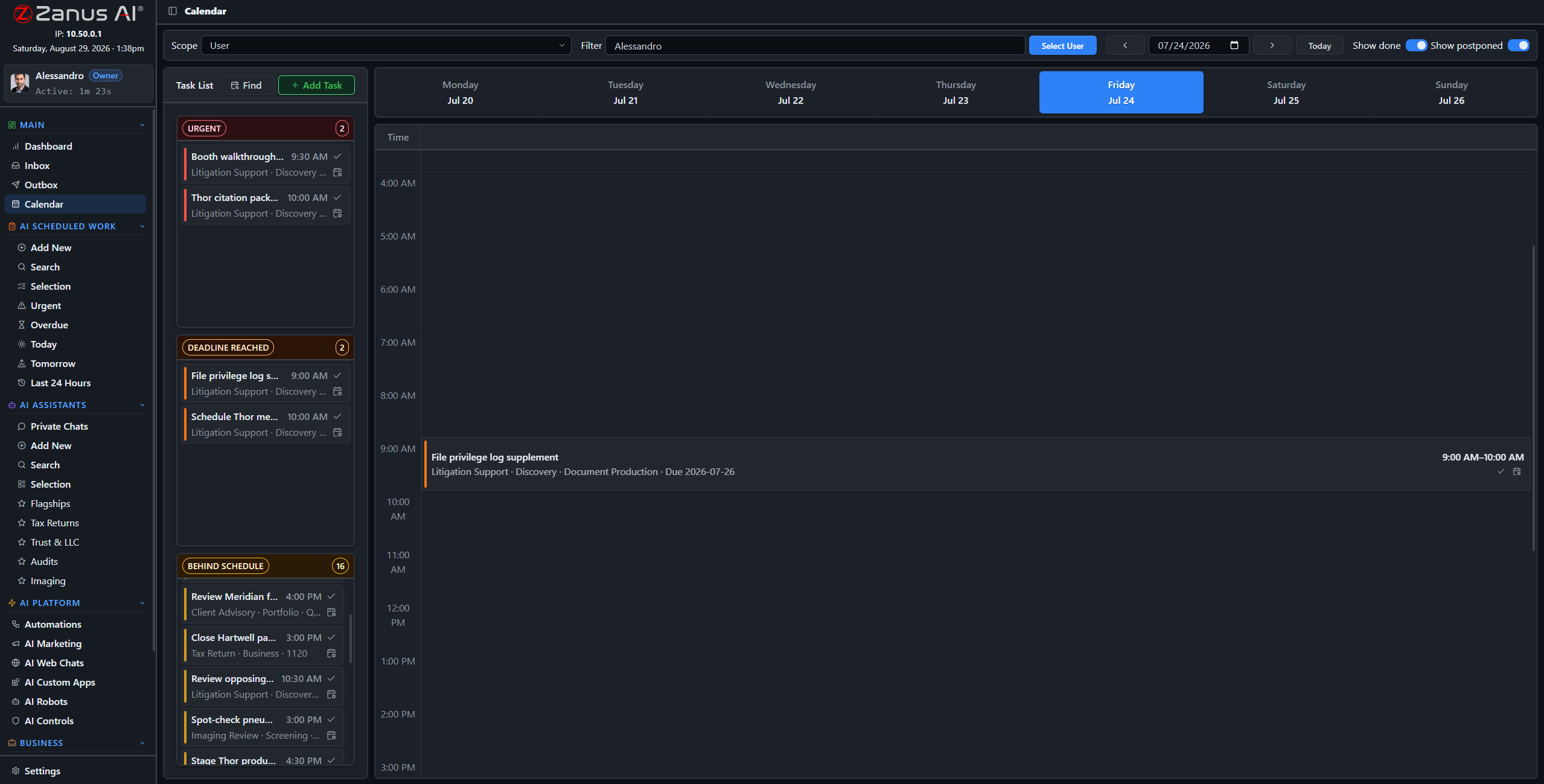
Procedure upkeep, scheduled like inspection work: rubric reviews and checklist updates on the calendar.
What it does
Scoring rubrics, pre-flight checklists, site-safety procedures, reporting standards: one library, current versions on top, superseded drafts outranked.
“What is the minimum standoff for this structure type?” — answered in seconds with the procedure attached, to any authorized pilot, on any device, on site.
Work types carry their default rubrics: the AI scoring a roof reads from the current scoring standard — by construction, which is exactly why the scores stay consistent.
Rubric upkeep, scheduled like inspection work
Quarterly rubric reviews, checklist updates when equipment changes, change summaries for the crew briefing: assign them once as recurring AI work and the standards never drift quietly out of date.
- Recurring review works with deadlines
- Change summaries drafted for crew briefings
- Every review on the audit record
Questions, answered
How do rubric updates roll out?
Upload the new version, set it on top: from that moment every answer and every scoring work cites the new rubric. Old versions remain archived — so you can always show which standard scored which report.
See it working on YOUR operation — the demo IS the product.
ZANUS AI FOR RISK ASSESSMENT & VISUAL INSPECTION — TEAM TRAINING
New inspectors, calibrated fast.
A new inspector’s first months are calibration: learning YOUR rubric, YOUR report standard, YOUR way of calling a defect. New hires learn your standards from the AI, and every pilot and inspector has an assistant that answers “how do we…?” instantly.
Private tenant or your own server · your whole team · footage stays in your custody

Training lives inside the software: the AI walks each new hire through the operation’s own standards.
What it does
New pilots learn your flight checklists and safety procedures; new inspectors learn your rubrics and report standards — guided training, productive in days.
“How do we score hail spatter versus impact fracture?” — asked to the assistant, answered from the rubric with examples, without interrupting the senior inspector mid-report.
Private chats work on any device with a login — the how-to knowledge travels to the site, the truck and the office.

Calibration that does not depend on one mentor
The tenth “is this a 2 or a 3?” gets the same patient, rubric-sourced answer as the first — with the reference examples attached. Training stays current automatically, because the assistant reads from the same living rubrics the scoring works use.
- Answers cite the current rubric and standard
- Personal preset assistants per role
- Training progress visible to managers
Questions, answered
Does training content go stale?
No — the assistant answers from the live libraries. Update the rubric once and every future answer, and every future scoring work, updates with it.
See it working on YOUR operation — the demo IS the product.
ZANUS AI FOR RISK ASSESSMENT & VISUAL INSPECTION — AUTOMATIONS
Upload to delivery, drawn once.
Describe the job in plain words — “when a flight is uploaded, file it to the site, open the review and queue the draft report” — and it becomes connected blocks on a canvas, running on its own, with every run visible.
Private tenant or your own server · your whole team · footage stays in your custody
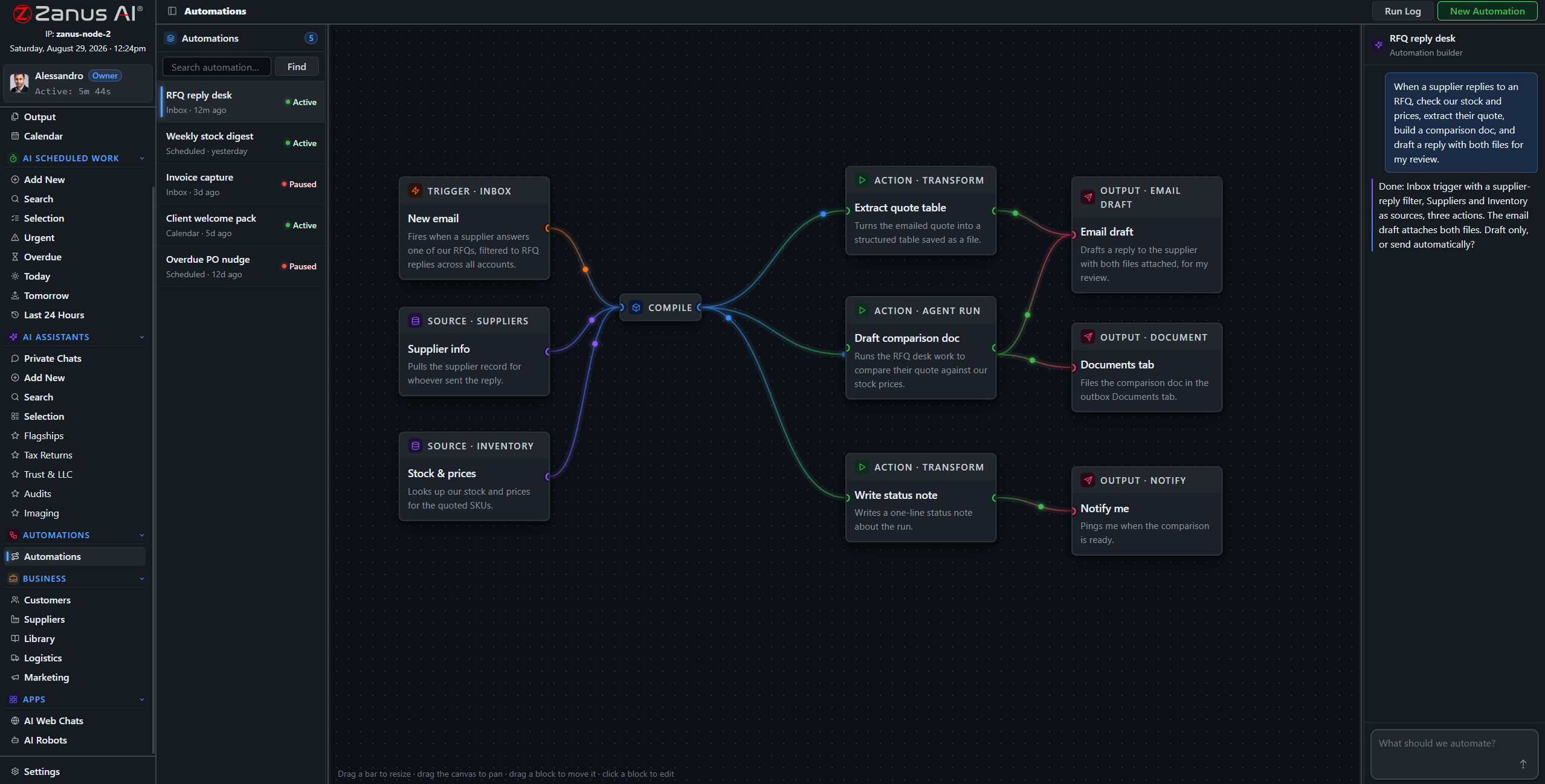
A real flow: upload trigger, site sources, AI analysis, three outputs — drawn from a description.
What it does
A flight lands in the system; the AI files it to the site record, opens the analysis session and queues the draft report — before the crew is back on the highway.
The inspector signs off; the AI drafts the delivery email with the report attached and the invoice queued — sent by your rules, logged on the record.
Sites due for annual review trigger a drafted reminder to the client — the recurring revenue in your archive stops depending on someone remembering.
When something fails, you SEE it
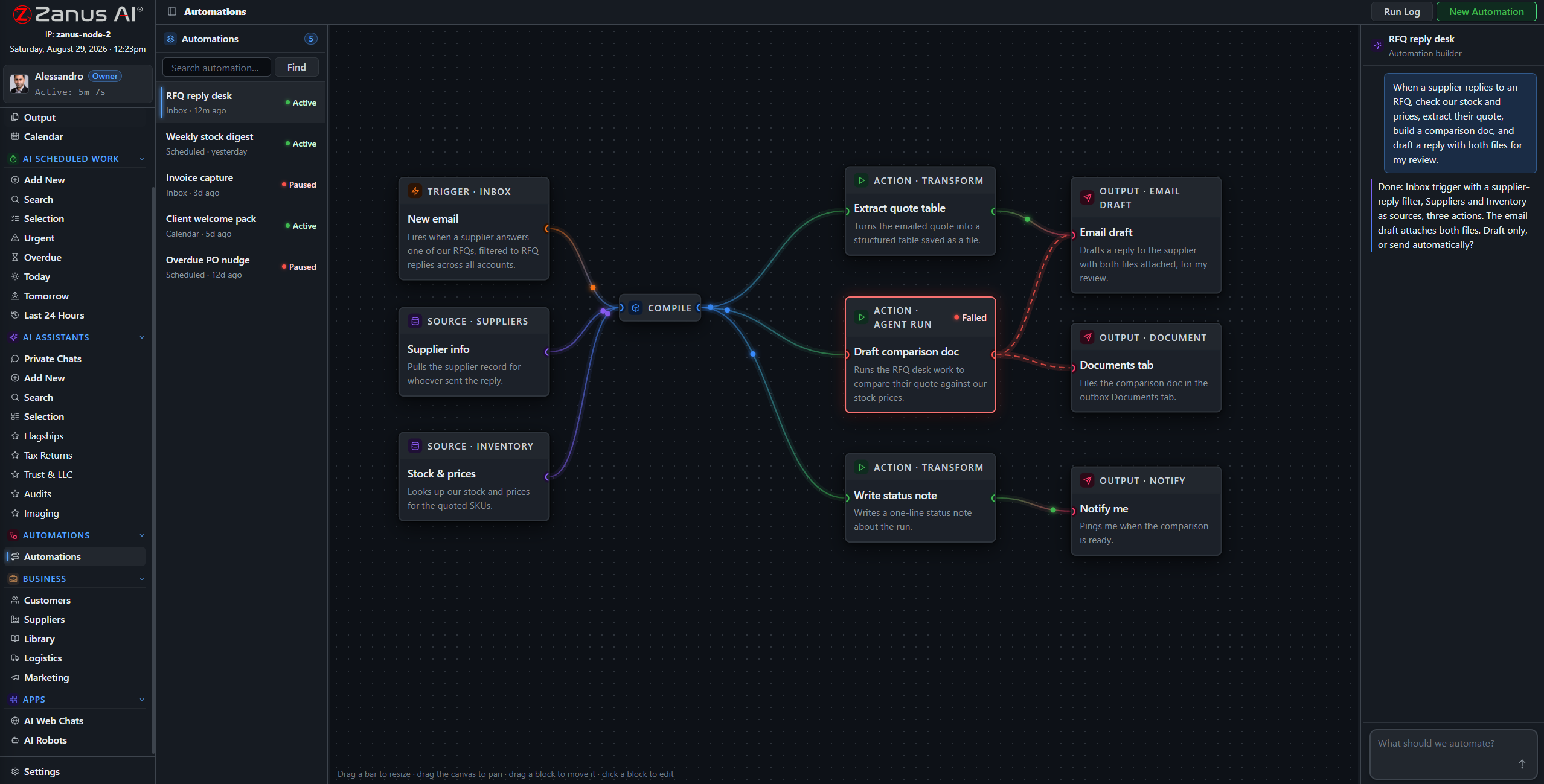
Run states live on the flow: green success, red failure on the exact block. A silently failed intake flow means a client waiting on a report nobody is writing — here, nothing fails silently.
- Run log per automation
- One-click retry on failures
- Finished documents in Output, statused
Questions, answered
Who approves outgoing reports?
Your rules — and for reports the sensible rule is absolute: every report is signed by the inspector before the delivery flow may touch it. Reminders and confirmations can auto-send if you designate them safe.
See it working on YOUR operation — the demo IS the product.
ZANUS AI FOR RISK ASSESSMENT & VISUAL INSPECTION — CLIENT REPORTING
Reports delivered. Clients retained.
Report delivery packages, re-inspection reminders, post-storm outreach to past clients, portfolio summaries for property managers — drafted by the AI from your own records, in the client’s language, queued for your approval. The follow-up work that builds a book of business, done.
Private tenant or your own server · your whole team · footage stays in your custody
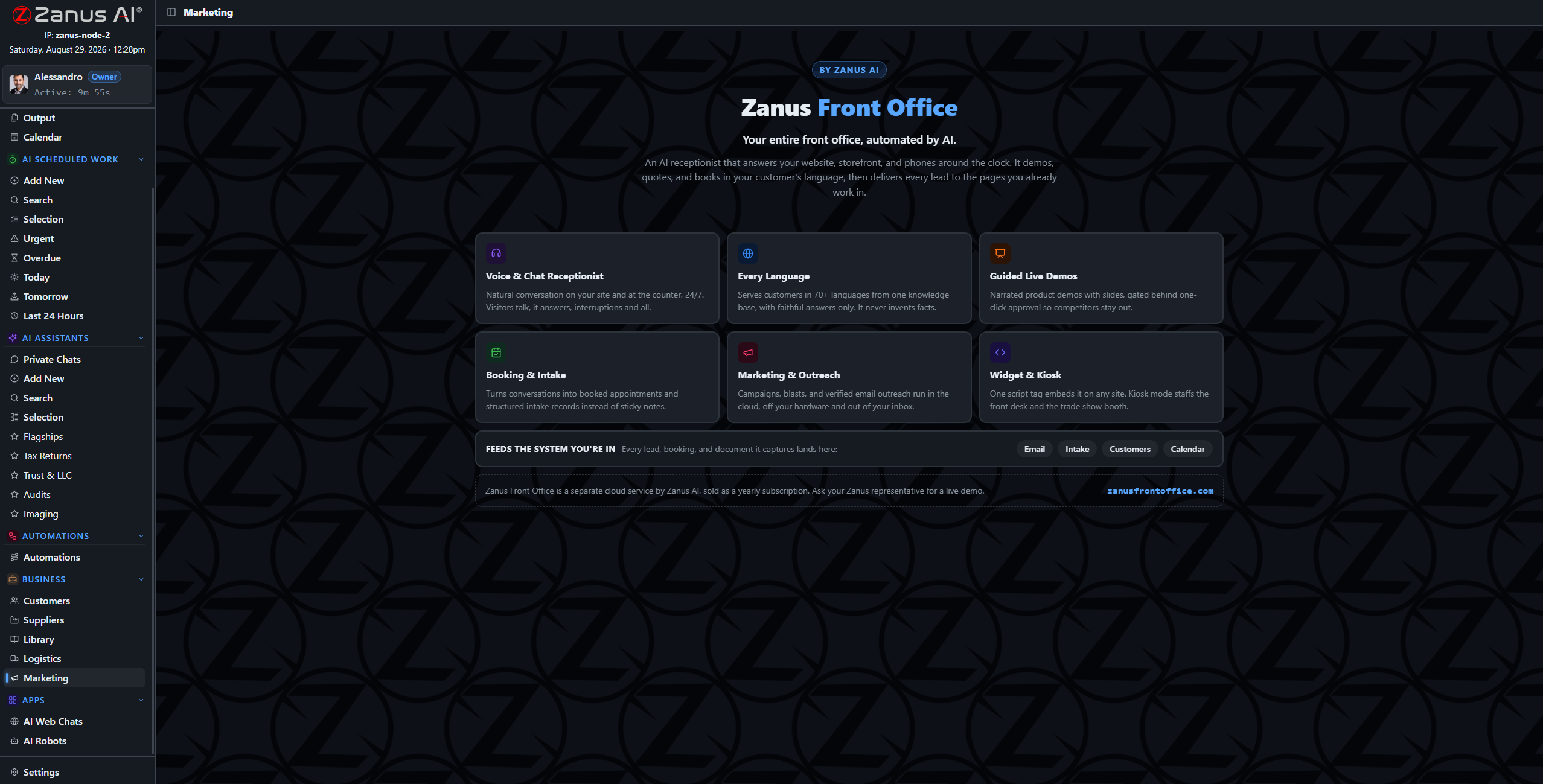
Campaigns and sequences drafted from the records — deliveries, reminders, campaigns — awaiting approval.
What it does
Clients with sites due for annual review, past clients in the hail path, property managers with declining scores: audiences built from your own site records — no list exports.
Deliveries and reminders written the way clients actually read them — plain, professional, in their language, with your company’s voice.
Opt-outs and contact preferences are enforced by the system, not by memory. Every send is on the record.
The storm map becomes a campaign
A hail event crosses your service area; “reach every past client with a roof we have flown in that corridor” becomes a drafted, scheduled campaign in minutes — audience, content and sending all inside your tenant, nothing exported to a mailing platform.
- Audiences from your own site history — private by architecture
- Campaigns and sequences drafted for review
- Responses booked straight into crew calendars

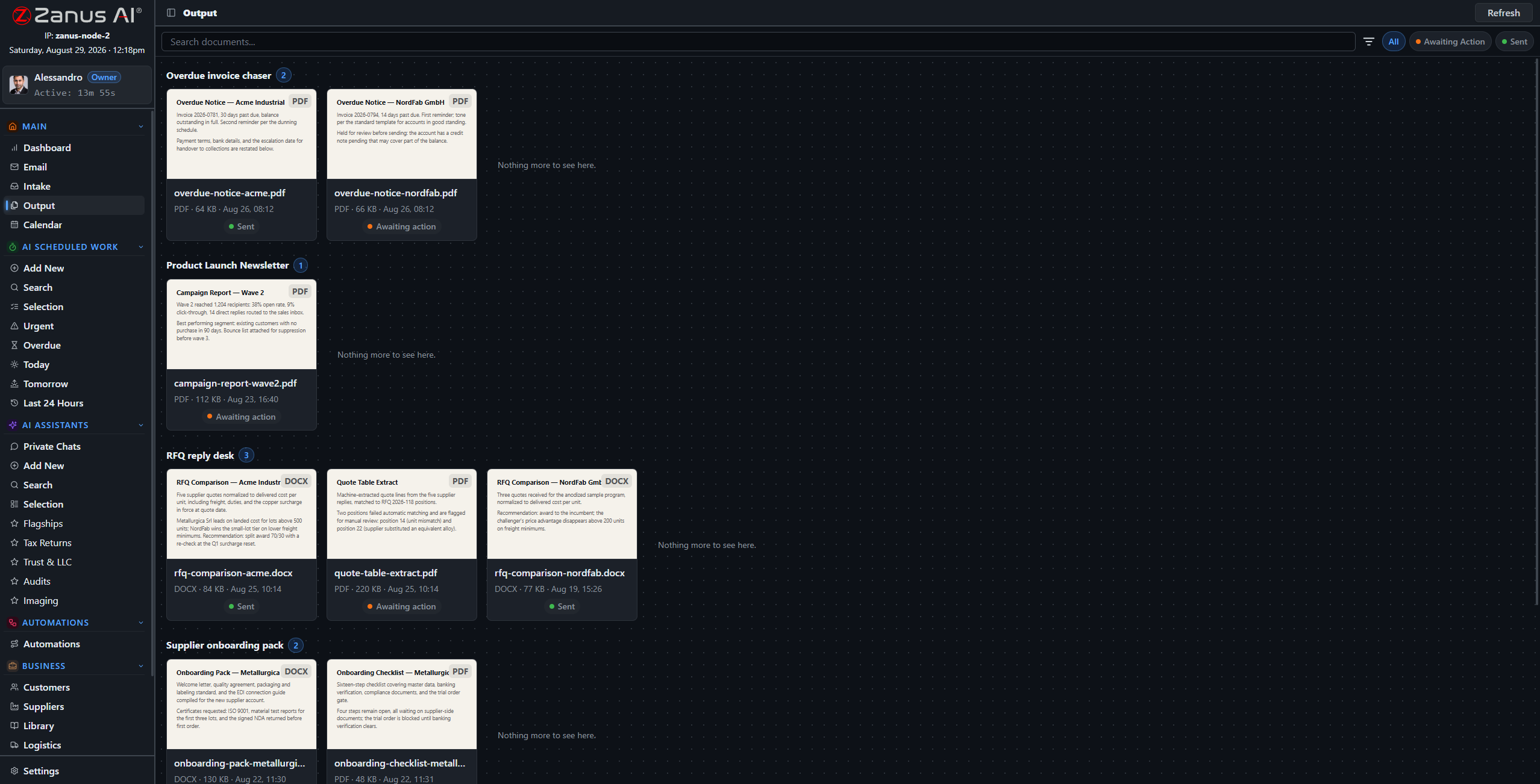
Approval first, always
Every outbound client communication lands in the approval queue unless you designate the category as auto-send. Reports especially: nothing carrying a finding leaves without the inspector’s sign-off.
- Approval workflow per communication type
- Full history of what was sent to whom
- Results tracked: bookings, replies, renewals
Questions, answered
Can it send the report automatically?
Only after sign-off: the inspector approves the report, then the delivery flow sends it with the cover note and logs the delivery. The signature gate is not optional.
Does our client list leave the system?
No. Audiences, drafting and sending all run inside your isolated tenant — your book of business never feeds a third-party marketing platform.
See it working on YOUR operation — the demo IS the product.
ZANUS AI FOR RISK ASSESSMENT & VISUAL INSPECTION — INSPECTION TOOLS & INTEGRATIONS
Your flight stack stays. The findings flow.
Flight planning in one tool, photos in another, the claim in the adjuster’s system — and none of them writes the report. Zanus becomes the system of work on top: connectors sync data both ways, the intake pipeline files what arrives, and finished reports flow back where they belong. No rip and replace.
Private tenant or your own server · your whole team · footage stays in your custody

No rip and replace: flight planning, photo management and claims systems stay — the AI layer connects to them.
What it does
Clients, sites and documents mapped field by field, with a dry-run preview before anything writes — push, pull or two-way, your choice.
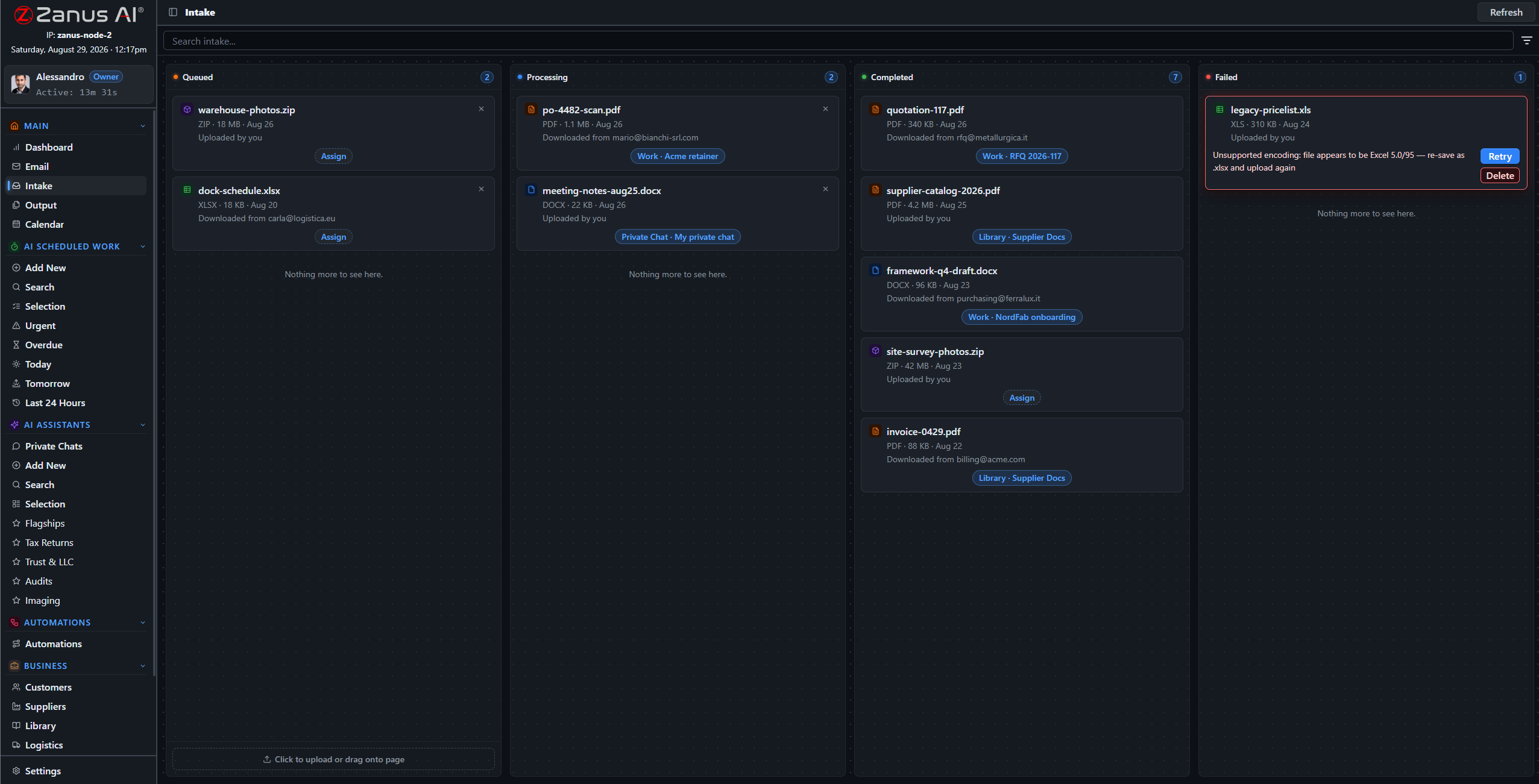
Flight exports, photo sets and prior reports route through the intake pipeline to the right site record — organized on arrival, not next winter.
A full API for whatever else the operation runs: client portals, claims platforms, custom dashboards — data in, results out, under scoped keys.
One question across all your systems
The flight log in one tool, the photos in another, the report in the library — and the AI reads across all of it. “What is outstanding on this property?” becomes one question with one grounded answer.
- Field mapping with dry-run preview
- Each system stays master of its own records
- Every sync event on the audit record
- External systems appear as blocks on the automation canvas
Reports flow back where they belong
The signed report, the condition summary, the invoice: finished documents return to the claims system, the client portal or the project folder through the same connectors — after your inspector’s sign-off, never before.
- AI output filed back to the site or claim
- Approval workflow before anything writes back
- Webhooks notify your systems in real time
Questions, answered
Which flight and claims platforms do you support?
Connectors are mapped per deployment — bring your flight-planning, photo and claims tools to the demo and we walk through the exact integration path.
Does client footage pass through third parties?
No. The connectors run inside your tenant — or inside your building on the on-premises option. Footage moves directly between your systems.
See it working on YOUR operation — the demo IS the product.
ZANUS AI FOR RISK ASSESSMENT & VISUAL INSPECTION — COMPLIANCE
Custody you can testify to.
Inspection findings end up in claims, disputes and sometimes courtrooms — the footage and the reasoning behind every score must be intact, attributable and access-controlled. The architecture answers: isolated tenants, permissions to the field level, server-side redaction, a searchable audit trail, chain-of-custody-conscious handling throughout.
Private tenant or your own server · your whole team · footage stays in your custody
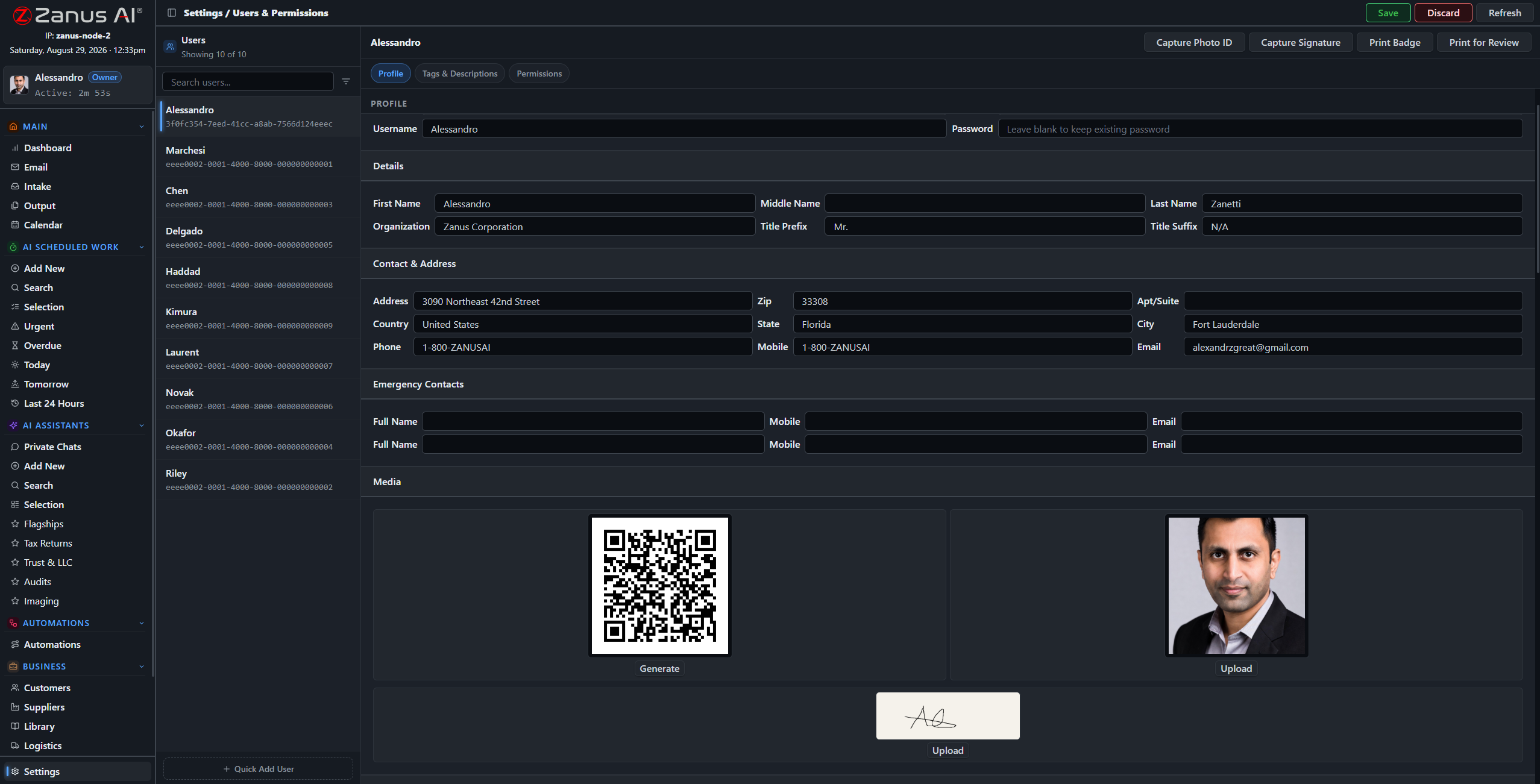
One record per user: role, tags, and granular permissions over every domain of the system.
What it does
The server redacts what a role cannot see — a crew working one portfolio never sees another client’s sites, footage or findings.
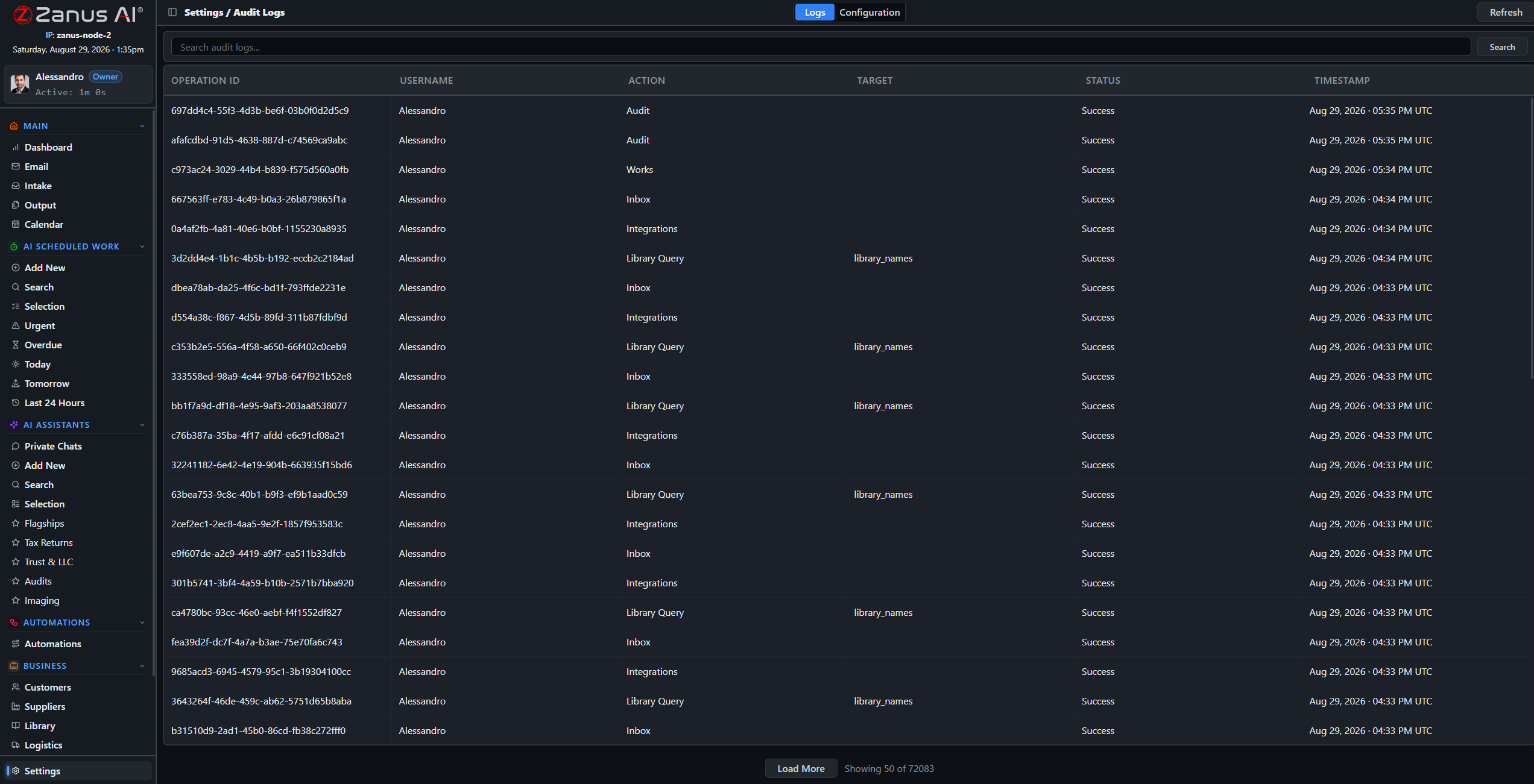
A searchable log of every audited action: who viewed which footage, who edited which finding, when — the provenance question answers itself.
Scores carry their documented reasoning, reports carry their sources, pre-update snapshots preserve every prior version — what you said and why, provable later.
When the finding is challenged
A year later, a claim disputes your score. The answer is a search away: the original footage, the rubric version in force that day, the documented reasoning, the inspector’s sign-off and every access since — assembled in minutes, not reconstructed from memory.
- Searchable audit trail
- Automatic pre-update snapshots with rollback
- Air-gap capable on-premises option for full custody
Questions, answered
Is this evidence-grade?
The handling is chain-of-custody-conscious: isolation, access control, audit trail and version snapshots are built in. Requirements for a specific legal or insurance context are reviewed with your team during onboarding — bring your counsel to the demo.
Where does the footage live?
In your isolated tenant — never training outside models — or fully on-premises on hardware you own, physically incapable of internet exposure.
See it working on YOUR operation — the demo IS the product.
ZANUS AI FOR RISK ASSESSMENT & VISUAL INSPECTION — LIVE DEMO
Skip the sales video.
Talk to the AI instead.
Big vendors show inspection demos as videos behind a lead form. Ours is the product itself, configured for risk assessment: open the chat below-right and try it — book a roof assessment, ask how condition scoring works, request a demo of the report workflow.
The conversation you have with us IS the demo
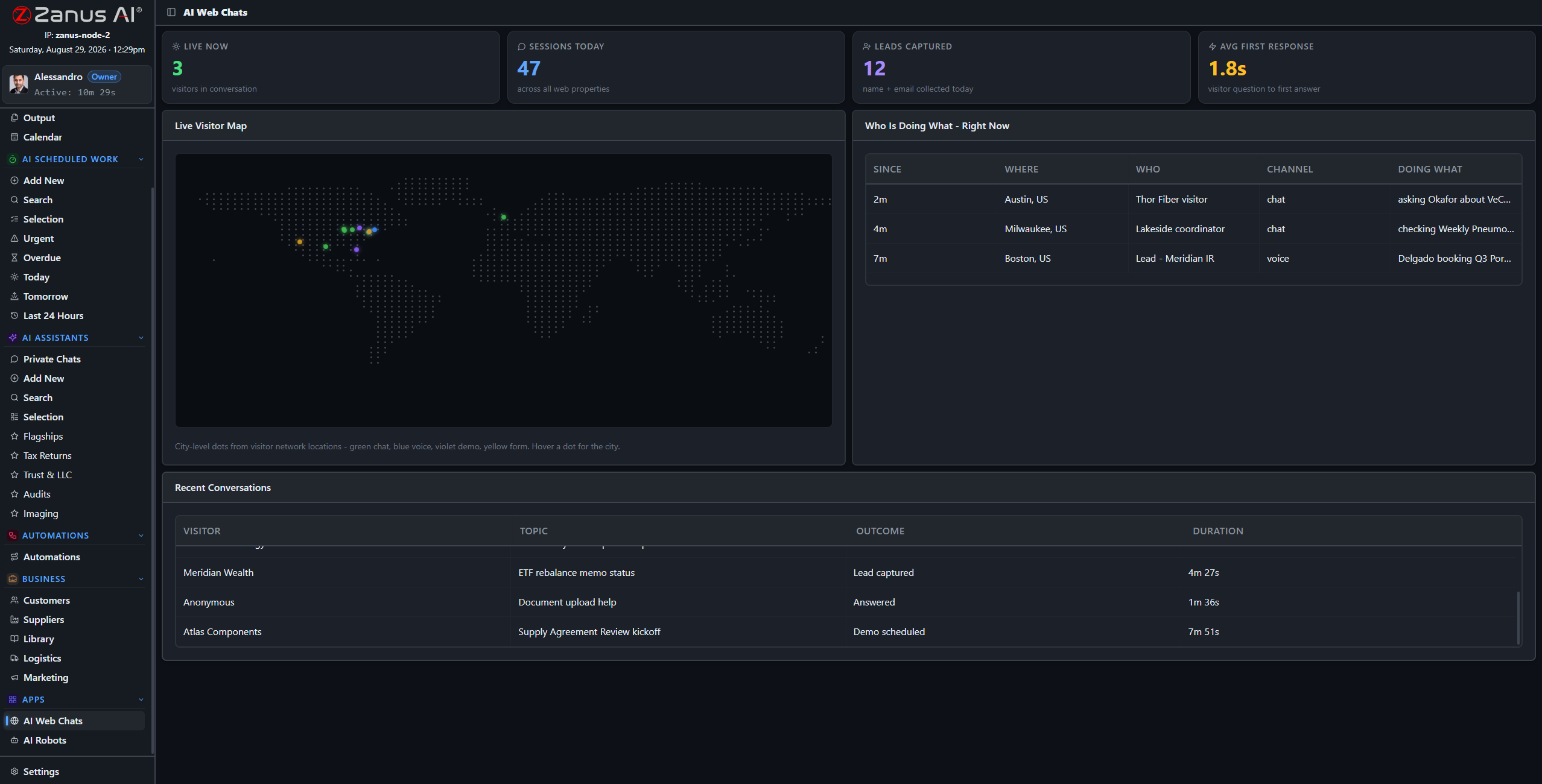
This screen is watching demos like yours happen: live conversations, outcomes, first response in seconds.
What it does
Ask the chat: “I need a roof inspection after the storm” — watch it qualify the job, quote from real prices and book the crew, like your office on its best day.
Ask: “how would you score a flat roof from drone footage?” — it walks the workflow it would run in your tenant: ingestion, rubric, reasoning, sign-off.
The full demo loads an inspection tenant with sample records: post-flight reviews, condition scores, report drafts — your world, working.
Or pick your exact business
Every link below is a full live-demo page for that specific business — its vocabulary, its calls, its booking rules.
Two minutes to your inbox
Request the demo and the interactive inspection demo arrives in about two minutes — no sales call, no calendar dance. Watch it, interrupt it with questions, and book the human conversation when YOU are ready.
- Interactive demo, inspection-configured
- Ask questions mid-demo — it answers and resumes
- In your inbox in ~2 minutes, free

Questions, answered
Is the demo really the product?
Yes — the same AI, configured with a sample inspection tenant. What you see is what your team gets, with your footage, rubrics and templates instead of the samples.
See it working on YOUR operation — the demo IS the product.
Sharing with a colleague? 📄 Get the PDF · ✉️ Email this page ·