ZANUS AI FOR TELECOMMUNICATIONS — OVERVIEW
The network runs 24/7. Now the back office does too.
Subscriber calls answered every hour of the outage. Install appointments booked into real crew calendars. Runbooks, fault histories and capacity records that answer the NOC in seconds — isolated in YOUR private tenant, or on hardware you own.
Private tenant or your own server · your whole team · subscriber data isolated by architecture
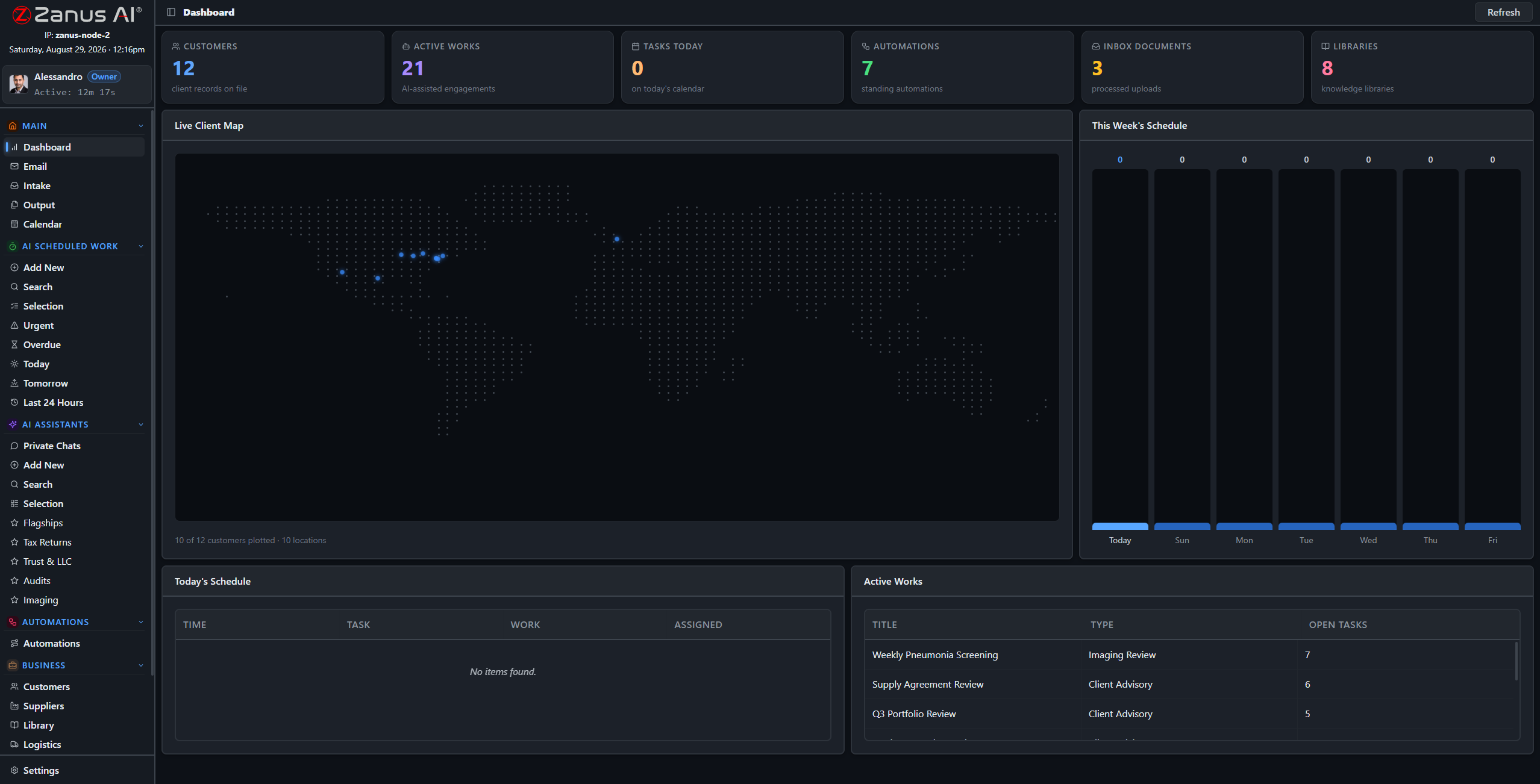
A real deployment view: subscriber records, scheduled fault-trend reviews, notices awaiting approval.
What it does
When a fiber cut lights up the call board at 9 PM, the AI answers every subscriber in one ring — status, restoration estimate, ticket logged — while your people work the fault.
MOPs, fault histories and site records become a system the NOC can query in plain language, with the source document cited — at 2 AM exactly as at 2 PM.
Your tenant is isolated; call records and subscriber files never train anyone else’s model. Need full sovereignty? The same OS runs on servers inside your own facility.
Front office: every subscriber call, answered
Billing questions, plan changes, outage status, new-service requests: the Zanus front office answers on your menu, in your voices, books installs into real crew calendars and answers the questions your CSRs repeat all day — in up to 40 languages.
- AI phone on your lines and voices, 24/7
- Install and service appointments booked into crew calendars
- Plans and equipment quoted from your real catalog
- See the Front Office for telecom →

Back office: the network paperwork, working
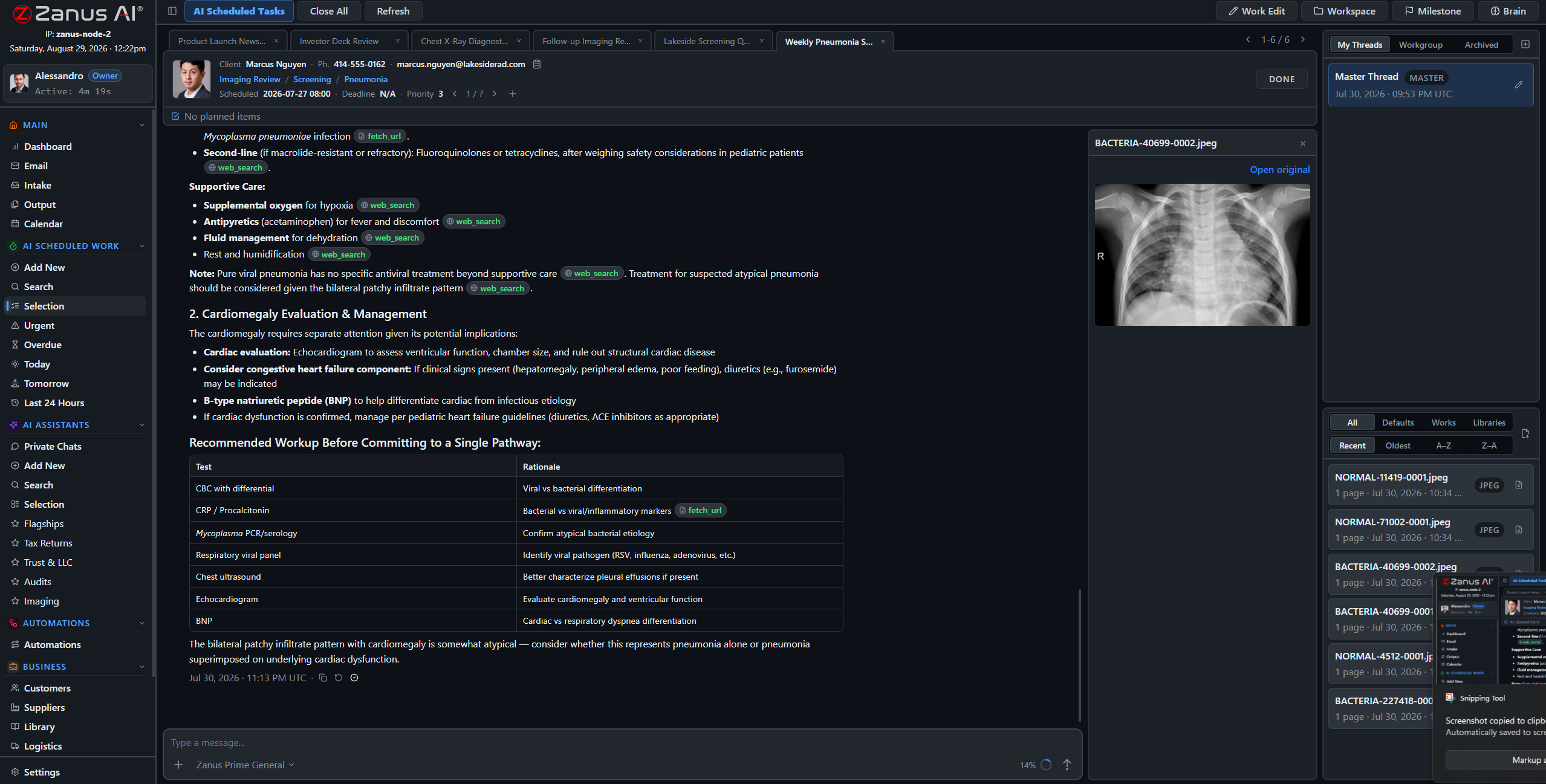
A weekly fault-trend review executed on schedule, the outage postmortem drafted from tickets and transcripts with every claim cited, the monthly capacity report filed before the planning meeting — assigned to the AI like to an analyst, signed off by your engineers.
- Scheduled AI work: fault reviews, postmortems, capacity reports
- Verified answers from YOUR runbooks and fault histories
- Finished documents await engineering sign-off
- See the Back Office for telecom →
When subscriber data cannot leave your racks
Carriers and regional operators with sovereignty requirements run the identical OS on Zanus hardware in their own facility: air-gap capable, USB updates, owned outright, your whole team — subscriber records physically incapable of leaving the building.
- Private On-Premises AI: owned, no recurring fees
- On-Prem Tokens Server for high-volume processing
- Explore the AI Servers →

Questions, answered
Is subscriber data safe in a hosted tenant?
Your tenant is isolated and nothing trains outside models. Permissions reach the field level, the server redacts what a role cannot see, and every access is on the audit record. Operators requiring full sovereignty run the same system on-premises. Regulatory specifics are reviewed with your team during onboarding.
Can it survive an outage call storm?
The AI answers every line by your rules, around the clock — it does not queue, tire or improvise. It tells subscribers only what you have approved, logs every conversation with a transcript, and escalates by the rules you set per line and per hour.
We run consumer and enterprise lines — one system?
Yes: workgroups separate residential support, enterprise accounts and internal engineering, and each role sees exactly what it is allowed. Routing, voices and escalation rules are set per line.
See it working on YOUR network — the demo IS the product.
ZANUS AI FOR TELECOMMUNICATIONS — FRONT OFFICE
Hold queues are churn. End them.
Every minute a subscriber waits on hold is a minute spent deciding to switch providers. The Zanus front office answers on your menu, in your voices — outage status, billing questions, plan changes, install bookings — 24/7, in up to 40 languages.
Private tenant or your own server · your whole team · subscriber data isolated by architecture

Calls, chats, bookings and follow-ups — one dashboard your support manager can read.
What it does
A node goes down in a thunderstorm and 400 subscribers dial at once. Every call is answered in one ring with the status you approved — no hold music, no abandoned queue, every ticket logged.
The AI checks serviceability by your rules, offers real open crew slots and books the install — confirmation texted to the subscriber, calendar synced for the dispatcher.
Upgrades, bundles and equipment quoted from your actual catalog with payable links — no invented promotion, no wrong price, ever.
From dial tone to booked install, hands-free
A new subscriber calls; the AI answers, confirms the address and service type, offers real crew availability, books the install and sends the welcome details — while your CSRs handle the calls that genuinely need a human.
- Real calendar sync with install crews — no double-booking
- Coverage and billing questions answered from your approved rules
- Every lead qualified and followed up automatically
- Technical faults escalated to the NOC by your rules, never improvised


The web side works the same shift
Website chat grounded in your approved plans and policies, web forms for service requests worked in minutes, and a transcript of every conversation on the record — the storefront never closes.
- Grounded chat on your site, up to 40 languages
- Service-request forms answered in minutes, not days
- Transcripts of every conversation, searchable
- See the full Front Office tour →
Questions, answered
Do we keep our numbers and IVR?
Yes. Your numbers stay; calls route AI-first, staff-first, or any mix — configured per line and per hour of day.
What does it say during an outage?
Only what you approve. The AI answers from your posted status and bulletins — no source, no claim — so subscribers hear one consistent story instead of forty guesses.
What languages?
Up to 40 — each subscriber is answered in their own language, with your company’s approved information.
See it working on YOUR network — the demo IS the product.
ZANUS AI FOR TELECOMMUNICATIONS — BACK OFFICE
The network is documented.
Now the documentation works.
Fault tickets, MOPs, site records, change logs, capacity studies: a network is a paper trail with antennas. The Zanus back office turns that trail into a working AI staff — reviewing, drafting and answering with sources cited, under your engineers’ sign-off.
Private tenant or your own server · your whole team · subscriber data isolated by architecture
A real session: the week’s fault tickets reviewed, patterns flagged, sources cited, engineer decides.
What it does
Weekly fault-trend reviews, outage postmortem drafts, monthly capacity reports — assigned to the AI like to a junior analyst, executed on schedule, fully auditable.
MOPs, escalation matrices and vendor manuals become a system the whole NOC can query — with the source document one click away.
Every AI-drafted postmortem and report lands in Output awaiting review. Nothing about your network ships without an engineer’s decision.
The postmortem drafts itself
An outage closes and the AI compiles the timeline from tickets, call transcripts and the change log, drafts the postmortem with every claim cited, and files it for the NOC lead’s review — the morning after, not three weeks later when memory has faded.
- Timeline assembled from tickets and transcripts
- Root-cause narrative drafted with citations
- Postmortem in Output, awaiting engineering sign-off


Capacity and ticket-trend reports, drafted
The monthly capacity review from your own utilization records, the ticket-trend summary that reads every transcript for recurring complaints and sentiment — compiled by the AI in your report templates, ready before the planning meeting.
- Reports in your own templates and letterhead
- Ticket and call analytics from your real records
- Approval workflow before anything circulates
Questions, answered
Does the AI touch the network itself?
No. It is documentation and workflow support: reviewing, drafting, comparing and citing from YOUR records. Configuration changes are made by your engineers, by your change process.
Does it connect to our OSS/BSS?
API connectors integrate with existing systems; documents and data flow through the intake pipeline under your handling rules. Bring your stack to the demo and we map it.
YOU MIGHT ALSO LIKE
The Back Office executes. Who answers the phone?
Front Office AI picks up every call and chat — books, quotes, follows up, 24/7 in 40 languages. Watch it run a business like yours, live.
See it working on YOUR network — the demo IS the product.
ZANUS AI FOR TELECOMMUNICATIONS — NETWORK DOCS
Twenty years of fault tickets. One question.
Runbooks, MOPs, fault histories, tower and site records, splice documentation, vendor manuals — loaded into curated libraries the AI reads from. Ask in plain language; get the answer with the source cited, at the permission level of whoever asks.
Private tenant or your own server · your whole team · subscriber data isolated by architecture
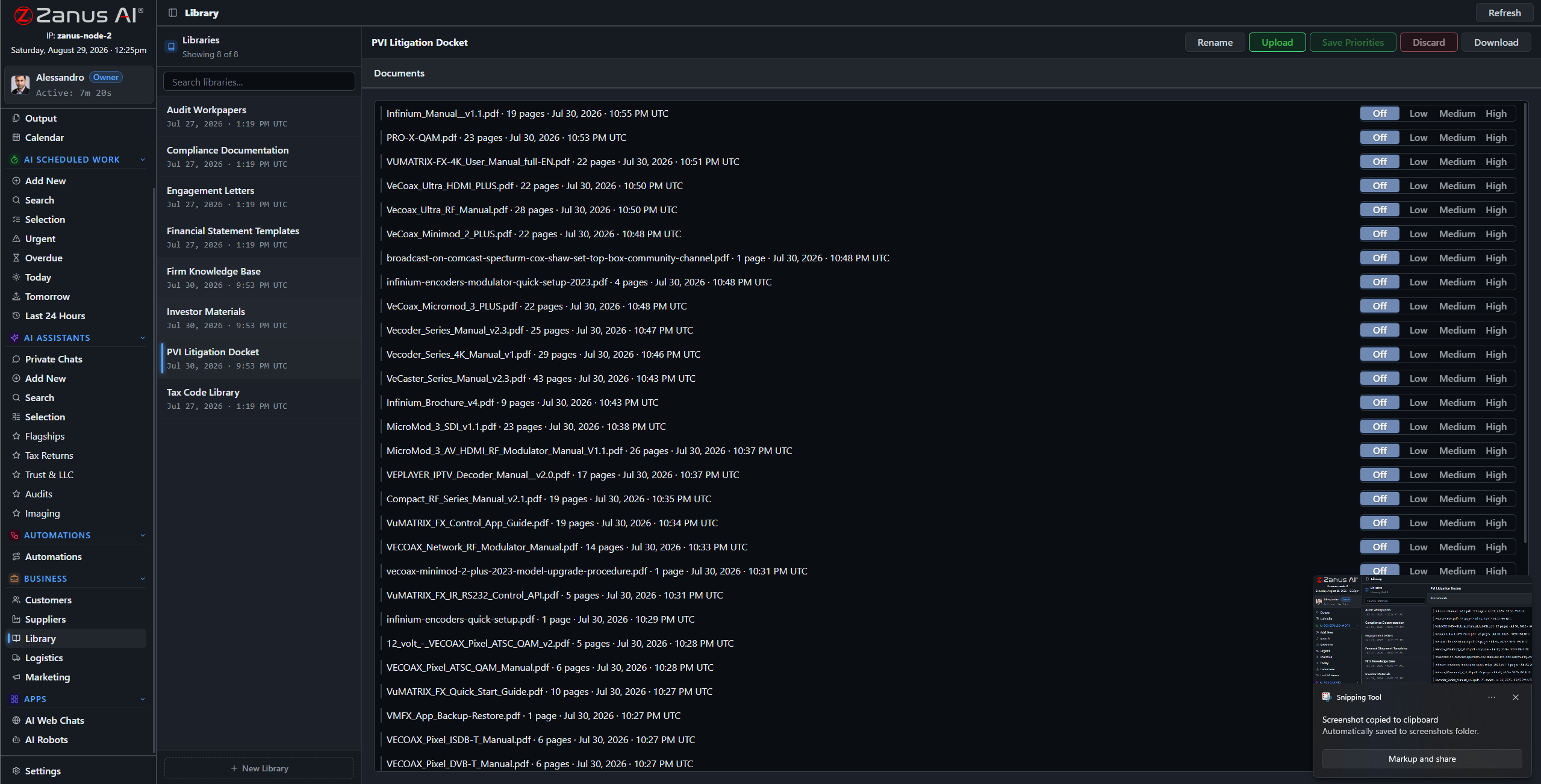
Libraries: current MOPs outrank drafts, as-built records outrank proposals — you set the order.
What it does
PDFs, spreadsheets, scanned site surveys, network diagrams and media — the ingestion pipeline turns what the operation has accumulated into queryable knowledge.
No source in your library, no claim: the AI cites the runbook, the ticket, the site record — or says it cannot answer. Guesswork is not an option on a network.
The contractor asks about one site; the senior engineer asks across the region: each gets answers scoped to their role, enforced server-side.
“Have we seen this fault before?”
The 3 AM question that used to mean an hour of searching old tickets: now the fault history answers in seconds, with the matching incidents and their resolutions attached — and the on-call engineer gets back to fixing instead of digging.
- Plain-language questions across the whole archive
- Matching tickets and resolutions attached to every answer
- Priority order: current runbooks always win

Questions, answered
Who can see subscriber records?
Only roles you authorize. Permissions reach the field level and the server redacts what a user cannot see — a support agent sees the account, not the whole file.
Do our documents train outside models?
Never. Your tenant is isolated; your network knowledge is yours alone — and the on-premises option keeps it physically inside your facility.
See it working on YOUR network — the demo IS the product.
ZANUS AI FOR TELECOMMUNICATIONS — AI WORKFORCE
An analyst that never misses the Monday report.
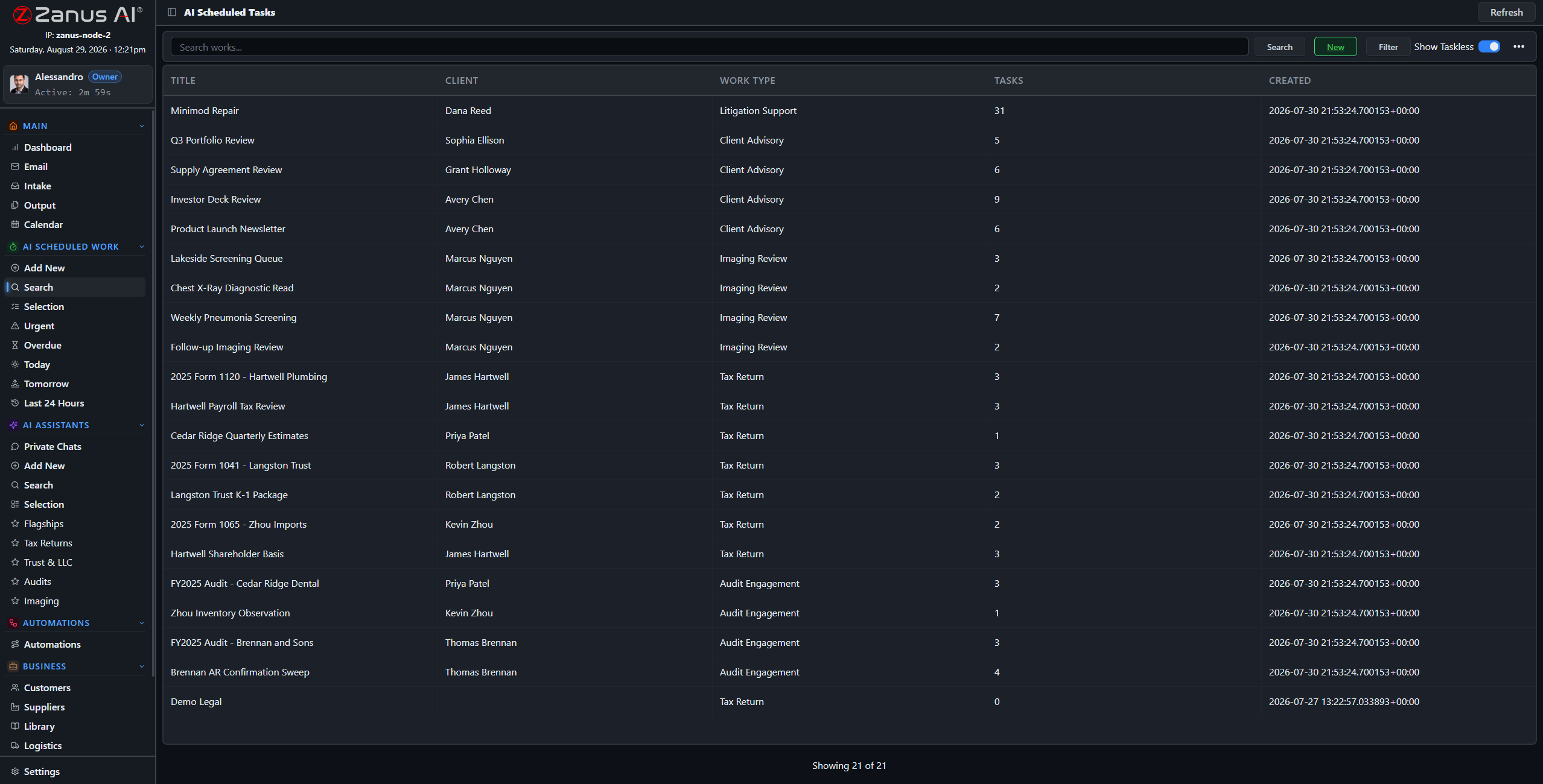
Assign work to the AI the way you assign it to staff: type, sources, deadline, priority. Weekly fault-trend reviews, postmortem drafts, capacity studies — executed on schedule, with citations, under review.
Private tenant or your own server · your whole team · subscriber data isolated by architecture
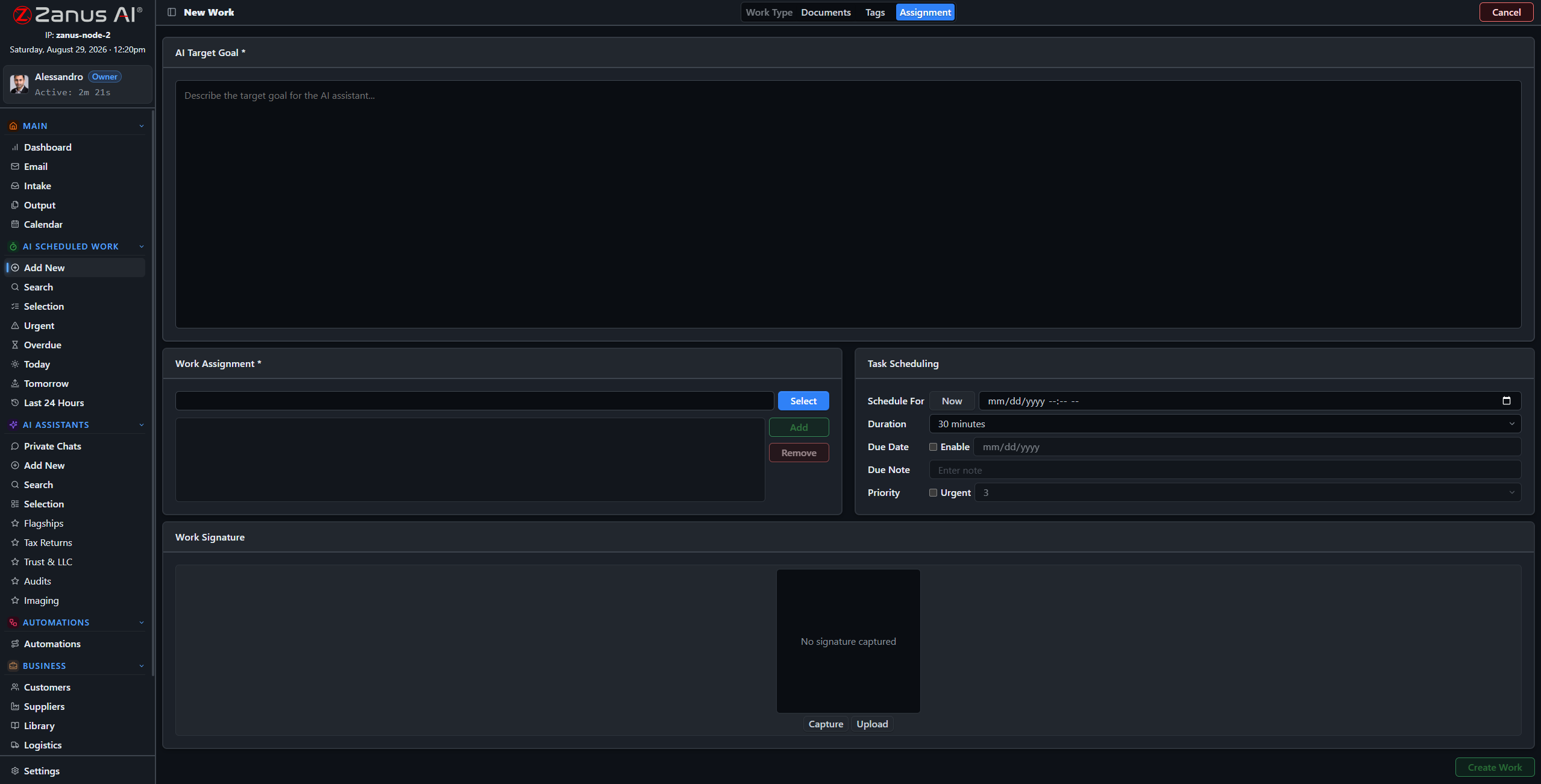
Four steps: work type, records and libraries, tags, schedule — the AI takes it from there.
What it does
Fault-trend review, postmortem draft, capacity report, ticket-quality audit: work types molded to your operation, with default libraries and examples per type.
The AI’s workload is managed like the team’s: one-click views show what is urgent, late, today and tomorrow — nothing slips silently.
Every work is a full session: reasoning streamed, sources cited, milestones tracked, linked to the ticket and the calendar.
Monday, 6 AM: the fault-trend review is filed
Set “Weekly Fault-Trend Review” once: every Monday the AI reads the week’s tickets, flags the repeat offenders — the node that failed three Tuesdays running, the complaint pattern building in one zip code — and files the report before the shift change.
- Recurring schedules for periodic network work
- Patterns flagged with the tickets cited
- Report in Output, awaiting the NOC lead
Questions, answered
Can we supervise mid-work?
Yes — open any session, read the reasoning, redirect it, or stop it. The AI works like staff: visible, accountable, interruptible.
What volume can it handle?
It does not get tired: the constraint is your review capacity, not the AI’s. Configurations size from a regional ISP to a multi-market operator.
See it working on YOUR network — the demo IS the product.
ZANUS AI FOR TELECOMMUNICATIONS — RUNBOOKS & MOPS
The MOP binder, current by construction.
A method of procedure only protects the network if the tech follows the current version — not the one printed in 2019. In Zanus, runbooks and MOPs are living documents: answerable in chat, attached to work, priority-ordered so the latest revision always wins.
Private tenant or your own server · your whole team · subscriber data isolated by architecture
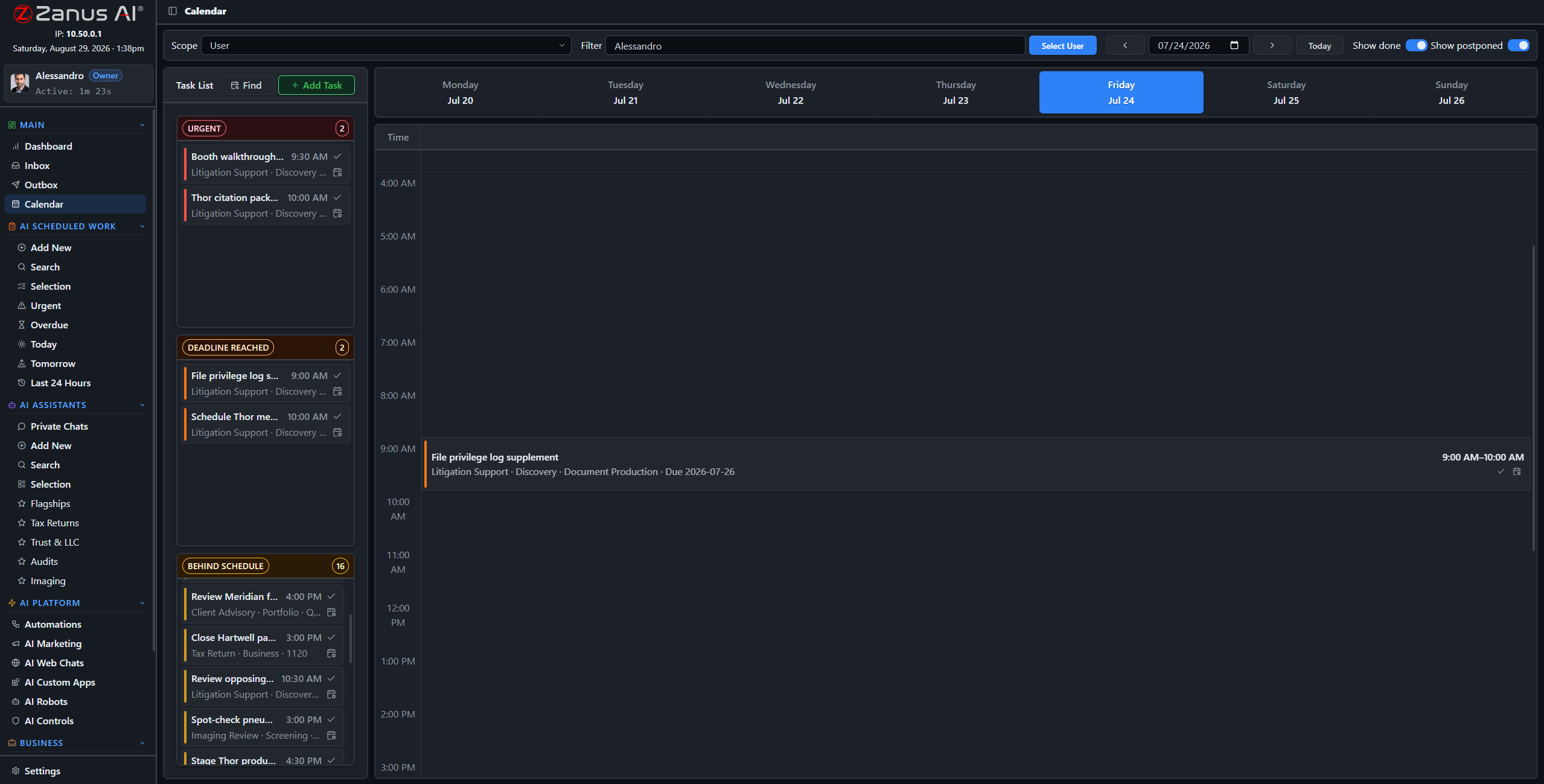
Runbook upkeep, scheduled like network work: quarterly reviews and revision checks on the calendar.
What it does
Escalation matrices, maintenance-window procedures, safety rules for tower and plant work: one library, current revisions on top, superseded versions outranked.
“What is the rollback procedure for this card swap?” — answered in seconds with the MOP attached, to whichever on-call engineer asks, whenever they ask.
Work types carry their default procedures: the AI drafting a maintenance-window plan reads from the current MOP — by construction.
Runbook upkeep, scheduled like network work
Quarterly runbook reviews, revision checks after every vendor update, change summaries for the NOC briefing: assign them once as recurring AI work and the binder never goes stale again.
- Recurring review works with deadlines
- Revision summaries drafted for shift briefings
- Every review on the audit record
Questions, answered
How do updates roll out?
Upload the new revision, set it on top: from that moment every answer and every AI work cites the new MOP. Old versions remain archived for audit.
See it working on YOUR network — the demo IS the product.
ZANUS AI FOR TELECOMMUNICATIONS — TEAM TRAINING
New techs ramp in days, not quarters.
A NOC seat takes months to fill and months more to train — and the escalation knowledge lives in two senior heads. New hires learn your procedures from the AI, and every tech and CSR has an assistant that answers “how do we…?” instantly.
Private tenant or your own server · your whole team · subscriber data isolated by architecture

Training lives inside the software: the AI walks each new hire through the operation’s own procedures.
What it does
New CSRs learn your plans, policies and escalation rules; new NOC hires learn your runbooks and systems — through guided training, ramped in days.
“Who gets paged for a core router alarm at night?” — asked to the assistant, answered from the escalation matrix, without waking anyone.
Private chats work on any device with a login — the how-to knowledge follows the tech to the NOC, the truck or the 4 AM shift.

The senior engineer, off the interruption treadmill
The tenth “how do I open a maintenance window?” gets the same patient, sourced answer as the first — from the assistant, not from your most expensive engineer. Training stays current automatically, because the assistant reads from the same living runbooks as everything else.
- Answers cite the current runbook
- Personal preset assistants per role
- Training progress visible to managers
Questions, answered
Does training content go stale?
No — the assistant answers from the live libraries. Update the runbook once and every future answer updates with it.
See it working on YOUR network — the demo IS the product.
ZANUS AI FOR TELECOMMUNICATIONS — AUTOMATIONS
The NOC’s repetitive work, drawn once.
Describe the job in plain words — “when a trouble ticket arrives, classify it, pull the matching fault history and draft the first response” — and it becomes connected blocks on a canvas, running on its own, with every run visible.
Private tenant or your own server · your whole team · subscriber data isolated by architecture
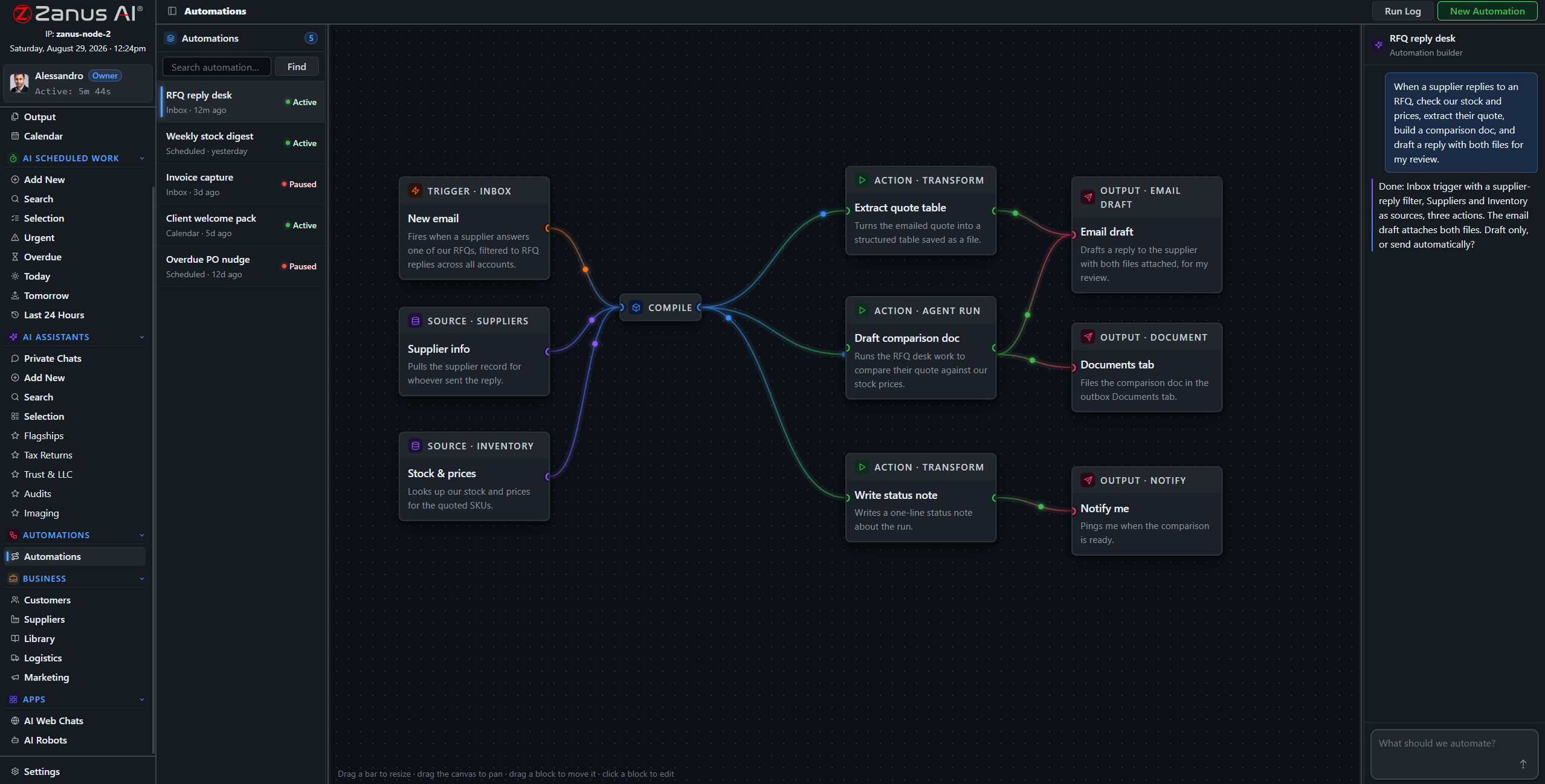
A real flow: inbox trigger, record sources, AI compile, three outputs — drawn from a description.
What it does
A trouble ticket lands; the AI classifies it, attaches the matching fault history and site record, and queues a drafted first response — before a human has opened the queue.
A window is scheduled; the AI drafts the subscriber notice for the affected area from your records, in each subscriber’s language, queued for approval.
The nightly ticket-trend digest, the Friday operations summary: compiled by the AI, filed to Output, on time every time.
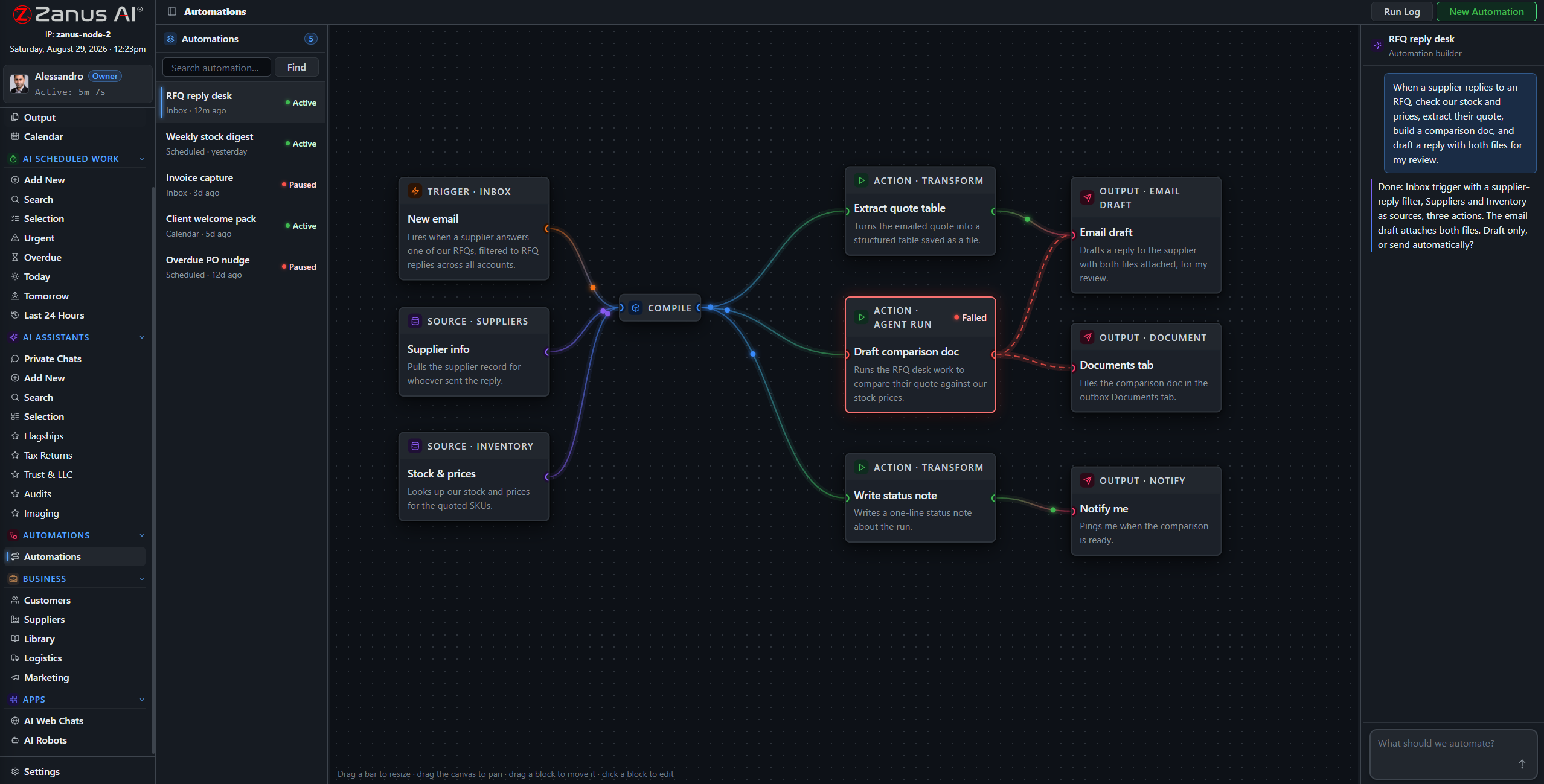
When something fails, you SEE it
Run states live on the flow: green success, red failure on the exact block. On a network, a silent failure in the reporting chain is how surprises reach the morning meeting — here, nothing fails silently.
- Run log per automation
- One-click retry on failures
- Finished documents in Output, statused
Questions, answered
Who approves outgoing subscriber notices?
Your rules: queue everything for human approval, or auto-send only the categories you designate as safe — planned-maintenance notices, say, but never outage explanations.
See it working on YOUR network — the demo IS the product.
ZANUS AI FOR TELECOMMUNICATIONS — SUBSCRIBER NOTICES
Notices that go out before the calls come in.
Maintenance-window notices, outage updates, upgrade campaigns, win-back sequences for churned subscribers — drafted by the AI from your own records, in each subscriber’s language, queued for your approval. The subscribers who were told do not call to ask.
Private tenant or your own server · your whole team · subscriber data isolated by architecture
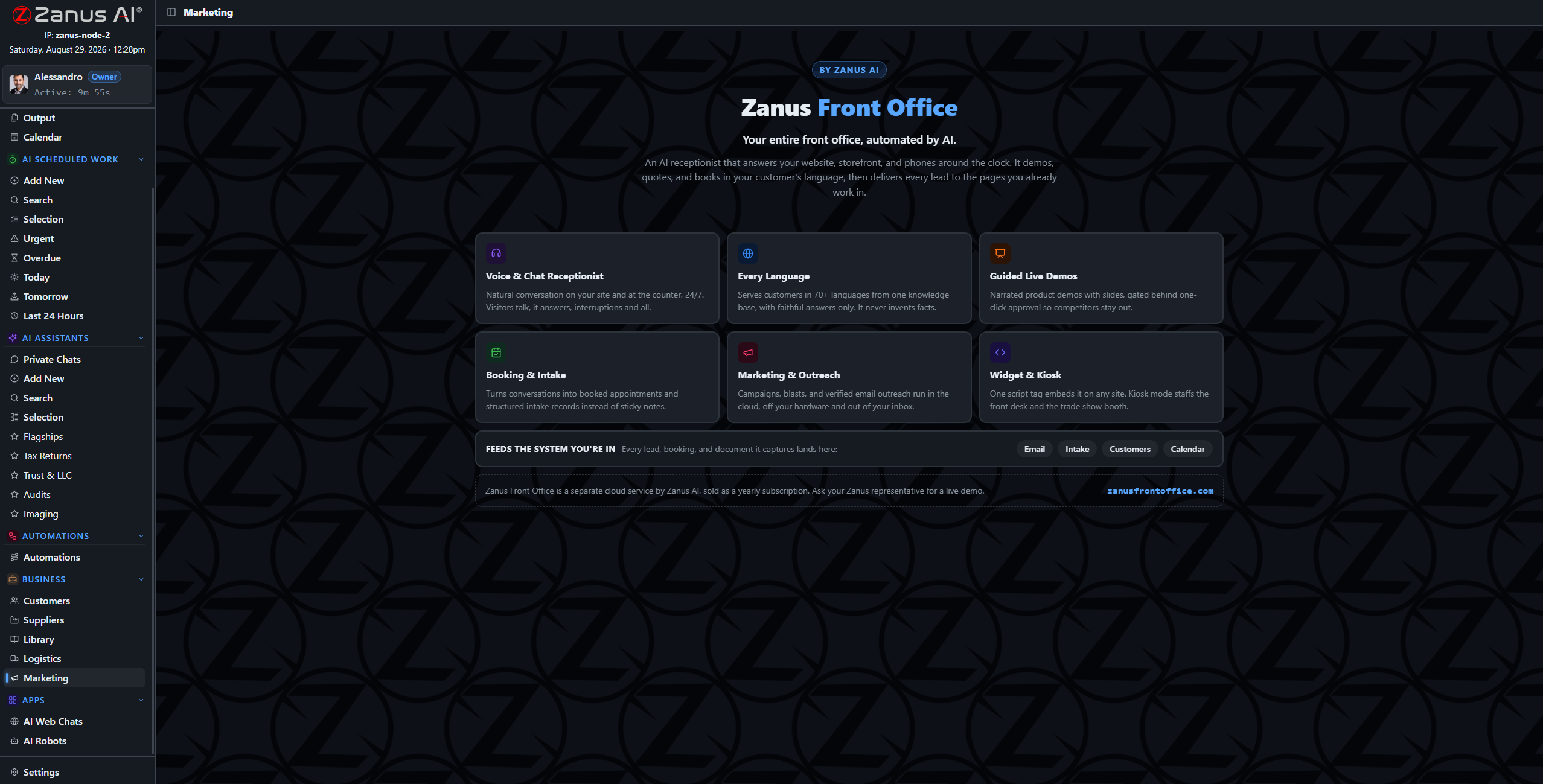
Campaigns and sequences drafted from the records — notices, upgrades, win-backs — awaiting approval.
What it does
Affected node, plan tier, contract age, churn risk: audiences built from your own subscriber categories — no exporting lists to a third-party mailing tool.
Notices written the way subscribers actually read them — plain, direct, in their own language, with your company’s voice.
Opt-outs and contact preferences are enforced by the system, not by memory. Every send is on the record.
From the records to the campaign, without export
The audience, the content and the sending all live in the same system as the subscriber records — nothing leaves your tenant to reach a mailing platform. “Invite every subscriber on the legacy plan in the upgraded footprint” becomes a drafted, scheduled campaign in minutes.
- Audiences from your own subscriber data — private by architecture
- Campaigns and sequences drafted for review
- Win-back sequences for canceled accounts, by your rules

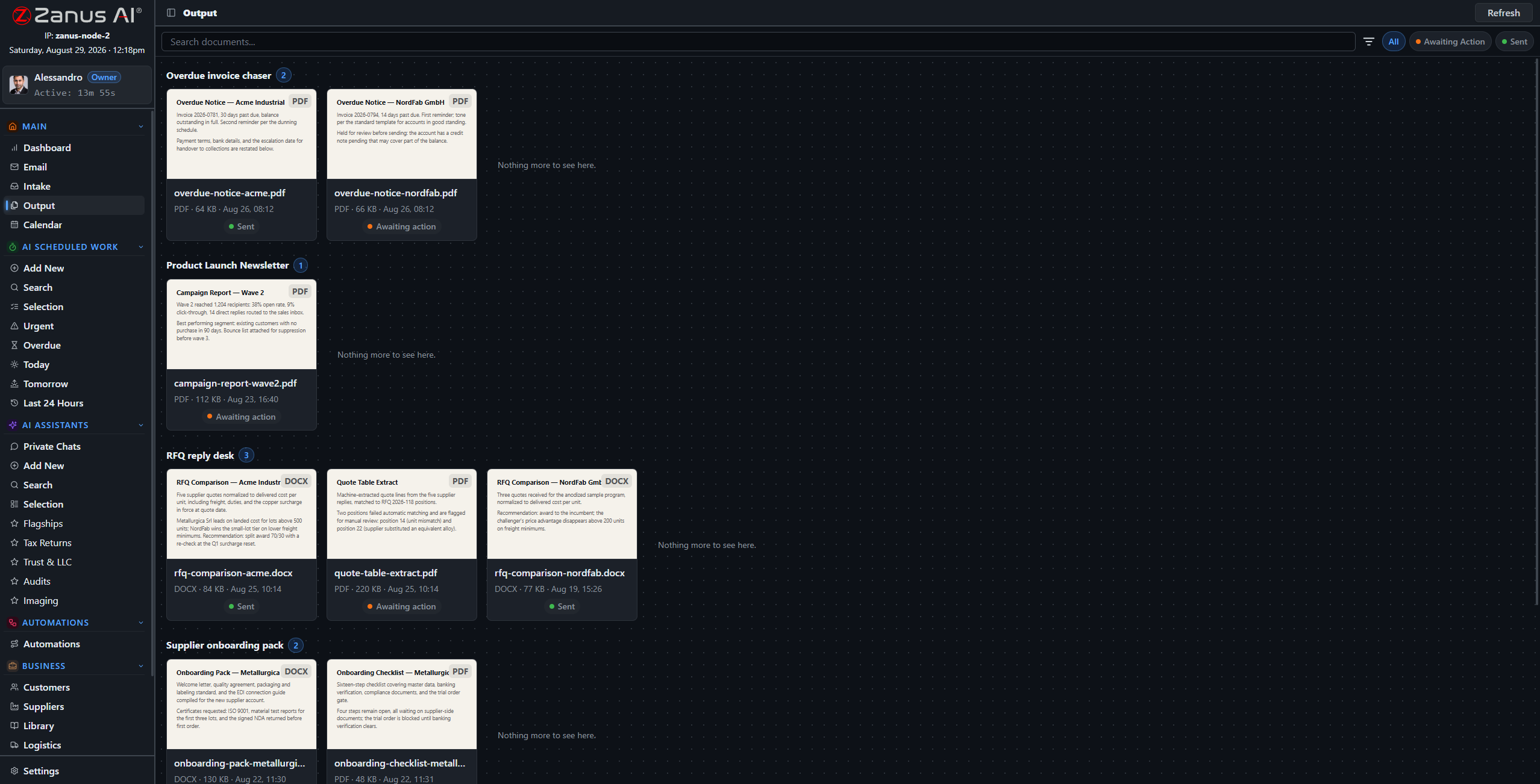
Approval first, always
Every outbound subscriber communication lands in the approval queue unless you designate the category as auto-send. The operator stays in control of every word that reaches a subscriber.
- Approval workflow per communication type
- Full history of what was sent to whom
- Results tracked: replies, upgrades, saves
Questions, answered
Is this compliant for subscriber communications?
The system enforces your consent records and contact preferences automatically, keeps every send on the audit record, and subscriber data never leaves your tenant. Your compliance team sets the rules once — and reviews specifics with us during onboarding.
Can it announce maintenance windows automatically?
Yes — a scheduled window can trigger the notice flow: drafted for the affected area, queued for approval or auto-sent if you designate that category as safe.
See it working on YOUR network — the demo IS the product.
ZANUS AI FOR TELECOMMUNICATIONS — OSS/BSS & INTEGRATIONS
Your OSS stays. Your BSS stays. The intelligence is new.
Provisioning lives in the OSS, billing in the BSS, tickets in the ticketing system — and none of them answers a question. Zanus becomes the system of work on top: connectors sync data both ways, the intake pipeline files what arrives, and AI-drafted documents flow back where they belong. No rip and replace.
Private tenant or your own server · your whole team · subscriber data isolated by architecture

No rip and replace: the OSS, BSS, ticketing and billing stay — the AI layer connects to all of them.
What it does
Accounts, tickets and documents mapped field by field, with a dry-run preview before anything writes — push, pull or two-way, your choice.
Statements, disputes and carrier invoices route through the intake pipeline to the right account record — and the AI can draft the follow-ups.
A full API for whatever else the operation runs: monitoring dashboards, provisioning tools, custom portals — data in, results out, under scoped keys.
One question across all your systems
The account lives in the BSS, the ticket in the ticketing system, the site record in the library — and the AI reads across all of it. “What is open on this account?” becomes one question with one grounded answer.
- Field mapping with dry-run preview
- Each system stays master of its own records
- Every sync event on the audit record
- External systems appear as blocks on the automation canvas
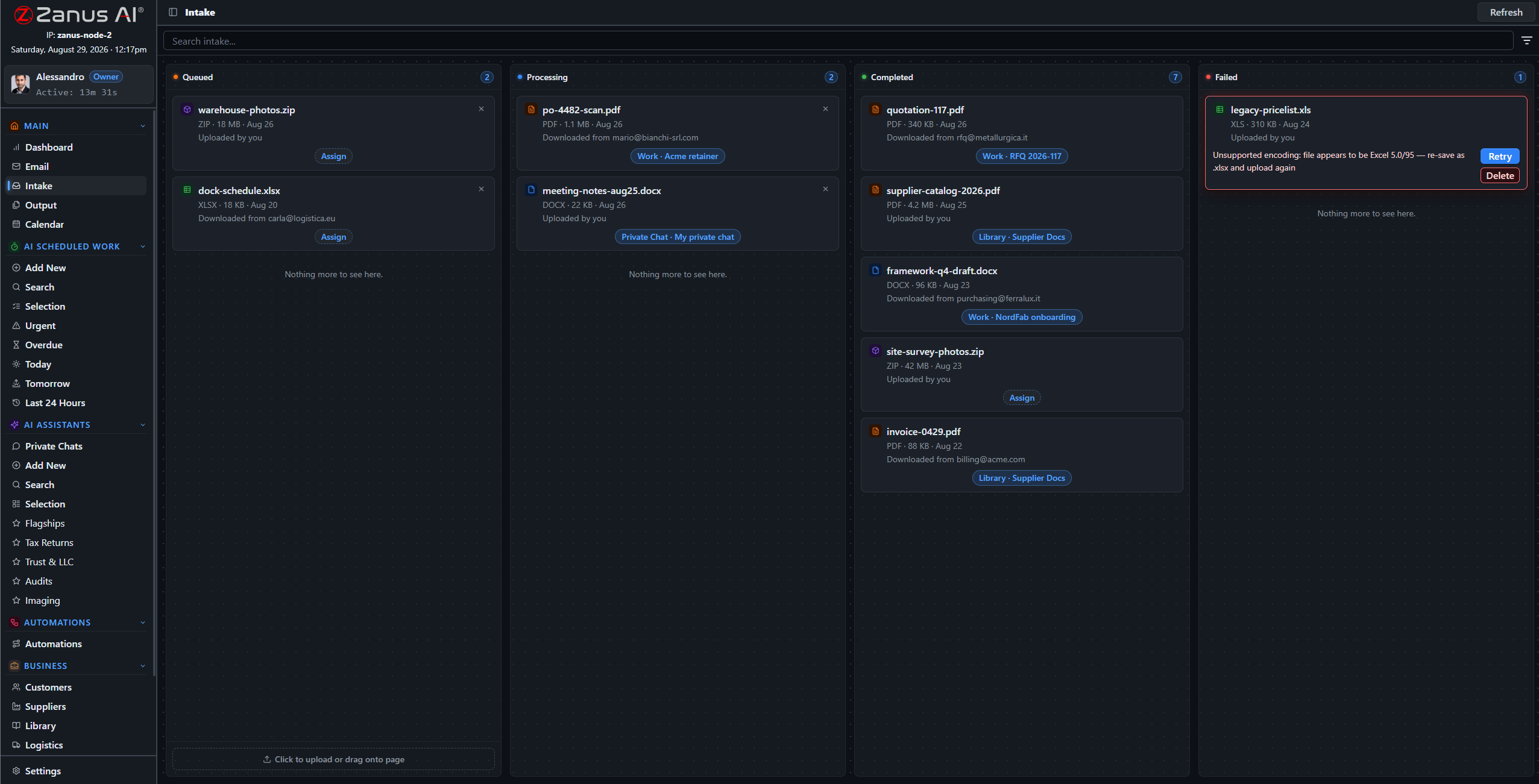
Documents flow back where they belong
The postmortem the AI drafted, the capacity report, the subscriber notice: finished documents return to the systems and records they belong to through the same connectors — reviewed and approved by your people first.
- AI output filed back to the account or ticket
- Approval workflow before anything writes back
- Webhooks notify your systems in real time
Questions, answered
Which OSS/BSS do you support?
Connectors are mapped per deployment — bring your stack to the demo and we walk through the exact integration path for your systems.
Does subscriber data pass through third parties?
No. The connectors run inside your tenant — or inside your facility on the on-premises option. Data moves directly between your systems.
See it working on YOUR network — the demo IS the product.
ZANUS AI FOR TELECOMMUNICATIONS — DATA CUSTODY
Subscriber data that stays subscriber data.
Call records, account files and usage data are exactly what regulators and subscribers expect you to guard. The architecture answers: isolated tenants, permissions to the field level, server-side redaction, a searchable audit trail — and CPNI-conscious handling throughout.
Private tenant or your own server · your whole team · subscriber data isolated by architecture
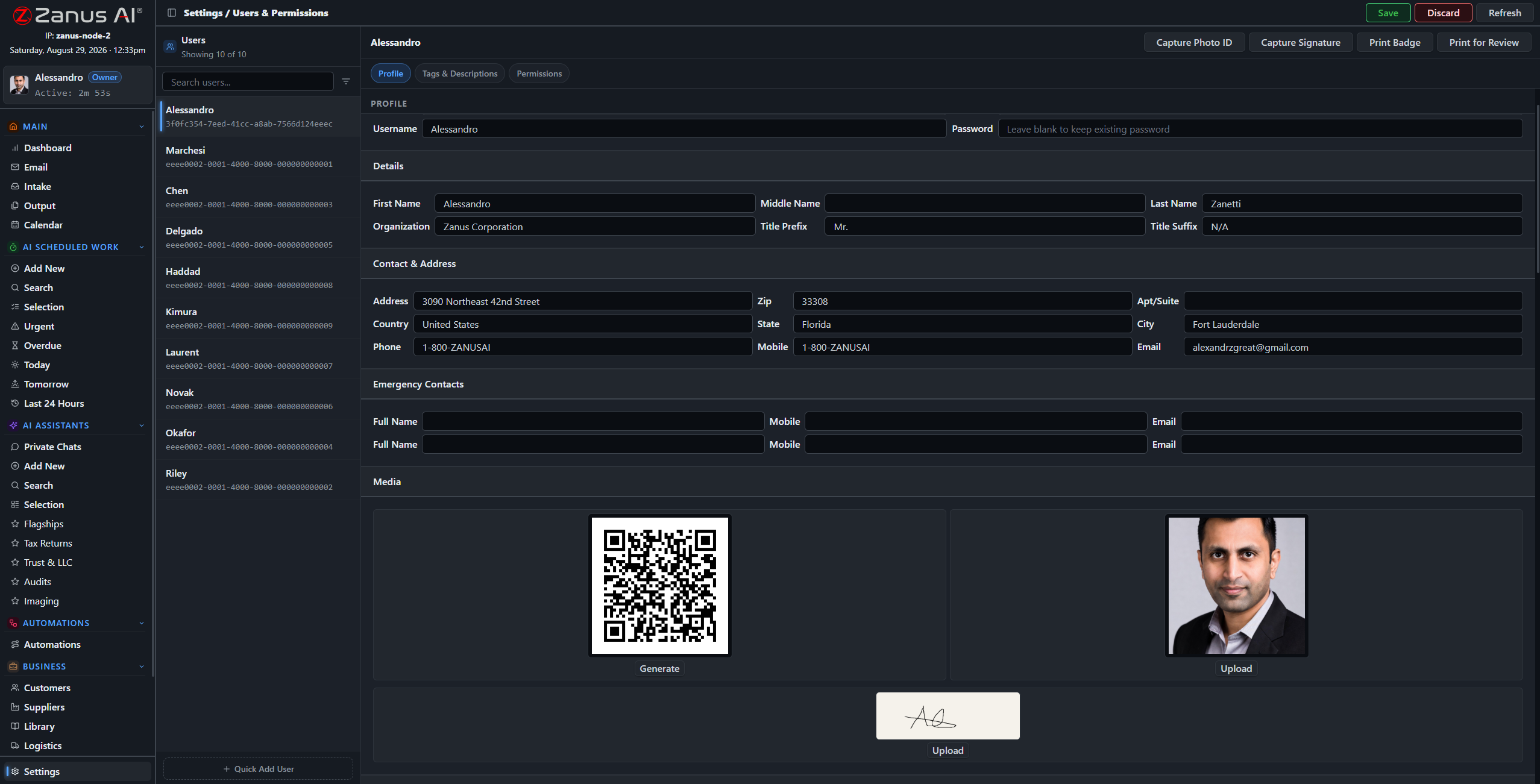
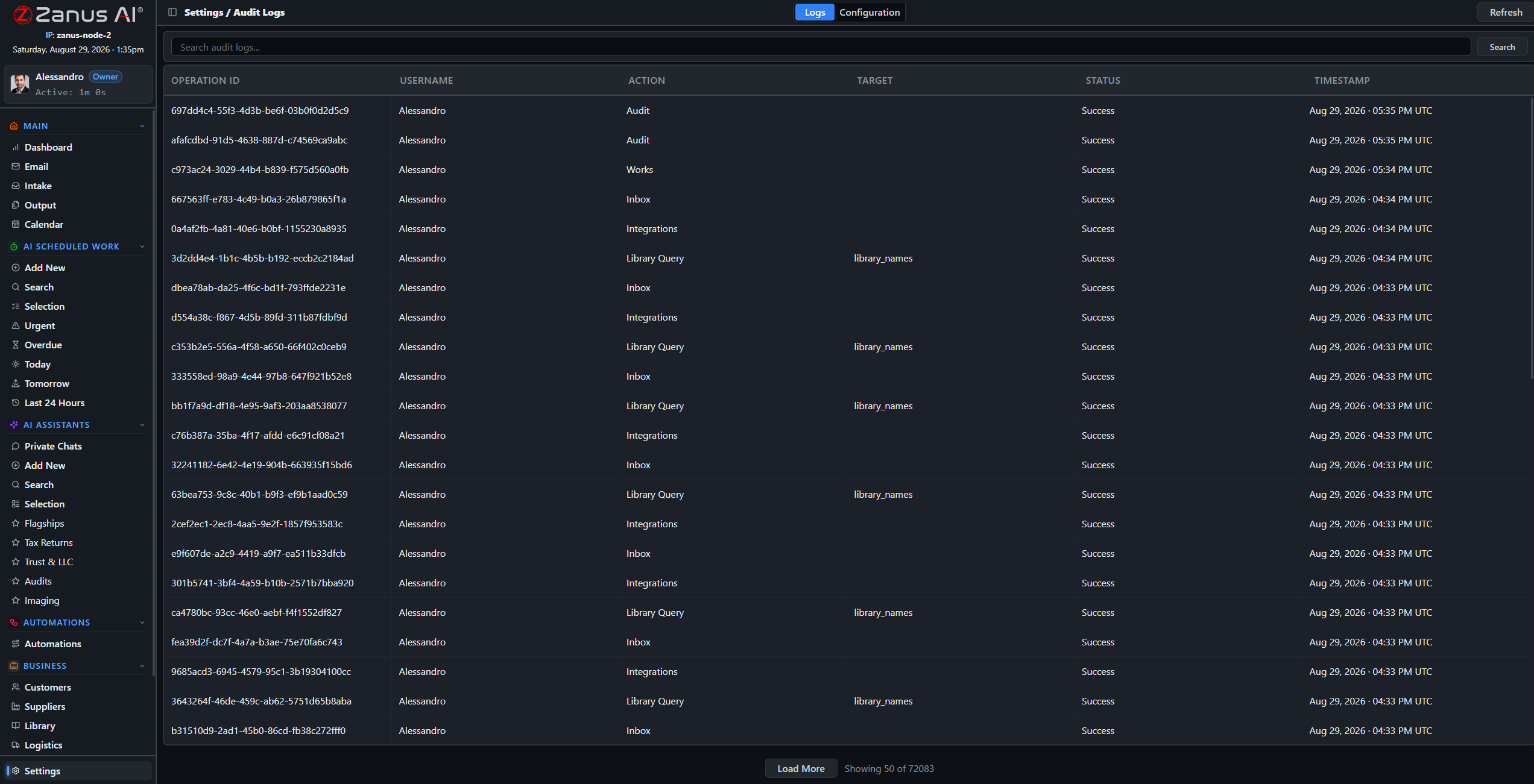
One record per user: role, tags, and granular permissions over every domain of the system.
What it does
The server redacts what a role cannot see — a field contractor sees the site ticket, never the subscriber’s account history.
A searchable log of every audited action, with configurable categories: who saw which account, who changed what, when.
Five-level workgroups map markets, departments and contractor tiers; the on-premises option puts the whole system inside your facility, air-gap capable.
The audit that takes minutes, not weeks
When the question comes — from a regulator, an enterprise customer’s security team or your own counsel — the answer is a search away: access records, document trails, update history, all in one place.
- Searchable audit trail
- Automatic pre-update snapshots with rollback
- USB updates for air-gapped deployments
Questions, answered
Where does subscriber data live?
In your isolated tenant — never training outside models — or fully on-premises on hardware you own, physically incapable of internet exposure.
How do you handle CPNI and privacy rules?
The architecture is CPNI-conscious: isolation, field-level permissions, redaction and the audit trail are built in. Regulatory specifics are reviewed with your team during onboarding — bring your compliance officer to the demo.
See it working on YOUR network — the demo IS the product.
ZANUS AI FOR TELECOMMUNICATIONS — LIVE DEMO
Skip the sales video.
Talk to the AI instead.
Big vendors show telecom demos as videos behind a lead form. Ours is the product itself, configured for telecom: open the chat below-right and try it — report an outage, ask about an upgrade, request a demo of the fault-history workflow.
The conversation you have with us IS the demo
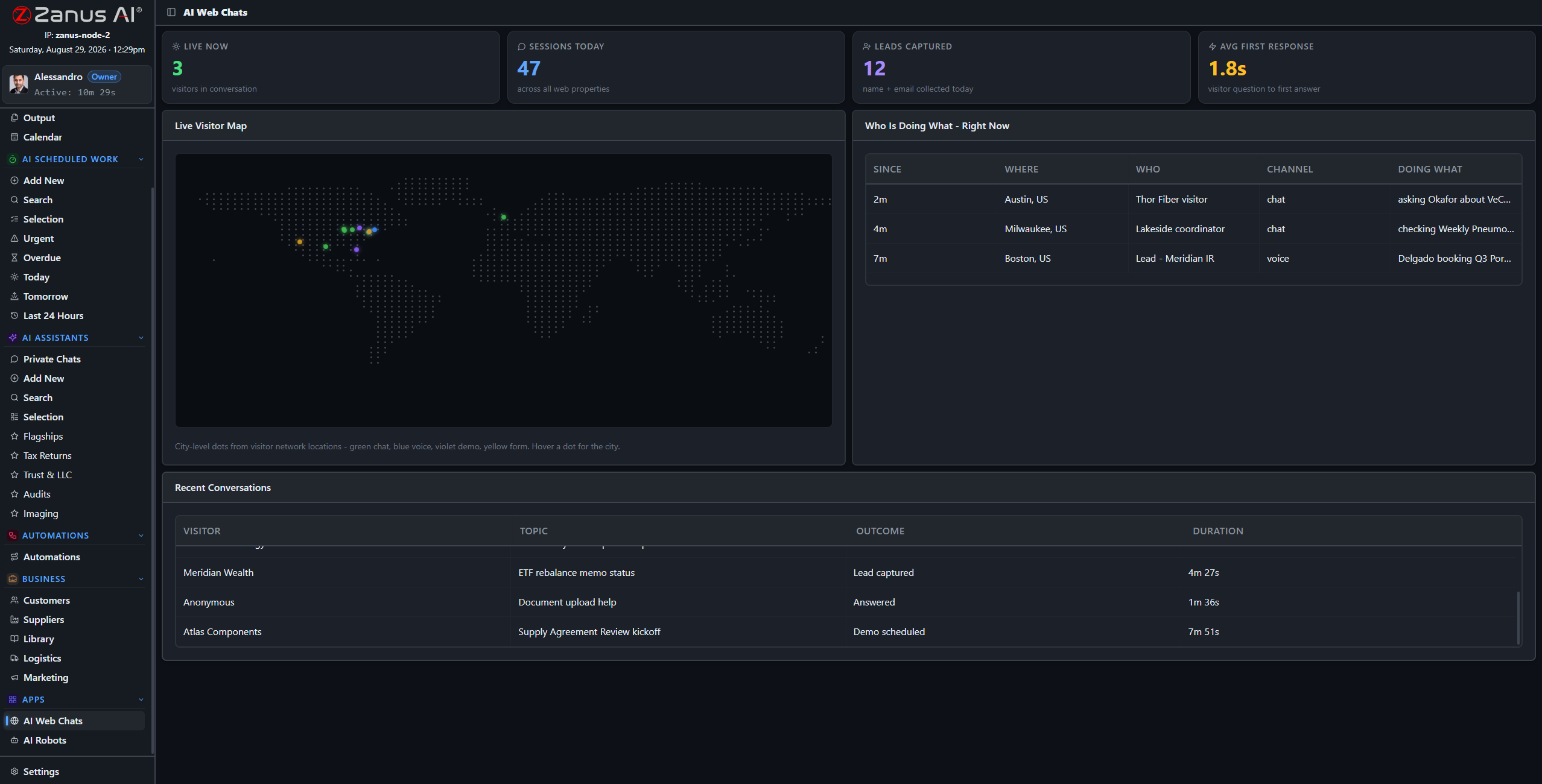
This screen is watching demos like yours happen: live conversations, outcomes, first response in seconds.
What it does
Ask the chat: “my internet is down — when is it back?” — watch it answer from approved status, log the ticket and offer the callback, like your best CSR on their best day.
Ask: “how would you draft an outage postmortem?” — it walks the workflow it would run in your tenant, grounded, cited, sign-off included.
The full demo loads a telecom tenant with sample records: fault-trend reviews, maintenance notices, runbook answers — your world, working.
Or pick your exact business
Every link below is a full live-demo page for that specific business — its vocabulary, its calls, its booking rules.
Two minutes to your inbox
Request the demo and the interactive telecom demo arrives in about two minutes — no sales call, no calendar dance. Watch it, interrupt it with questions, and book the human conversation when YOU are ready.
- Interactive demo, telecom-configured
- Ask questions mid-demo — it answers and resumes
- In your inbox in ~2 minutes, free

Questions, answered
Is the demo really the product?
Yes — the same AI, configured with a sample telecom tenant. What you see is what your team gets, with your runbooks and records instead of the samples.
See it working on YOUR network — the demo IS the product.
Sharing with a colleague? 📄 Get the PDF · ✉️ Email this page ·